How to Analyze Your YouTube Channel With AI
Paste your YouTube stats into ChatGPT and it still can't see your leads or sales. In this guide, you'll learn how to fix that, plus 7 questions to ask.

Claude and ChatGPT are good at spotting patterns in your YouTube numbers, but they can only work with the numbers you give them. YouTube's data stops at views, watch time and subscribers, so the questions that matter to a business, like which videos bring in leads and sales, stay out of reach.
You'll learn why that happens, the 3 ways to analyze your YouTube channel with AI, how to connect your channel, and 7 kinds of questions worth asking once you have.
By the way, one of those questions showed Justin Brown that a video with 41,612 views had brought in exactly 1 lead in a month.
AI can only answer the questions your data can answer
When you ask an AI assistant about your channel, it reasons over whatever data it can see. If that data comes from YouTube, it knows your views, click-through rate, retention and subscribers, and nothing about what happened after someone clicked a link in your description.
That means the most useful questions for a business get guesses instead of answers: which videos fill your email list, which pages convert, and which videos you should make more of.
The fix is to give your assistant attribution data: clicks, leads and sales for every video and every link. Then it can answer from facts. YouTube Analytics for Business covers the metrics YouTube leaves out, and how to track them.
3 ways to analyze your YouTube channel with AI
The first two work, but each leaves you with a gap. Option C closes both.
Option A: Export your stats and paste them into ChatGPT or Claude
Export a report from YouTube Studio and upload it, or paste it, into your assistant with your questions.
- Good for: free, and it works today with any assistant.
- Where it falls short: you repeat the export every time you want fresh numbers, so your analysis goes stale the moment you finish it. The export only holds YouTube's metrics, with no link clicks, leads or sales.
Option B: A YouTube Analytics connector
Tools like Coupler.io and Windsor.ai connect your YouTube Analytics account to AI assistants like Claude, so your assistant can pull current numbers on its own.
- Good for: live YouTube data without manual exports, including retention, click-through rate and watch time.
- Where it falls short: it's still YouTube's data. Your assistant sees views and watch time, but not which videos send people to your site or bring in leads and sales.
Option C: The Video Stats MCP connection
Video Stats tracks every link on every video, and its MCP connection gives your assistant that attribution data alongside your YouTube metrics. Justin Brown, who co-founded Video Stats, uses it to analyze his Primal Video channel. This is how it handles each gap above:

YouTube's numbers go in, Video Stats adds what happens after the click, and your assistant can finally answer the business questions.
| The problem | How Video Stats solves it |
|---|---|
| You repeat the export every time you want fresh numbers (A) | Your assistant queries your current data every time you ask |
| No link clicks, leads or sales (A) | Clicks, leads and sales for every video and every destination page |
| Your assistant can't see which videos send people to your site (B) | It can rank videos by clicks, leads or sales, and look up which videos send traffic to any page |
One thing it needs first: Video Stats has to be tracking your links, and it can only count leads and sales from pages where its tracking code is installed.
Options A and B give your assistant YouTube's side of the story. Option C gives it the side that pays your bills.
How to connect Video Stats to Claude or ChatGPT
Claude and ChatGPT connect with a single URL. In Video Stats:
- Go to Settings → MCP and copy your connector URL.
- In Claude or ChatGPT, open Settings → Connectors, choose Add custom connector, and paste the URL.
- Sign in to Video Stats when the window pops up, and click Authorize.
Developer tools like Claude Code, Claude Desktop and Cursor use a token and a short connection command instead. The setup guide walks through both methods, step by step.
Each connection covers one channel. If you manage several channels, connect each one separately.
Which AI apps can connect to Video Stats?
MCP connects your data to an app, and the app runs the AI model. So the question is which apps you can use, not which models. If an app supports custom MCP connections, it can usually reach Video Stats.
Commercial apps
| App | Company | Models it runs | How it connects | Status |
|---|---|---|---|---|
| Claude (web, desktop and CoWork) | Anthropic | Claude | Connector URL | ✅ Supported |
| Claude Code | Anthropic | Claude | Token and a short command | ✅ Supported |
| ChatGPT | OpenAI | GPT | Connector URL | ✅ Supported |
| Codex | OpenAI | GPT | Connector URL | ✅ Supported |
| Cursor | Anysphere | Claude, GPT, Gemini and others | Token | ✅ Supported |
| Gemini (web app) | Gemini | Settings → Connected Apps → Custom apps | ✅ Supported | |
| Gemini CLI | Gemini | MCP server settings | ✅ Supported |
Google limits custom apps in the Gemini web app to personal accounts in the US, for users aged 18 and over, in English.
Apps that run open-source models
| App | Models it runs | Status |
|---|---|---|
| LibreChat | Llama, Qwen, Mistral, DeepSeek and others, including models on your own computer | ✅ Supported |
| Cherry Studio | Many providers, including local open-source models | ✅ Supported |
Smaller open-source models can struggle with questions that need several steps, like "find my weakest videos, then compare their thumbnails". For those, a larger model gives better answers.
7 kinds of questions to ask your channel
Once you're connected, you ask in plain English. These are the 7 themes that cover almost everything Video Stats can answer, with real examples from Primal Video's channel where we have them.
1. Which of my videos bring in money?
Rank your videos by leads, sales or conversion rate instead of views, compare two to five videos side by side, or ask for a deep dive on one.
"What were my top 10 videos by leads last month, and how do their views compare?"
Which YouTube Videos Drive Leads? shows what this kind of ranking revealed on Primal Video over 90 days.
2. Which videos send traffic to my offers and affiliate links?
Ask which destination pages convert best, then flip it around and ask which videos send traffic to a specific page or affiliate link.
"Which of my landing pages bring in the most leads?"
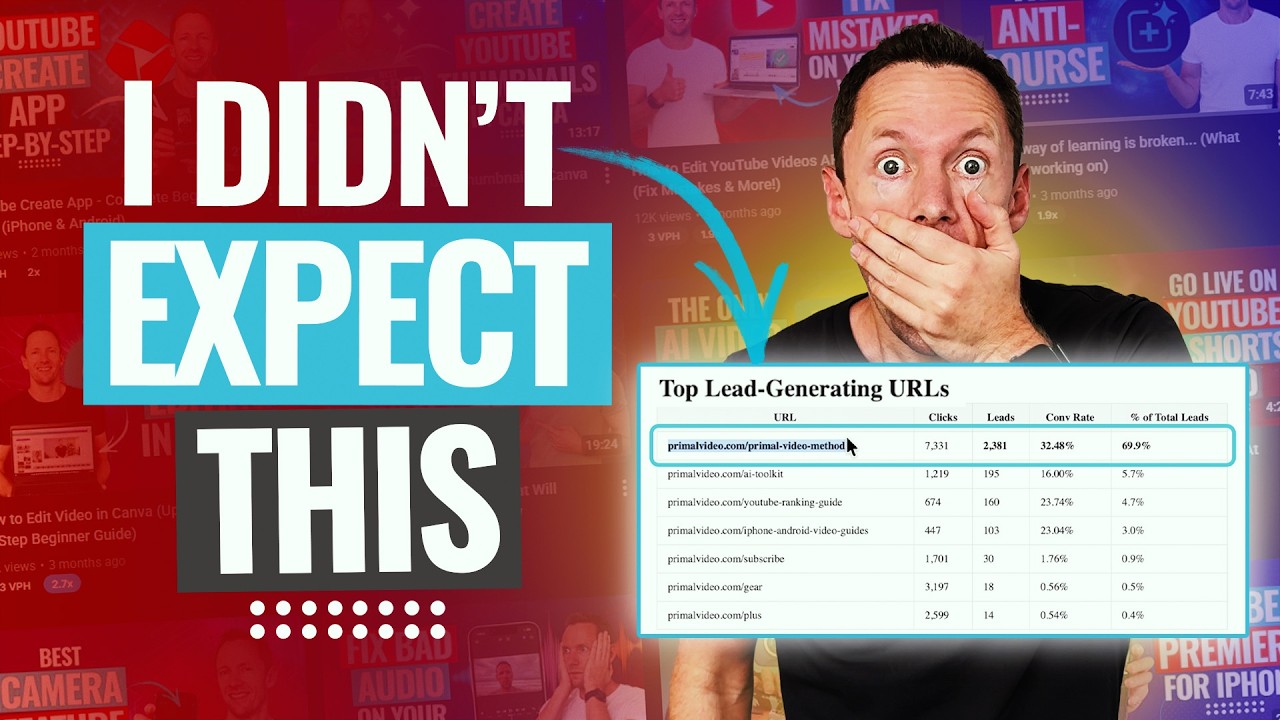
On Primal Video, the answer came back with the Primal Video Method guide page at the top: it has turned 36% of its 25,217 clicks into leads.
3. Which videos get traffic but don't convert?
Your assistant can find videos with plenty of views and a weak conversion rate, and score each one by how much you'd gain by fixing it.
"Find my videos with lots of views but weak conversion over the last 30 days."
For Primal Video, this is the question from the top of this guide. The 2025 OBS Studio tutorial got 41,612 engaged views, 244 link clicks and 1 lead in 30 days, against a channel average conversion rate of 9.4%. The same list flagged a "best free video editing software" roundup with 2,285 clicks but only 18 leads, probably because most of its viewers clicked through to the software itself.
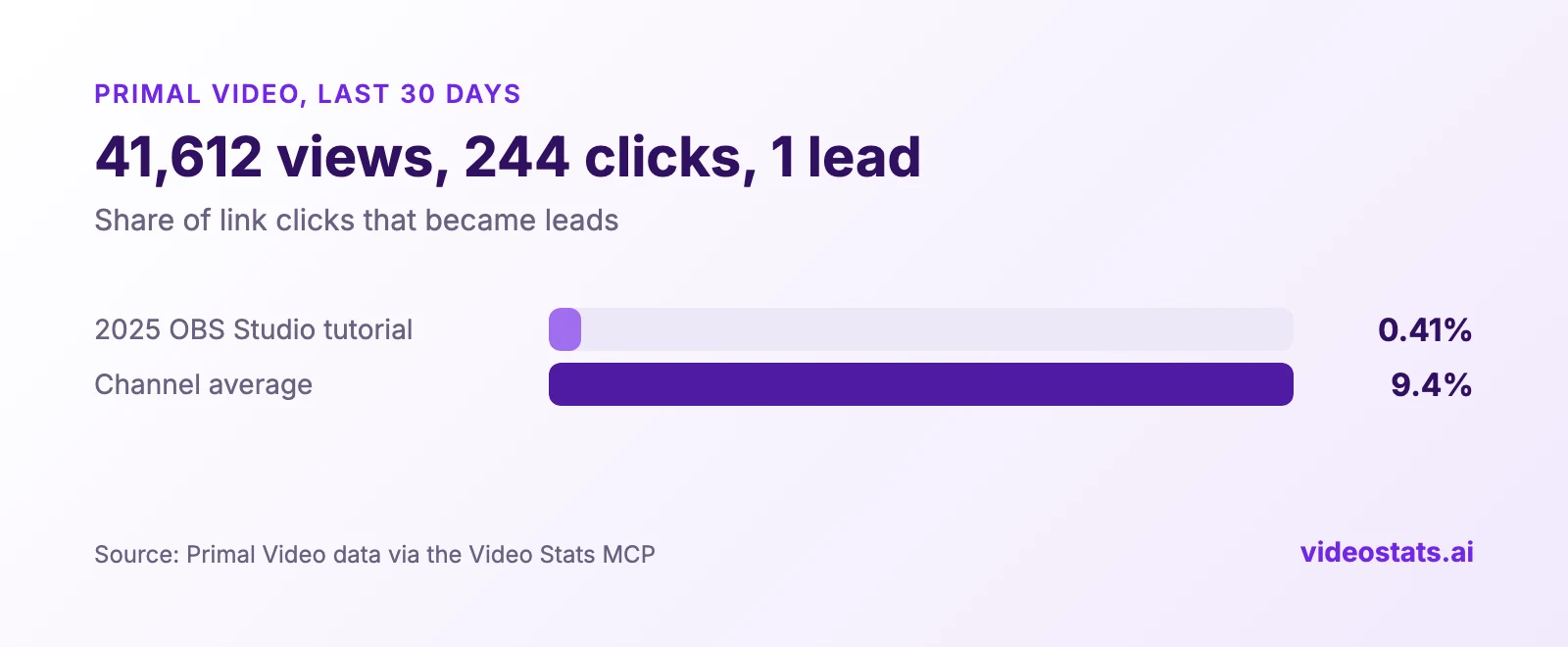
A popular video with a conversion problem is the cheapest win on your channel, because the traffic is already there.
4. What do my best thumbnails have in common?
The MCP connection can hand your assistant the thumbnail images themselves, along with each video's performance, so it can compare the visual patterns in your winners and your weakest videos.
"Compare the thumbnails on my five best and five worst videos by click-through rate, and tell me what the winners share."
5. How is my channel trending?
Ask for this month against last month, with daily numbers, or for a weekly report ready to share with your team or clients.
"How are my clicks and leads trending compared with the previous 30 days?"
For Primal Video, the answer was one worth knowing: clicks fell 28% against the previous 30 days, but leads held almost level at 2,219 against 2,238. A bigger share of clicks turned into leads.
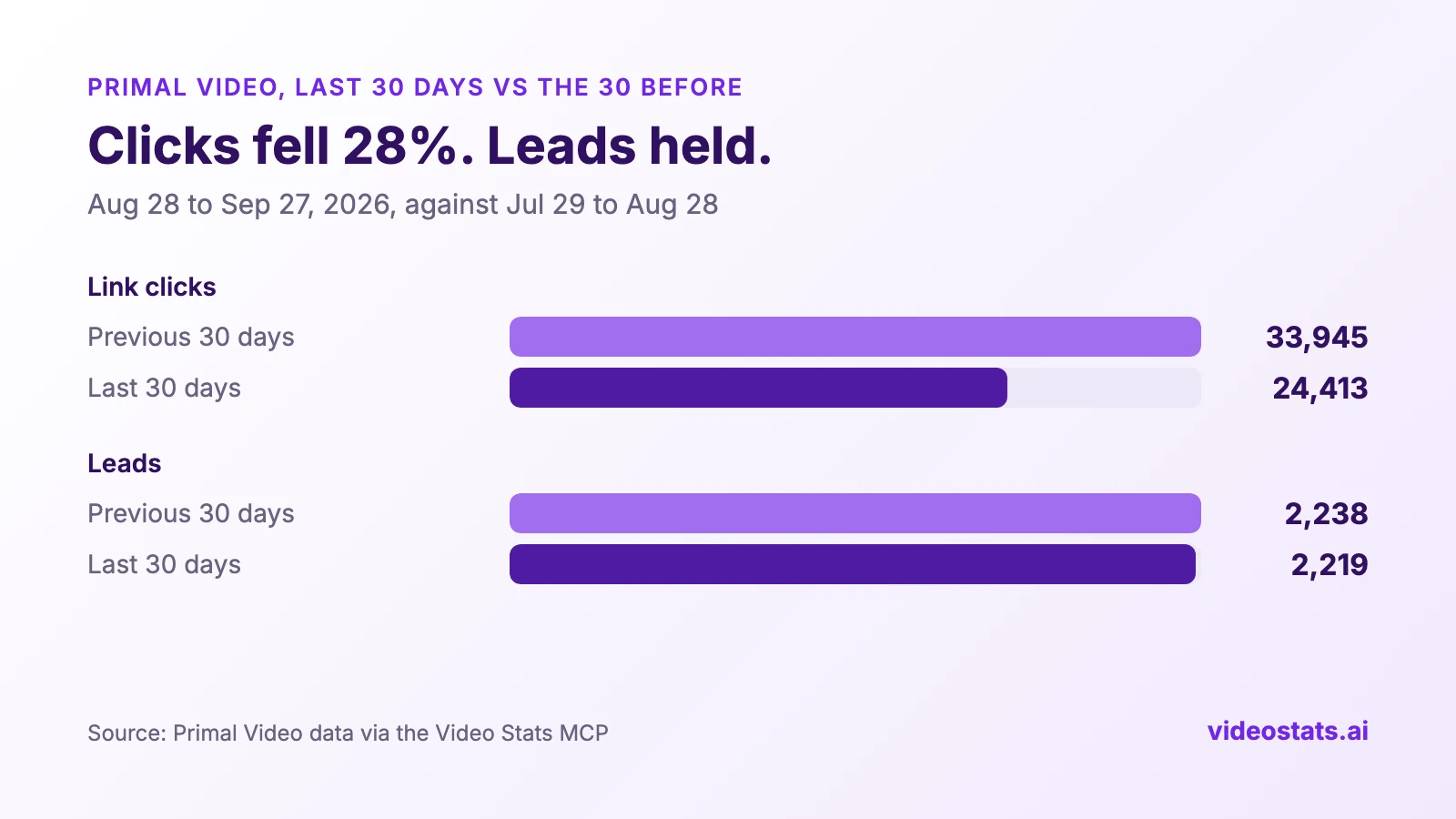
A drop in clicks isn't bad news when leads hold. Your assistant can spot the difference in seconds.
6. What should I make next?
Justin uses his assistant to plan content from what already works. Two of his questions:
"Which videos have been live for more than a year, still bring in leads, and are due for an update?"
"Based on my top 15 videos for leads, suggest related topics my viewers would want."
The answers come from your own channel's results, so they reflect what your viewers do, not what's popular in general.
7. Can you make a QR code for my next video?
Your assistant can create a trackable QR code for any link, tie it to a video, and report on scans, leads and sales later. Justin created one straight from Claude Code in his QR code video.
"Make a QR code for my free guide and tie it to my latest video."
Video Stats also includes ready-made prompts for common jobs, such as a channel health check, a weekly report, a thumbnail audit and an underperformer audit, so you can run a full analysis with one request.
Your assistant always knows which view count it's using
On August 24, 2026, YouTube changed its public view counter to include autoplay. Video Stats sends your assistant engaged views by default, with public views alongside and a label saying which one each answer used, so conversion rates stay comparable with your history. YouTube Engaged Views Explained covers the change in full.
FAQ
Can ChatGPT analyze my YouTube channel?
Yes. ChatGPT and Claude can analyze your channel if you give them your data, either by pasting in an export or through a connector. To answer business questions like which videos bring in leads or sales, they need attribution data, which YouTube doesn't provide.
What is an MCP connection?
MCP (Model Context Protocol) is an open standard that lets AI assistants read data from other services. Video Stats runs an MCP server, so Claude, ChatGPT, Claude Code, Claude Desktop and Cursor can query your channel's data directly.
Is it safe to connect my channel to an AI assistant?
Your assistant can read your Video Stats data and create QR codes, but it can't change your videos or your YouTube channel. You approve each connection, and you can revoke access at any time from your Video Stats account.
Which AI assistants work with Video Stats?
Claude (including CoWork and Claude Code), ChatGPT, Codex, Cursor, the Gemini web app and Gemini CLI are all supported, along with open-source apps like LibreChat and Cherry Studio. The table above lists every app and how each one connects.
Want your AI assistant to see what YouTube can't? Video Stats tracks every link on every video and connects the results to Claude and ChatGPT, so you can ask which videos bring in leads and sales, and get real answers.