YouTube to Email · Part 4
Leads Per 1,000 Views (LPM): Which Videos Grow Your List
A video can get 45,000 views and add almost nobody to your list. In this guide, you'll learn LPM, the 1 number that shows which videos grow your list.

It sounds backwards, but one of your videos can get tens of thousands of views and add almost nobody to your email list.
On Primal Video, Justin Brown's 1.9-million-subscriber channel, two videos published three weeks apart got almost the same views over the last 90 days: 45,333 and 45,041. One brought in 43 email subscribers. The other brought in 423. In this guide, you'll learn LPM, leads per 1,000 views, the 1 number that shows that gap at a glance, why it beats the 3 metrics most creators judge videos by, and 4 ways to raise it on your own channel.
By the way, the videos with the best conversion rate on the whole channel each had a single click.
Keep one goal in mind as you read: turning strangers into happy clients. LPM tells you which videos grow your list, and the last section covers what it can't tell you.
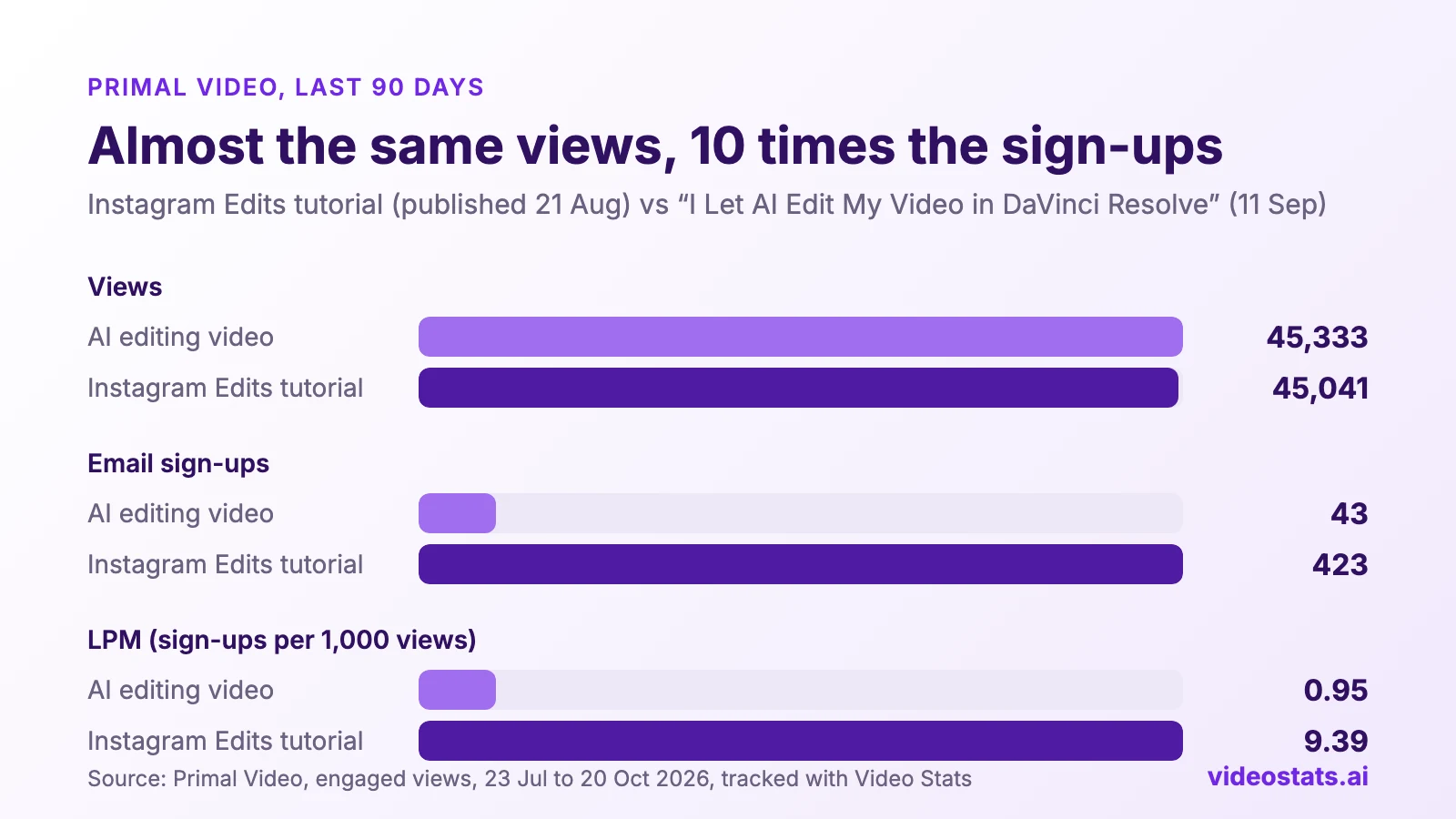
Almost the same views. One video grew the list 10 times faster.
Both videos came out during the period, the Instagram Edits tutorial on 21 August and the AI editing video on 11 September, so both had been out for more than a month.
What LPM (leads per 1,000 views) means
LPM is the number of leads a video brings in for every 1,000 views, over the same period:
LPM = leads ÷ views × 1,000
If you earn money from YouTube ads, you already know the idea. YouTube's RPM is, in YouTube's words, "how much money you've earned per 1,000 video views" (YouTube Help). LPM is the same idea for your email list: how many subscribers you earn per 1,000 views.
That means you can compare a video with 3,000 views against one with 140,000 on equal terms. Here's the Instagram Edits tutorial from the chart above:
| Primal Video, last 90 days | Instagram Edits tutorial |
|---|---|
| Views | 45,041 |
| Email sign-ups | 423 |
| LPM | 423 ÷ 45,041 × 1,000 = 9.4 |
Every 1,000 people who watched it added about 9 people to Primal Video's list.
Two rules keep the number honest:
- Count leads and views over the same period. Dividing last month's leads by a video's lifetime views makes every old video look worse than it is.
- Use engaged views. Since 24 August 2026, YouTube's public view count includes autoplay from the first frame, so it runs well above what YouTube Studio reports. YouTube Engaged Views Explained covers the change. All the numbers in this guide use engaged views.
Views, clicks and conversion rate each crown the wrong video
Most creators judge a video by one of three numbers: views, link clicks or conversion rate. Each one sees part of the journey from viewer to subscriber, and each can make a video look like a winner while it adds almost nobody to your list.
That means you can spend months making more of the wrong videos, or fixing a page that isn't the problem. Here's how each metric got it wrong on Primal Video over the same 90 days.
Views: a video with 45,000 views brought in 43 subscribers
"I Let AI Edit My Video in DaVinci Resolve... WOW!" came out on 11 September and got 45,333 views in under six weeks, which made it one of the channel's 12 most-viewed videos in the period. Its viewers clicked description links 636 times, and only 43 of them signed up for anything.
Views tell you how many people watched. They say nothing about what those people did next.
Clicks: the most-clicked video had a conversion rate under 1%
"Best Free Video Editing Software for PC & Mac" got more link clicks than any other video on the channel: 7,220. The DaVinci Resolve tutorial got 6,994. Ranked by clicks, they're neck and neck.
Ranked by sign-ups, they aren't close. The software video brought in 65 subscribers. The DaVinci tutorial brought in 1,430.
Clicks tell you viewers left YouTube. They don't tell you whether they landed somewhere that asks for an email address.
Conversion rate: the top of the list had one click each
This is the one from the start of this guide. When you rank Primal Video's videos by conversion rate, the top three each got exactly one click in 90 days, and that one click signed up. A 100% conversion rate on one click is luck.
Even with a sensible sample, conversion rate hides half the story. Primal Video's "YouTube Monetization Explained" video converted 18.2% of its clicks. The DaVinci tutorial converted 20.4%. By conversion rate, they're almost the same.
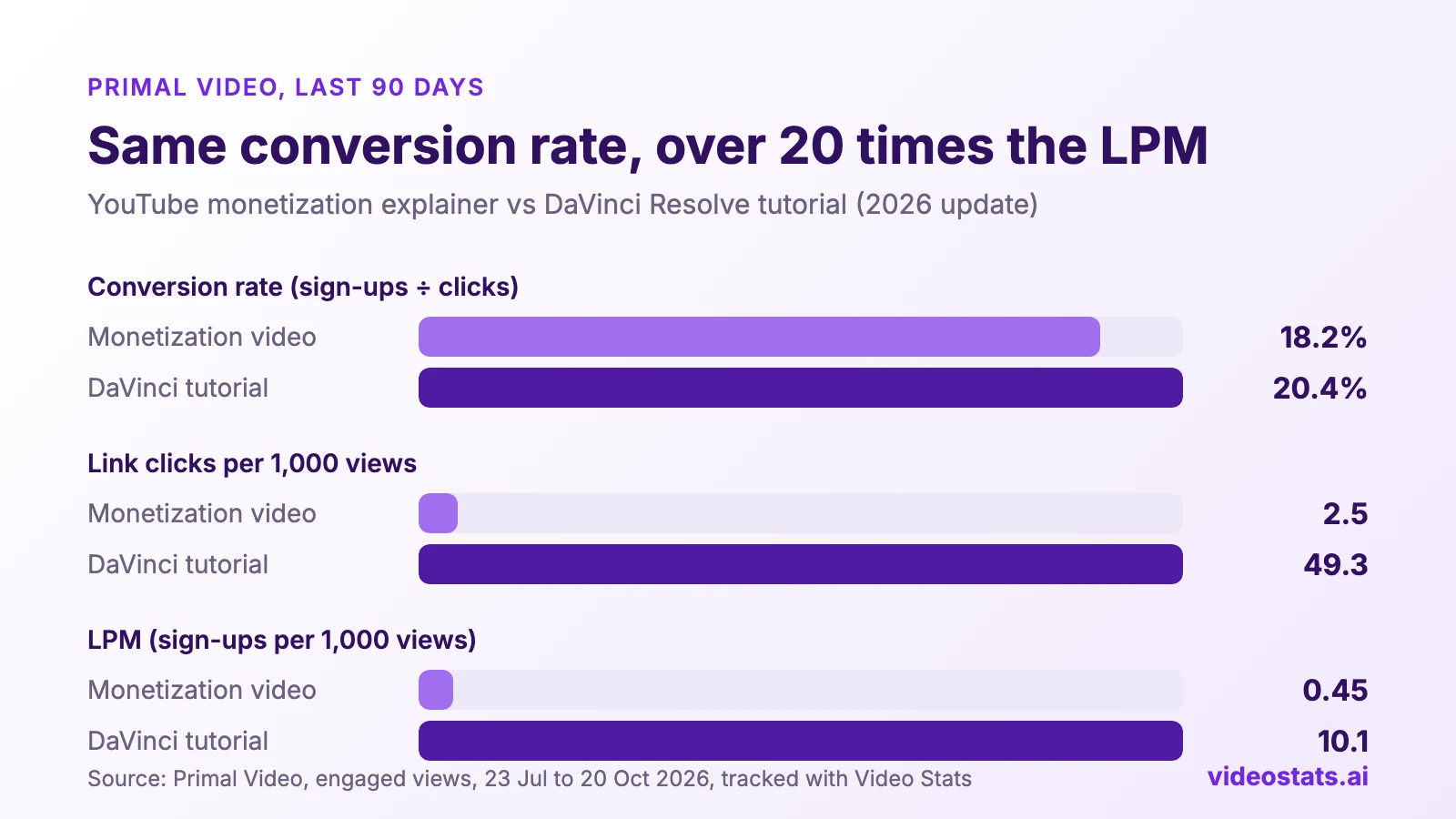
The conversion rates were almost the same. The DaVinci tutorial grew the list over 20 times faster per view.
Conversion rate only looks at the people who clicked. The monetization video had 101,195 views and only 253 clicks, so a good conversion rate on a small number of clicks added up to 46 subscribers.
Here's the most important insight: LPM is clicks multiplied by conversion
LPM looks like one number, but it's two steps of the funnel multiplied together:
LPM = link clicks per 1,000 views × conversion rate
Run the two videos from the chart through it:
| Primal Video, last 90 days | Monetization video | DaVinci tutorial |
|---|---|---|
| Link clicks per 1,000 views | 2.5 | 49.3 |
| Conversion rate (sign-ups ÷ clicks) | 18.2% | 20.4% |
| LPM | 0.45 | 10.1 |
A slightly better conversion rate and almost 20 times the clicks per view add up to over 20 times the subscribers per view.
That means LPM tells you that a video has a problem, and the two numbers inside it tell you where:
| Clicks per 1,000 views | Conversion rate | What's going wrong | Where to fix it |
|---|---|---|---|
| Low | Good | Viewers don't see the offer, or don't want it | The call to action in the video and the description |
| High | Low | Viewers click, but the page doesn't match what they watched | The lead magnet and the opt-in page |
| Low | Low | There's no matching offer at all | Give the video its own lead magnet |
Part 2 of this series found the same pattern from the other side. One of Primal Video's guides got 3.1 sign-ups per 1,000 views from a camera app tutorial that matched it, and 0.4 from a microphone video that didn't: fewer clicks and a lower conversion rate, multiplied together. YouTube Lead Magnets That Convert has the full breakdown.
Your top videos by LPM bring in almost as many subscribers from 40% of the views
When you rank your videos by LPM instead of views, a different list comes out on top, and it tells you which videos earn their views.
We ranked Primal Video's videos both ways over the same 90 days, taking the top 14 each time:
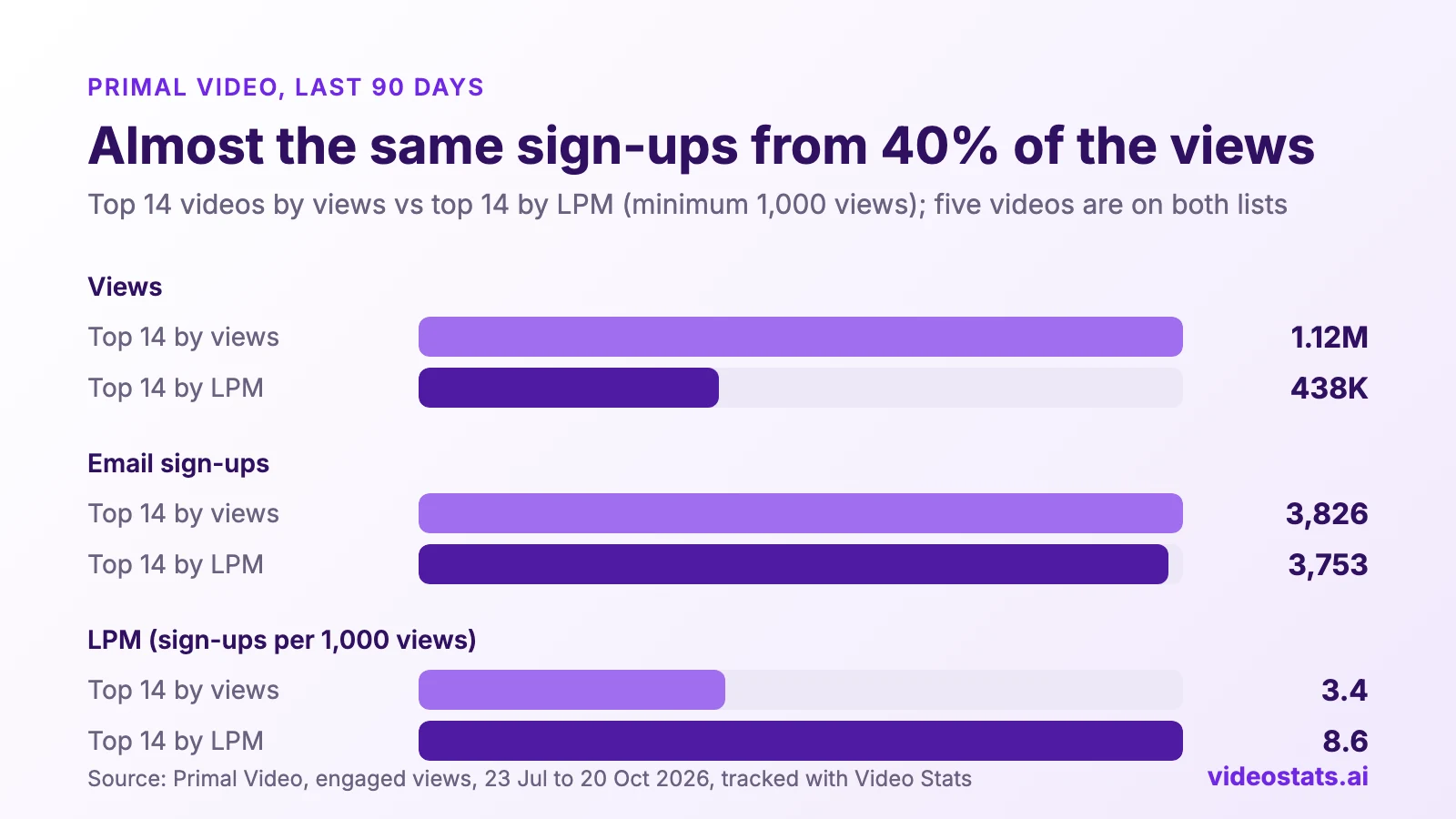
The top videos by LPM brought in almost as many subscribers from 40% of the views.
Five videos made both lists, all of them beginner tutorials for a specific app: DaVinci Resolve, Final Cut Pro, VN, Clipchamp and Instagram Edits. The top of the LPM list is the same kind of video with less traffic:
| Primal Video, last 90 days | Views | Sign-ups | LPM |
|---|---|---|---|
| Final Cut Pro tutorial (2025 version) | 3,648 | 49 | 13.4 |
| CapCut Pad tutorial (iPad) | 35,999 | 455 | 12.6 |
| Filming with iPhone guide | 3,588 | 41 | 11.4 |
| DaVinci Resolve tutorial (2026 update) | 141,843 | 1,430 | 10.1 |
| Instagram Edits tutorial (2026) | 45,041 | 423 | 9.4 |
A video with 3,648 views and an LPM of 13.4 is a topic your audience is ready to sign up for. Getting more views on it is likely to bring in more subscribers too.
For the LPM ranking, we left out videos with fewer than 1,000 views in the period, because a rate on a few hundred views swings on one or two sign-ups. We also left out one video with 1,067 views and 590 link clicks. That's 55 clicks for every 100 views, more than three times the rate of the channel's most-clicked video (15 per 100). With an LPM of 30.9, it would have topped the list on a click rate that isn't typical of the channel.
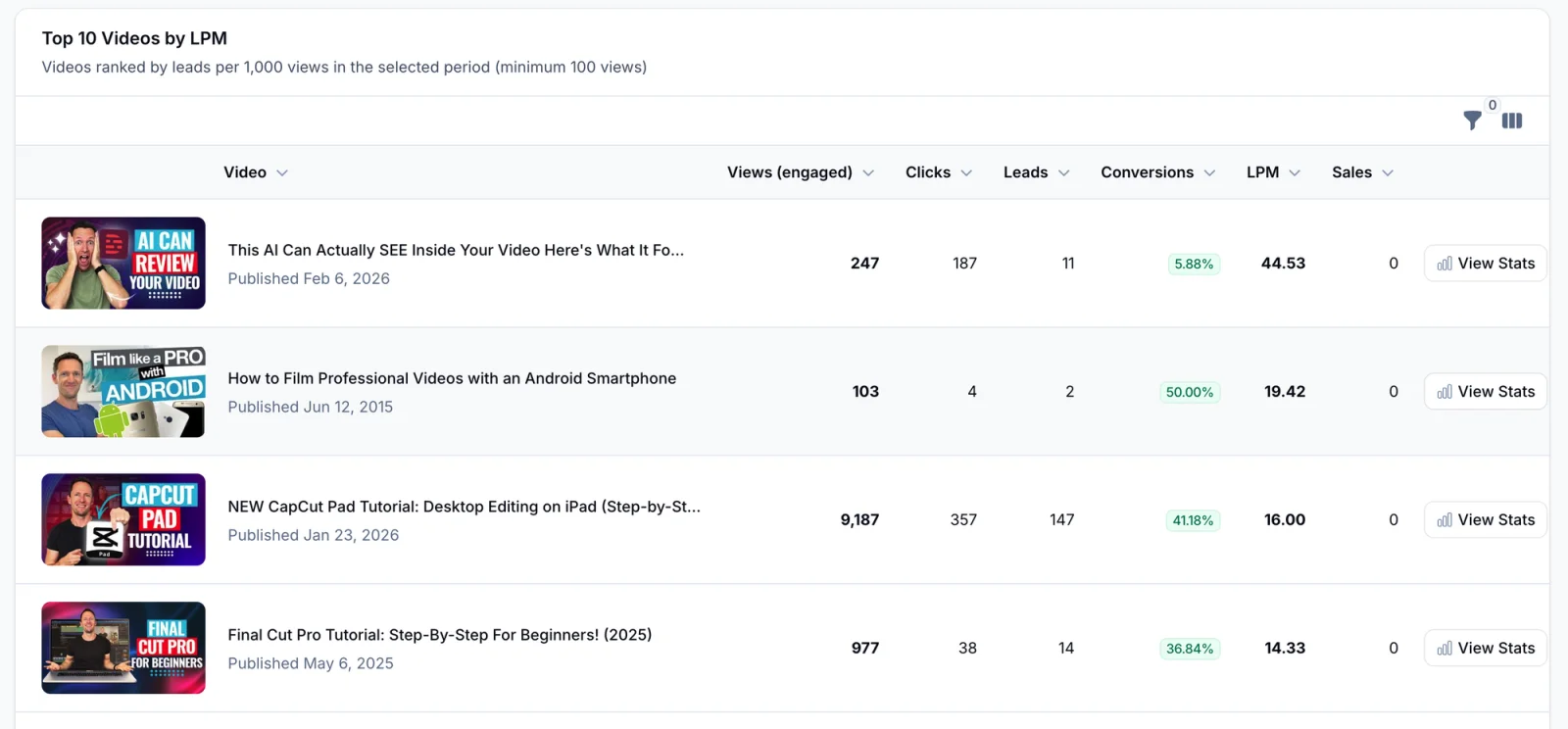
Primal Video's Top 10 Videos by LPM, 20 September to 20 October 2026. The top two rows show why you set a minimum and check for odd traffic: one video got 187 link clicks from 247 views, and the next got 2 sign-ups from 103 views. From row 3 down, the list is beginner app tutorials again.
How to calculate LPM for your own videos
You need two numbers for each video, over the same dates.
- Pick a period. 90 days gives most videos enough views to judge. Use 28 or 30 days for recent uploads.
- Get each video's views for that period. In YouTube Studio, open Analytics, choose Advanced mode, set the dates and look at the Views column. Studio reports engaged views, so you don't need to adjust them.
- Get each video's sign-ups for the same period. This is the hard part: your email tool counts subscribers, but it doesn't know which video they came from. Part 1 of this series covers 3 ways to track sign-ups by video, including our free YouTube UTM Link Builder.
- Divide sign-ups by views, and multiply by 1,000.
- Set a minimum. Leave out videos with fewer than 100 views in the period, or 1,000 if your channel is large. Otherwise one lucky sign-up on a quiet video tops your list.
Check your result against the funnel: if a video's LPM is low, work out its clicks per 1,000 views and its conversion rate, and use the table above to see which half needs fixing.
Wait 30 days and 1,000 views before you judge a new video's LPM
A new video's LPM jumps around for its first few weeks, so an early number can make a good video look like a flop, or a weak one look like a winner.
Two things cause it. The first is arithmetic: when a video has few views, each sign-up moves its LPM a long way. The second is who's watching. In its first days, a bigger share of a video's views come from your subscribers, who already know you. Later views come from people who find it through search and suggested videos, and the two groups don't sign up at the same rate. So the LPM a video starts with often isn't the one it settles at.
That means judging a video in its first week can mean betting your next few videos on what a handful of people did.
Here's how far one sign-up moves LPM:
| Views in the period | One extra sign-up adds |
|---|---|
| 100 | 10 to LPM |
| 1,000 | 1 to LPM |
| 10,000 | 0.1 to LPM |
The Top LPM screenshot above shows it. Primal Video's Android filming guide had an LPM of 19.42 from 2 sign-ups on 103 views. One more sign-up would have made it 29.1, and one fewer would have made it 9.7. That's the same video telling three different stories.
Before you compare a new video with one that's been out for a while:
- Wait until the new video is at least 30 days old and has 1,000 views, whichever comes later. On a small channel, where 1,000 views can take months, use 30 days and treat the result as a hint.
- Compare both videos over the same dates, starting after the new video's first week. That keeps its launch spike from flattering or sinking it.
- Check again at 90 days. That's when most videos have settled into the audience they'll keep.
Rush it, and you can:
- drop a topic after a quiet first week, when it would have become one of your best list-builders
- make three more videos like one that got lucky with its first 300 viewers
- swap out a lead magnet before it's had a fair test, and never find out which one worked
What's a good LPM on YouTube?
There's no published benchmark yet, because LPM is new. On Primal Video, over the last 90 days:
- The top 14 videos by views averaged an LPM of 3.4.
- The top 14 by LPM averaged 8.6.
- Beginner tutorials for a specific app, the bulk of the LPM list, ran from about 5 to 13.
- Several popular videos, including the monetization explainer and the AI editing video, sat under 1.
Those numbers come from one channel in one niche, so use them as a reference point rather than a target. The most useful benchmark is your own: work out the LPM of your best lead-generating video, and compare every other video against it.
4 ways to raise a video's LPM
1. Update old videos that still get views
Your biggest opportunity is a video that already gets the views. On Primal Video, two tutorials that have since been remade still get as many views as their new versions, and almost no sign-ups:
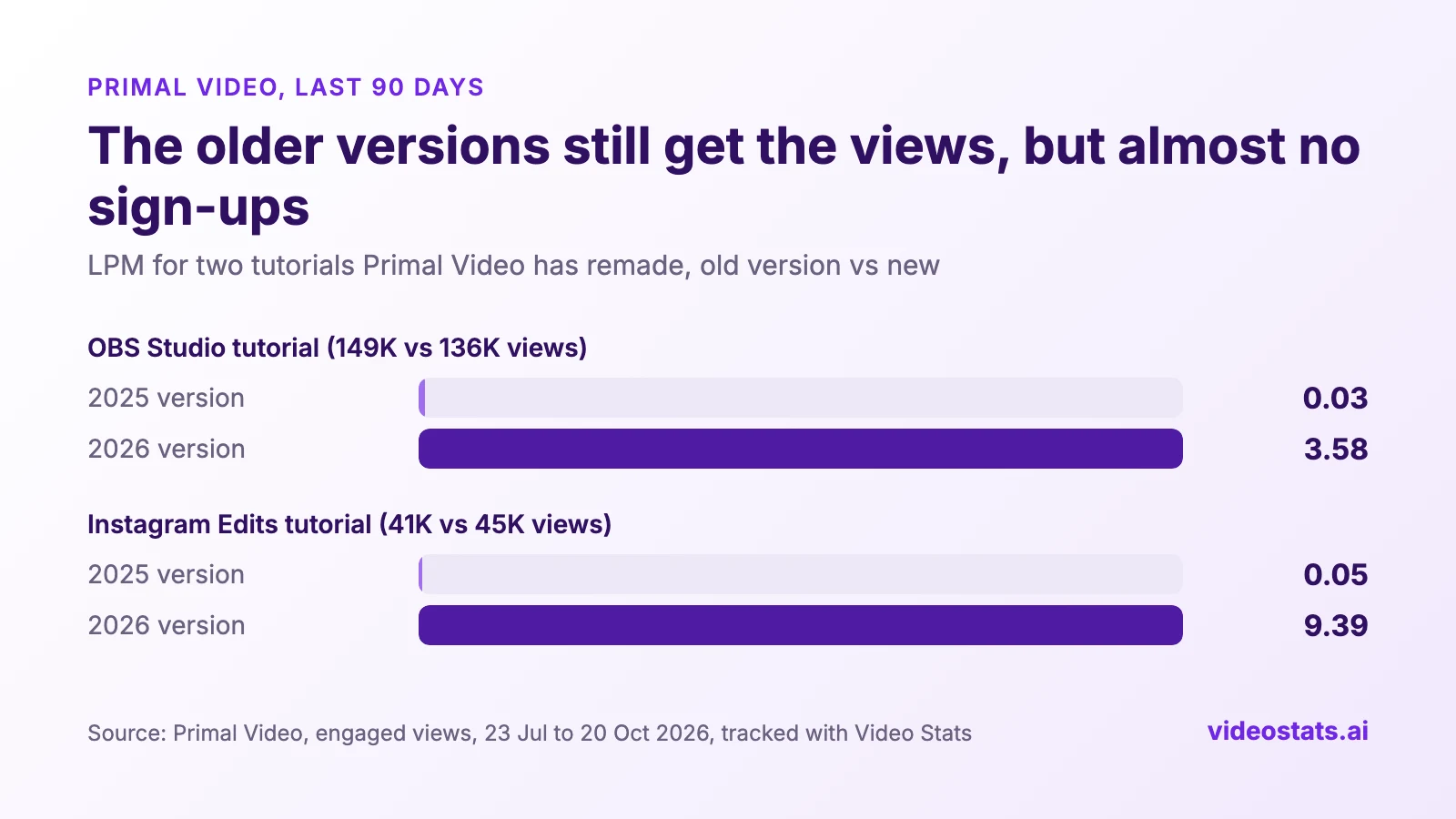
Same topic, same size of audience. The new versions add subscribers; the old ones barely do.
The 2026 versions were published during the period, so their numbers cover less than 90 days. LPM is a rate, so the comparison still holds.
The two pairs need two different fixes:
- OBS Studio: change the offer. The 2025 version links to the Primal Video Method, a guide to editing videos faster. That suits an editing tutorial, but OBS is software for recording and livestreaming. The 2026 version links to the livestream checklist instead, the offer that Part 2 found turns 44% of its clicks into subscribers.
- Instagram Edits: move the offer up. Both versions link to the same guide, with the same words: "FREE AI GUIDE To Fast Track Your Video Editing". In the 2026 description, it's the second link, with only a link to the app above it, and the same link is in the first pinned comment. In the 2025 description, it's the fifth link, below two app download links and two music affiliate links, and there's no pinned comment.
The placement made the difference. The 2026 version gets 25 link clicks per 1,000 views against 3 for the old one. Its conversion rate is 37% against 2%, and the old video's rate is that low because conversion rate counts clicks on every link in the description. If all 120 of the old video's clicks had gone to the guide, at the new video's rate they'd have brought in about 45 sign-ups. They brought in 2, so most of them went to the app and music links.
When you remake a video, the old one keeps getting views for months or years. You can't re-record it, but you can update its description and pinned comment to match the new version: the same offer, near the top, with fewer links competing with it, and pinned. Then it starts earning subscribers again.
2. Get more viewers to click
If clicks per 1,000 views is the weak half, the offer isn't visible enough. Mention it in the video at the moment it helps, put the link second or third in the description, pin a comment with the same link, and add a QR code for viewers watching on a TV. Part 2 shows how Primal Video does each of these, and YouTube QR Codes: Turn TV Viewers Into Email Subscribers covers the QR code.
3. Match the page to the video
If the conversion rate is the weak half, viewers are clicking and then deciding the offer isn't for them. The lead magnet that converts best is the next step from the video they watched, named after the result they want. On Primal Video, matched lead magnets turn 30% to 45% of their clicks into subscribers, and general ones under 20% (Part 2).
4. Make more of the videos at the top of your LPM list
Your LPM ranking is a list of topics your audience signs up for. On Primal Video, it's dominated by beginner tutorials for one specific app. A new tutorial for another app is a safer bet for list growth than another video like "Best Free Video Editing Software", however many clicks that one gets.
Where to see LPM for every video in Video Stats
Most creators never work out LPM because the two numbers live in different places. YouTube Studio has the views. Your email tool has the subscribers. Joining them by video, for the same dates, every time you want to check, is a spreadsheet job most people skip.
Video Stats, which Justin co-founded, tracks sign-ups by video and calculates LPM for you:
- Video Performance, Top LPM tab: your top 10 videos by LPM for any date range, leaving out videos under 100 views.
- Top Converting Videos on your dashboard: LPM next to clicks, sign-ups and conversion rate, so you can see which half of the funnel is weak.
- Link Stats: LPM for each link, which shows how well a single lead magnet does from each video it's linked from.
- Your AI assistant: connect Video Stats to ChatGPT or Claude and ask "Which of my videos have the best LPM over the last 90 days?"
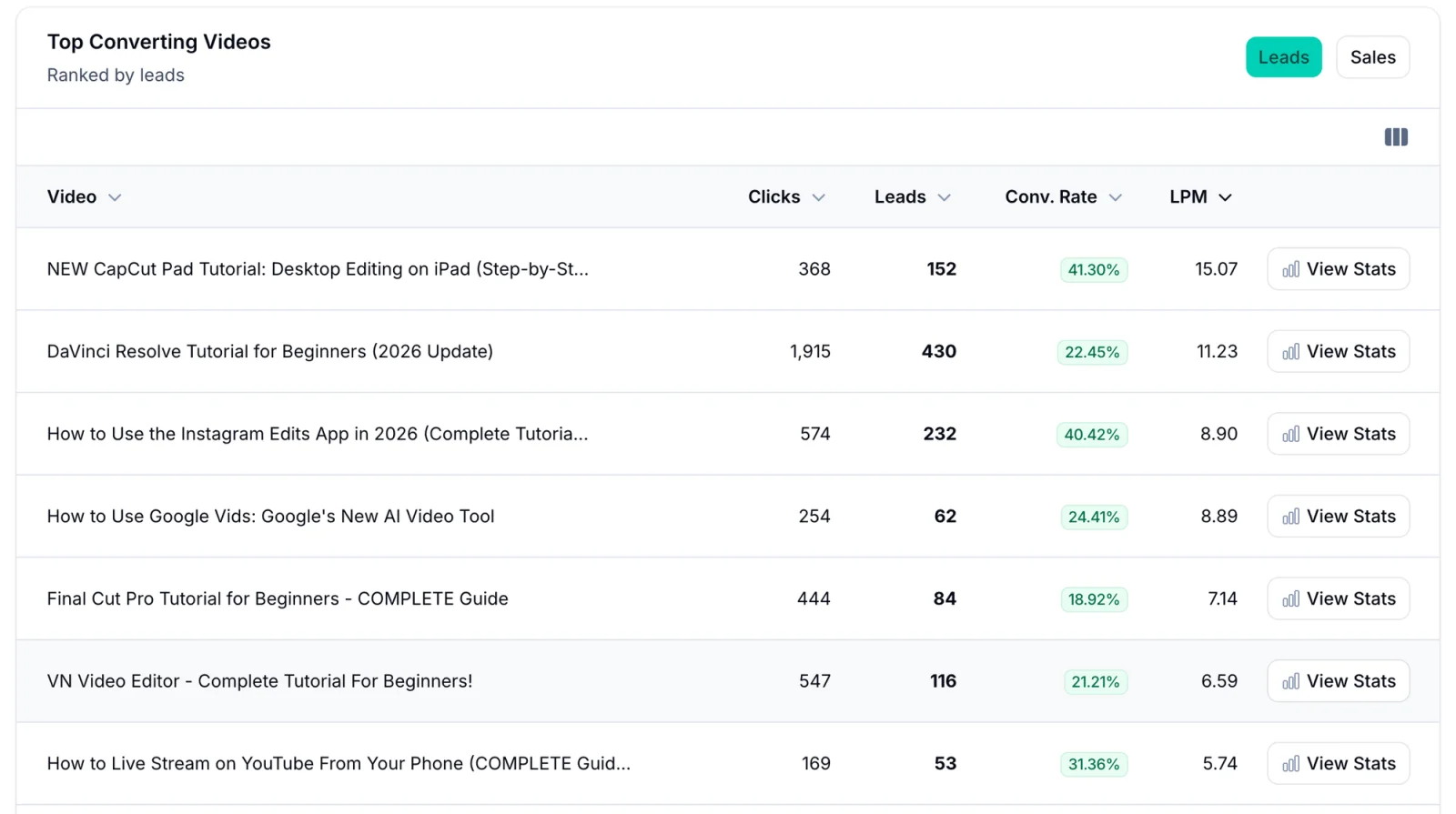
Primal Video's Top Converting Videos, last 30 days as of 21 October 2026. The DaVinci tutorial brought in the most leads, but the CapCut Pad tutorial added more subscribers per view.
Every number in this guide came from those tools.
LPM is one metric: judge each video by its job
LPM measures one thing: how well a video grows your email list. It's a better list-growth number than views, clicks or conversion rate. But not every video is there to grow your list, and list growth is a step toward the real goal, not the goal itself.
That means if you judge every video by LPM, some of your most valuable videos will look like failures. The short version: if a video's main job isn't leads, LPM isn't the right number to judge it by.
Before you look at a video's LPM, ask what it's for:
| The video's main job | Judge it by |
|---|---|
| Grow your email list | LPM, then clicks per 1,000 views and conversion rate |
| Sell a product, or earn affiliate commission | Sales and revenue from the video's links |
| Get watched to the end, so you can show ads to those viewers later | Audience retention and watch time in YouTube Studio |
The last row needs a word of explanation. Some videos are made to hold attention. The people who watch to the end go into an audience you show ads to later, through a retargeting campaign. For those videos, a link that sends viewers off YouTube halfway through works against the goal, so a low LPM is what success looks like.
Two more things LPM can't see:
- Clicks that earn money without an email address. "Best Free Video Editing Software" has a low LPM, but its 7,220 clicks go somewhere. If some of them are affiliate links, that video may be earning well. Judge it on affiliate clicks and sales as well as LPM.
- Whether the subscribers buy. A video with a high LPM that attracts people who'll never buy fills your list with people you pay to email. Video Stats tracks sales as well as leads, so you can check which videos bring in buyers.
Use LPM to find the videos that grow your list, judge the rest by their own job, and check that the list you grow is the one that buys.
FAQ
What is LPM on YouTube?
LPM stands for leads per mille: the number of leads, such as email sign-ups, a video brings in for every 1,000 views. It's the list-growth version of YouTube's RPM, which measures revenue per 1,000 views.
How do you calculate leads per 1,000 views?
Divide a video's sign-ups by its views over the same period, then multiply by 1,000. A video with 455 sign-ups from 35,999 views has an LPM of 12.6.
What's a good LPM for a YouTube video?
On Primal Video, the top 14 videos by LPM averaged 8.6 over 90 days, and its beginner app tutorials ran from about 5 to 13. Every niche is different, so compare your videos against your own best one.
How long should you wait before judging a new video's LPM?
At least 30 days and 1,000 views, whichever comes later. Before that, one or two sign-ups can swing the number a long way, and launch-week viewers, many of them your subscribers, don't sign up at the same rate as the people who find the video later.
Is LPM the right metric for every video?
No. It's the right metric for videos whose main job is growing your email list. Judge a video made to sell by its sales, and a video made to be watched to the end by its retention and watch time.
Is LPM better than conversion rate?
For judging videos, yes. Conversion rate only counts people who clicked, so a video can convert well and still add almost nobody to your list. LPM includes both how many viewers click and how many of them sign up.
Should I use public views or engaged views for LPM?
Engaged views. They match YouTube Studio and the view counts from before YouTube's August 2026 change, so your LPM stays comparable over time.
Want to see the LPM of every video on your channel? Video Stats tracks the subscribers each video brings in and ranks your videos by LPM. Start your free trial.