Ask Your Channel · Part 8
Best Performing YouTube Videos: Let AI Rank Them by Money
Your most-viewed YouTube video can bring in almost no money. In this guide, you'll learn 5 questions that get AI to rank your videos by leads and sales.
Your most-viewed YouTube video can bring in almost nothing. Over the last 90 days, Primal Video's most-viewed video, an OBS Studio tutorial with 157,337 views, brought Justin Brown 6 email subscribers. A CapCut tutorial with less than a quarter of the views brought in 457.
In this guide, you'll learn 5 questions that get ChatGPT or Claude to rank your best performing YouTube videos by leads and sales instead of views, and what to do with each answer.
By the way, the fix for that OBS tutorial was already sitting on the same channel.
YouTube Studio ranks your best performing videos by views, not by what they earn you
YouTube Studio's top content reports sort by views and watch time, and its revenue report only counts money YouTube pays you, such as ad revenue and YouTube Premium. Your email list, your own products and your affiliate links happen off YouTube, so Studio can't see them.
That means the videos building your business can sit halfway down your Studio list, while the videos at the top bring in little. If you plan your next video from that list, you make more of what YouTube rewards and less of what pays you.
On Primal Video, the 15 most-viewed videos of the last 90 days had 36% more views than the 15 videos that brought in the most leads, and 29% fewer leads.
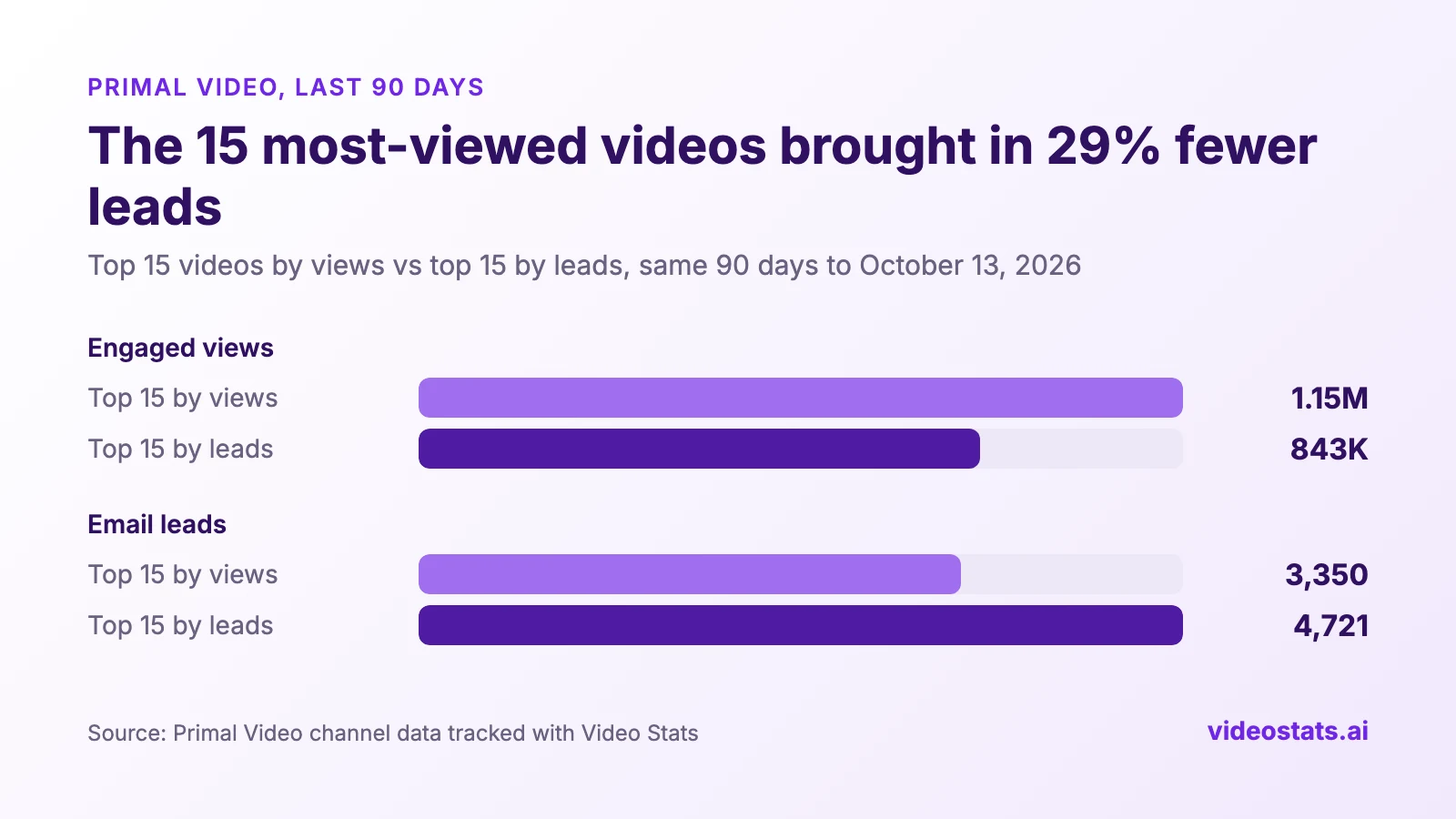
Ranking by views put 1,371 fewer leads in Primal Video's top 15.
For Justin, an email sign-up is the money metric. In his words, "a lead for us is someone joining or opting in to our email list, which is really a key piece of our business." If you sell your own course or service, your money metric is sales and revenue. Either way, you need data YouTube doesn't have.
Connect ChatGPT or Claude to the numbers behind your videos
Video Stats, which Justin co-founded, tracks the links in your video descriptions and counts the clicks, leads and sales each video sends you. Its MCP connection lets ChatGPT, Claude and other AI assistants read those numbers alongside your YouTube stats, so you can ask questions in plain English.
If you haven't connected yet, Part 2 covers ChatGPT, Part 3 covers Claude, Part 4 covers Claude Code and Cursor, and Part 7 covers Grok Bot. Leads need the tracking code on your opt-in pages, and sales need it on your checkout.
5 questions that rank your YouTube videos by money
The answers below come from Primal Video's channel, over the same 90 days to October 13, 2026. Views are engaged views, the count that matches YouTube Studio.
1. "Which videos brought in the most leads in the last 90 days?"
Start with a straight ranking by the metric that pays you. Your assistant can rank by leads, sales, link clicks or conversion rate.
| Video (last 90 days) | Views | Link clicks | Leads |
|---|---|---|---|
| DaVinci Resolve Tutorial for Beginners (2026) | 143,623 | 7,189 | 1,429 |
| CapCut Pad Tutorial | 36,962 | 1,189 | 457 |
| How to Use OBS Studio (2026) | 121,670 | 2,226 | 447 |
| Instagram Edits App Tutorial (2026) | 38,275 | 992 | 370 |
| VN Video Editor Tutorial | 54,538 | 1,701 | 348 |
Primal Video's top 5 videos by leads. All five are step-by-step tutorials for one tool.
If you sell your own products, ask for sales or revenue instead: "Rank my videos by revenue over the last 90 days." Video Stats reports revenue in US dollars.
2. "Which videos bring in the most leads per 1,000 views?"
A ranking by total leads favours your biggest videos, because traffic hides how well a video works. Leads per 1,000 views, or LPM, levels the field. It works like YouTube's RPM, but counts leads instead of ad revenue.
LPM shows you which videos turn their audience into leads, which means it tells you which topics to make more of before you spend a week on the next video.
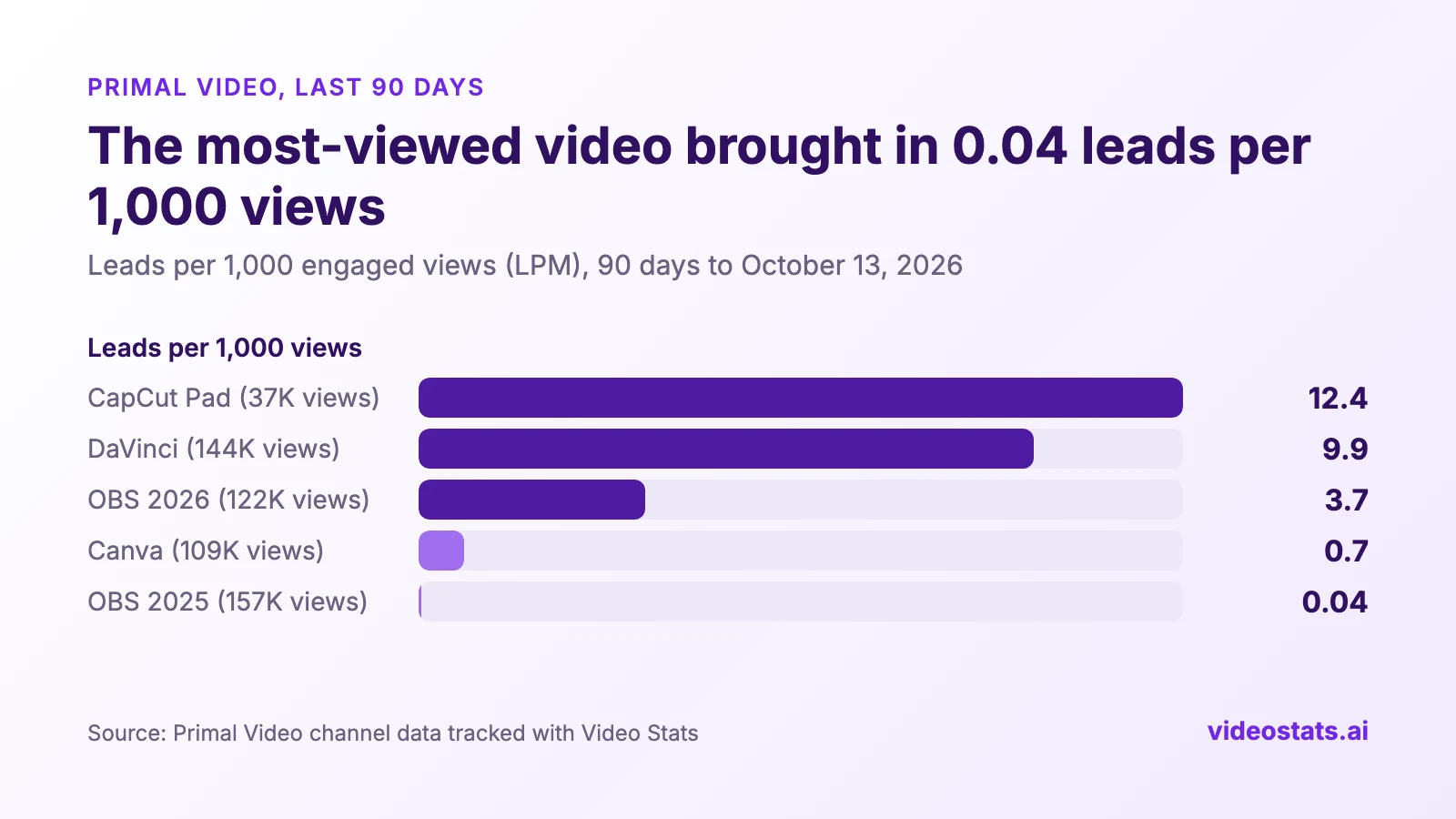
The CapCut Pad tutorial earned 300 times more leads per view than the most-viewed video.
Ask for a minimum number of views, such as "only videos with at least 1,000 views". Without one, a small video can top the list on a handful of leads. On Primal Video, a video called "This AI Can Actually SEE Inside Your Video" tops the LPM ranking at 35 leads per 1,000 views, but on 1,075 views. That's too small to plan a content strategy around.
3. "Compare my two OBS tutorials. Why does one bring in more leads?"
When two videos on the same topic perform differently, put them side by side. Your assistant compares 2 to 5 videos and names the winner on each metric.
This is the fix that was already on the channel. Primal Video has two OBS Studio tutorials, one from 2025 and a remake from 2026:
| Last 90 days | OBS tutorial (2025) | OBS tutorial (2026) |
|---|---|---|
| Views | 157,337 | 121,670 |
| Link clicks | 1,178 | 2,226 |
| Leads | 6 | 447 |
| Clicks that became leads | 0.5% | 20.1% |
| Leads per 1,000 views | 0.04 | 3.67 |
Same software, same audience. The older video gets more views and almost no leads.
The 2025 video isn't a bad video. Its description was written before Primal Video could see which links turned viewers into subscribers. You can find out what each video offers with one more question: "Which videos send traffic to my livestream checklist, and which send traffic to the Primal Video Method?"
| Last 90 days | OBS tutorial (2025) | OBS tutorial (2026) |
|---|---|---|
| Free download in the description | Primal Video Method, a video editing guide | Livestream checklist |
| Clicks on the free download | 31 | 914 |
| Leads from it | 6 | 405 |
The 2026 remake offers a download for the thing the viewer came to do.
OBS is live streaming software, so a livestream checklist is the obvious next step for its viewers, and 44% of the people who clicked it signed up. The 2025 video offers a video editing guide instead, and almost nobody clicks it. Its other 1,147 clicks go to the OBS download and the other links in its description.
Both videos had tracked links for the whole 90 days, so the gap comes from what each description offers. If the 2025 video brought in leads at the 2026 video's rate per view, it would have added about 570 subscribers in 90 days, and the fix is one link in a description. YouTube Lead Magnets That Convert explains why a matched download wins.
4. "Show me a report for my CapCut Pad tutorial."
Rankings tell you which videos to look at. A report tells you what's going on inside one of them.
Ask for a report on any video by name, and your assistant finds it and shows a report card in the chat. It works in ChatGPT and Claude.
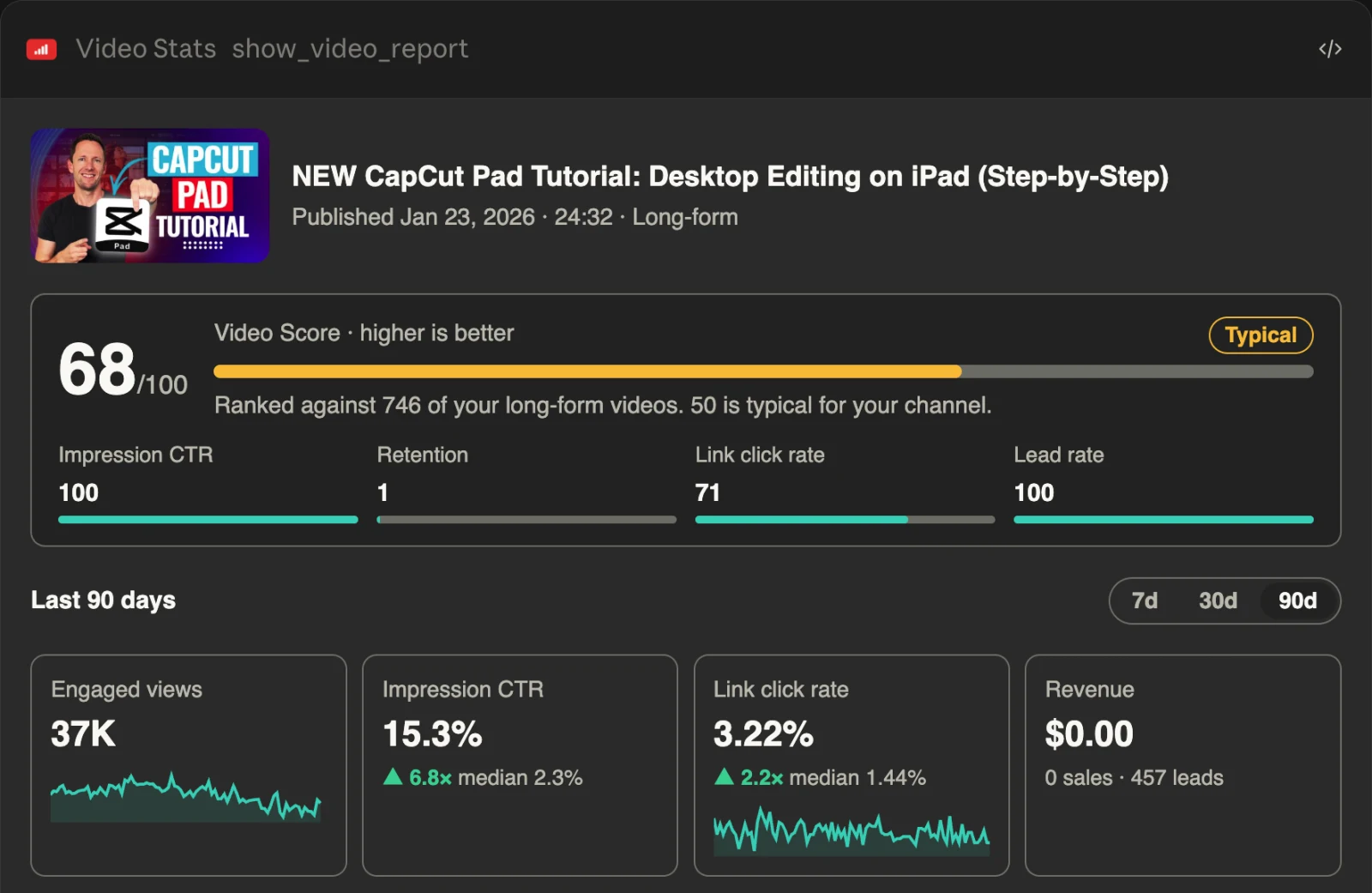
Top marks for the thumbnail and for turning clicks into leads. Retention is the one number holding the score back. (Report from October 2026.)
The card shows:
- A Video Score from 0 to 100. It ranks the video against the rest of your channel on four things: impression click-through rate, retention, link click rate and the share of clicks that become leads. 50 is a typical video for your channel, 70 and up is strong, and under 40 is weak. Shorts are only compared with Shorts, and retention is compared with videos of a similar length.
- Views, impression click-through rate, link click rate and revenue, each next to your channel's median, so you can see which one is holding the video back.
- Daily views and link clicks, and the path from views to link clicks, leads and sales.
- A 7, 30 or 90-day switch, and two buttons that ask your assistant what's driving the result or how the video compares with your others.
The score tells you where to look. The CapCut Pad tutorial scores 68, at the top of the Typical band. It ranks 100 out of 100 for impression click-through rate and lead rate, which puts its thumbnail and its offer among the best on the channel. Retention ranks 1, and that single number pulls the score down.
Before you act on a number like that, ask a follow-up. When we asked Claude about it, it pointed out that the share of a video people watch falls as videos get longer, and this is a 24.5-minute tutorial. Video Stats now ranks retention only against your videos of a similar length, so a long tutorial is judged against other long tutorials. To see where viewers leave, open the video's audience retention curve in YouTube Studio.
Click What's driving this? on the card, and your assistant explains the result in the chat. Here's what Claude said about the CapCut Pad tutorial:
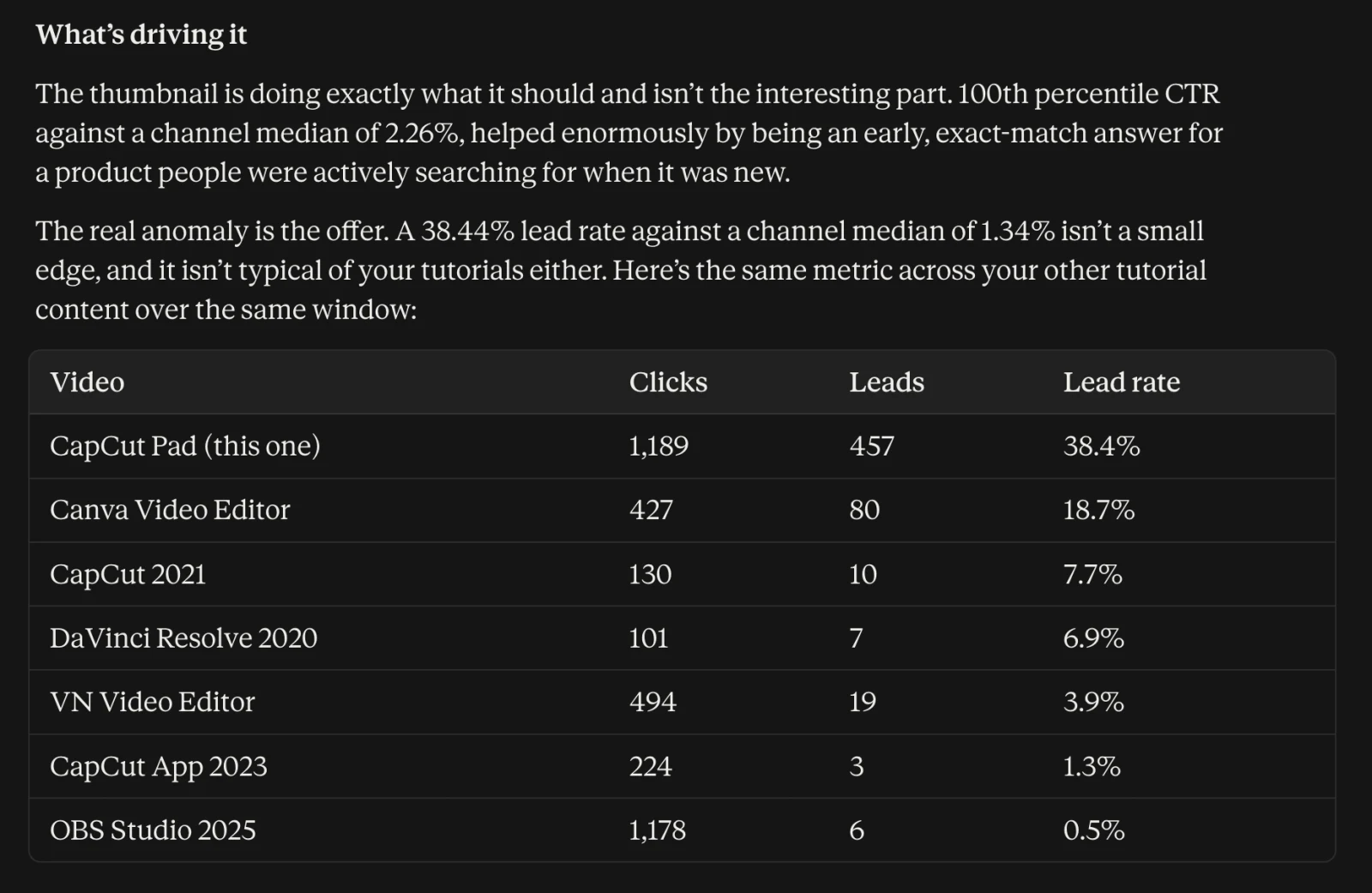
Claude points at the offer, not the thumbnail. Its table leaves out the channel's other strong tutorials, so ask which videos it compared.
The answer is a good start, and a follow-up makes it better. Claude compared the CapCut Pad tutorial with mostly older tutorials, while the 2026 Instagram Edits tutorial turned 37.3% of its clicks into leads over the same 90 days. Asking "Which tutorials did you compare it with, and why those?" tells you whether the offer or the topic is the thing to copy.
Read other videos the same way. A strong link click rate with a weak impression click-through rate calls for a better thumbnail and title, and the reverse calls for a better call to action or offer.
5. "Give me a deep dive on my newest tutorial."
For a full written analysis of one video, ask for a deep dive. Video Stats includes a ready-made Video Deep Dive prompt that pulls the video's results, looks at its thumbnail, compares both with your channel, and ends with two or three changes ranked by impact.
It's the right question for a video that converts well but doesn't get seen. In his 90-day video, Justin asked Claude for a full report on his channel, and it flagged a recent video with 3,644 views and 67 leads. YouTube had shown that video 61,000 times, but only 2.16% of those impressions became views. Claude's verdict: "a thumbnail fix could unlock significantly more views flowing through into that strong conversion rate."
When the viewers who find a video act on it, the thumbnail and title are where a deep dive starts.
4 things to do once you know which videos make you money
- Put your best offer on your most-viewed videos. Look for videos with lots of views and a low LPM, and compare their description links with your best converters. The OBS tutorial above is the pattern.
- Make more videos like your top LPM videos. On Primal Video, every video in the top 5 by leads is a step-by-step tutorial for one tool. Ask "What do my top 10 videos by leads per 1,000 views have in common?"
- Fix the thumbnails on videos that convert but don't get seen. A video with a high LPM and a low impression click-through rate loses leads before anyone clicks.
- Update the winners before they go stale. Primal Video updates some of its biggest tutorials every year. Ask "Which videos over a year old still bring in leads and are due for an update?"
How to Analyze Your YouTube Channel With AI covers the other kinds of questions you can ask, and 30 ChatGPT and Claude Prompts for YouTube Analytics has more to copy.
FAQ
How do I find my best performing YouTube videos?
In YouTube Studio, the Content tab and the Analytics overview rank videos by views and watch time. To rank them by leads, sales or revenue, you need link tracking such as Video Stats, then you can ask an AI assistant like ChatGPT or Claude to rank them for you.
Which YouTube videos make the most money?
YouTube Studio's revenue report shows what YouTube pays you per video, such as ad revenue and YouTube Premium revenue. Money from your email list, products and affiliate links happens off YouTube, so you need to track the links in your descriptions to see which videos bring it in.
What is a good number of leads per 1,000 views?
It depends on your niche, your offer and how you ask for the sign-up, so compare videos within your own channel. On Primal Video over 90 days, the strongest tutorials brought in 8 to 12 leads per 1,000 views, while the weakest popular videos brought in less than 1.
What is a Video Score?
A Video Score is a number from 0 to 100 that ranks one video against the rest of your channel on impression click-through rate, retention, link click rate and the share of clicks that become leads. 50 is a typical video for your channel. Video Stats shows it on the video report card in ChatGPT and Claude.
Can ChatGPT tell me which YouTube videos make money?
Only if it can see your money data. On its own, ChatGPT can't see your YouTube analytics, and YouTube's data stops at views and ad revenue. Connected to Video Stats, it can rank your videos by leads, sales and revenue from your real numbers.
See which of your videos make you money
Connect your channel to Video Stats, then ask your assistant the first question on this list. You'll know within a minute whether your most-viewed video is also your best one.
In the next part of this series, you'll see how to track which videos send clicks to your affiliate links.


