YouTube Engaged Views Explained: What Changed in August 2026
YouTube now shows two view counts, and only one of them pays you. In this guide, you'll learn the difference and 5 ways to report your views now.

If your view counts jumped in late August, your audience didn't grow overnight. On August 24, 2026, YouTube changed what the public view counter measures, and the old definition got a new name: the engaged view.
You'll learn exactly what changed, what stayed the same, why your conversion rates suddenly look worse, and 5 ways to report YouTube views so your numbers stay honest and comparable.
And if you work with sponsors, tip 4 covers which view number to put in front of them.
What YouTube changed on August 24, 2026
YouTube now counts two kinds of view for every video:
| A view (the public counter) | An engaged view | |
|---|---|---|
| Counted when | Playback starts: the first frame, autoplay included | Someone clicks to watch, or keeps watching past the opening seconds |
| Where you see it | The number under the video | YouTube Studio, and anything tied to earnings |
| Before August 24 | Didn't exist for long-form | Was called a "view" |
The change applies to long-form videos, podcasts and live streams. Shorts switched to first-frame counting earlier, in 2025.
The important part: an engaged view is the old view. For long-form videos, every view count from before August 24 already measured what YouTube now calls engaged views.
That also means public views will always be the bigger number. Every engaged view is also a public view, but plenty of public views (an autoplay, a few seconds in the feed) never become engaged views.
Your view counts went up, but your audience didn't
The public counter now includes plays that start on their own, like a video autoplaying in the home feed or on a channel page while someone scrolls past. Those plays never counted before.
That means a bigger number on the video page doesn't mean more people chose to watch. If you compare this month's public views with last month's views, you're comparing two different measurements.
How big is the gap? Agentio modeled it across 35,800 long-form videos from June and July 2026 and estimated that public counts run about 30% above engaged views. Its estimate for Shorts was 65%. The gap varied by device and topic:
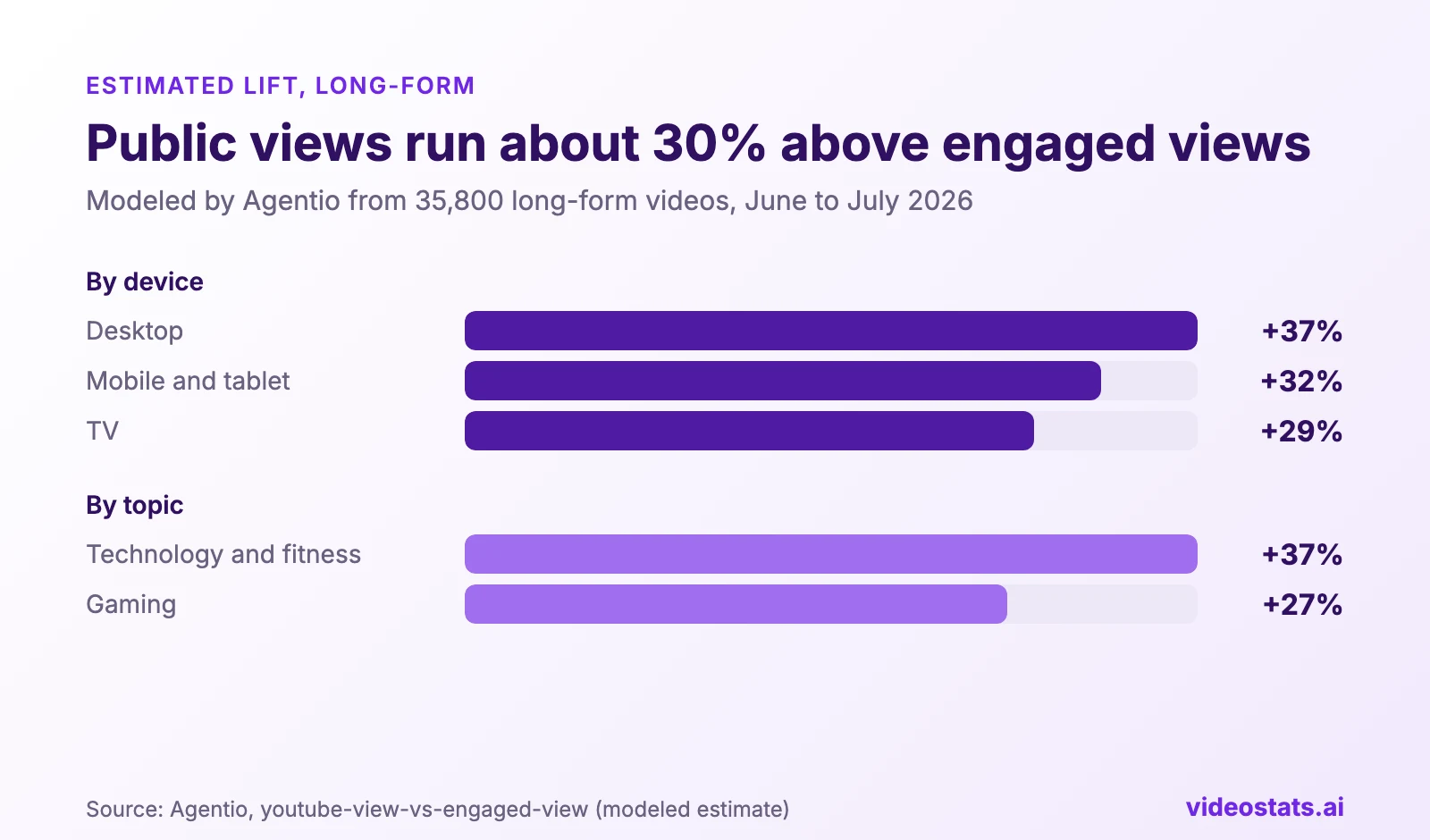
The gap is widest on desktop and in technology content. Agentio's figures are modeled, because YouTube doesn't publish the exact engaged-view threshold.
Your own channel's gap will differ, so check it rather than assuming 30%.
What didn't change
The change is about the public counter. YouTube says these stay the same:
- Earnings and Partner Program eligibility. In YouTube's words, an engaged view "has been, and will continue to be, how you qualify to earn."
- Click-through rate, average view duration and audience retention, which are calculated the same way as before.
- Recommendations. The algorithm doesn't treat your videos differently because of the new counter.
So your revenue won't jump with your view count, and your retention charts are still comparable with older ones.
Every rate that divides by views now looks worse
Any rate with views at the bottom of the fraction shrinks when you divide by the bigger public number. The video and the clicks haven't changed. Only the denominator has.
That means you could look at a recent video, see its link click rate or conversion rate drop by about a quarter, and decide it's failing when nothing about it changed.
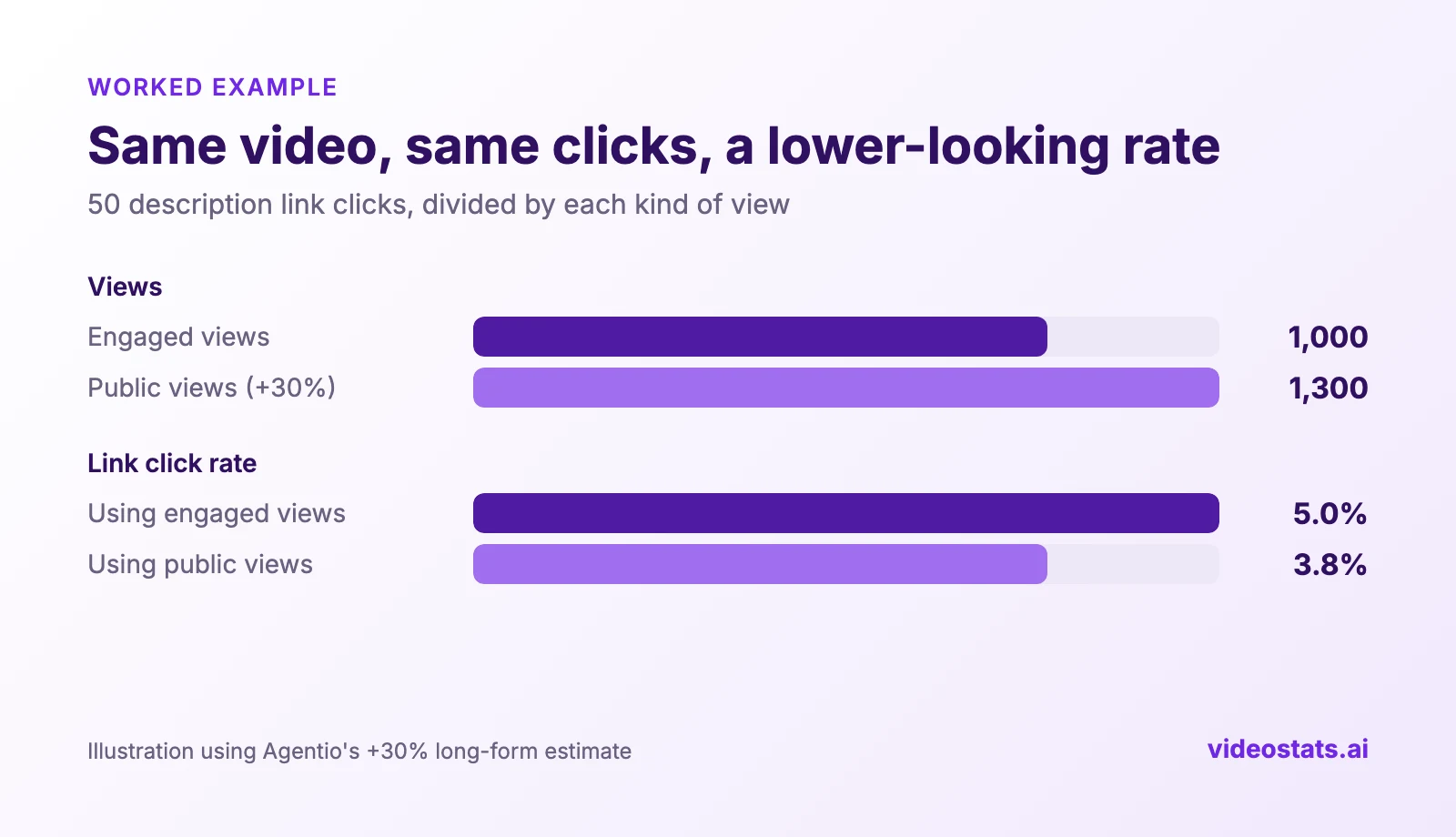
A 30% bigger denominator makes the same 50 clicks look about 23% worse.
The rates affected include:
- description link click rate (clicks ÷ views)
- conversion rate per view (leads or sales ÷ views)
- leads per 1,000 views
- any sponsor or affiliate metric priced per view
If you track which videos drive leads and sales, this matters more than the view count itself. YouTube Analytics for Business explains the metrics worth tracking, and Which YouTube Videos Drive Leads? shows them on a real channel.
5 ways to report YouTube views after the change
1. Use engaged views for every rate
Divide clicks, leads and sales by engaged views, not public views. Engaged views measure the same thing views measured before August 24, so your rates stay comparable with everything you've tracked so far.
2. Label every view number
Write "engaged views" or "public views" in every report, dashboard and spreadsheet column. A plain "views" column is now ambiguous, and a teammate or client will eventually compare the wrong two numbers.
3. Compare against your history using engaged views
Your old numbers are engaged views by definition. Compare a recent video's engaged views with an older video's views, and the comparison is fair. Compare its public views, and every recent video looks like a breakout hit.
4. Give sponsors engaged views, or both numbers clearly labeled
If a sponsor priced your last deal on views, your public count may now be around 30% higher for the same audience (Agentio's long-form estimate). Reporting that bigger number without saying so invites a hard conversation when their own results don't move. Report engaged views, or both with labels, and explain the change once. It protects your pricing and your credibility.
5. Judge Shorts and long-form separately
Shorts autoplay constantly in the feed, so their gap between public and engaged views runs much wider than long-form's. Pool them and your averages mean nothing. Compare each format against its own history.
How Video Stats keeps your numbers comparable
If you use Video Stats, your rates stay comparable across August 24 without any extra work, because engaged views are the default everywhere.
That means your conversion rates, top videos by leads and underperformer lists all use the same kind of view they always have.
You choose which view count is the headline number in Settings → View Counting. Engaged views are recommended, and switching never discards data, because Video Stats stores both numbers.
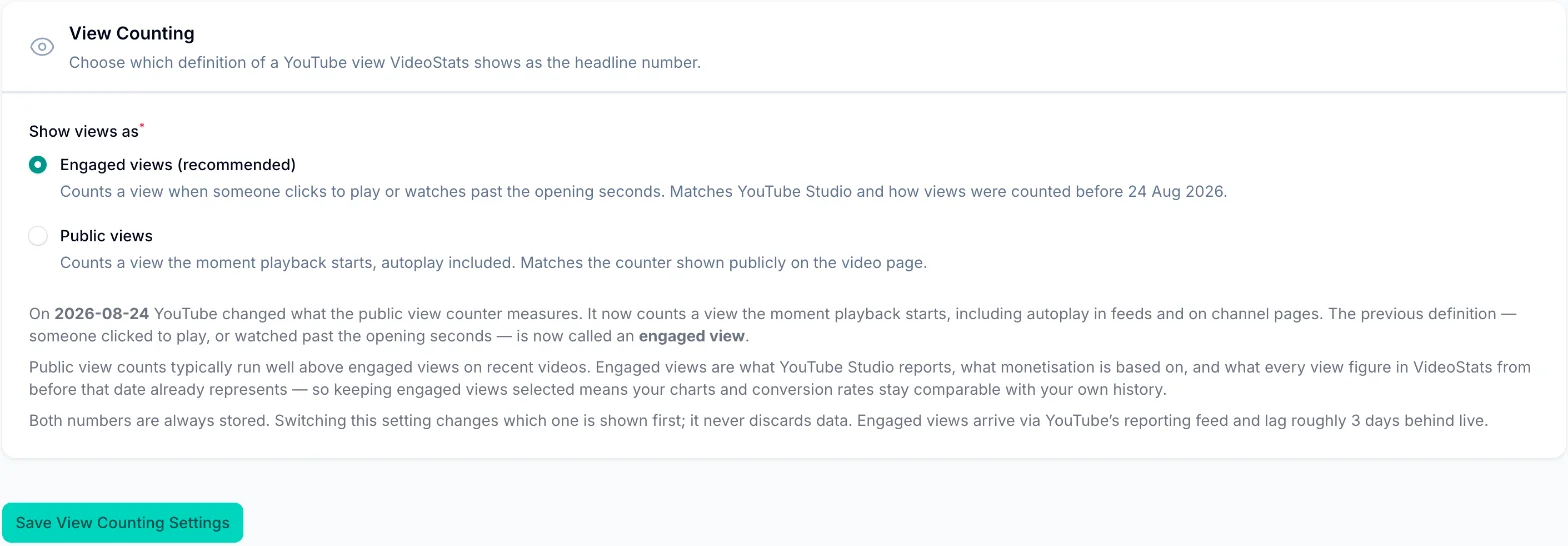
Pick the headline number once. Both counts are always stored.
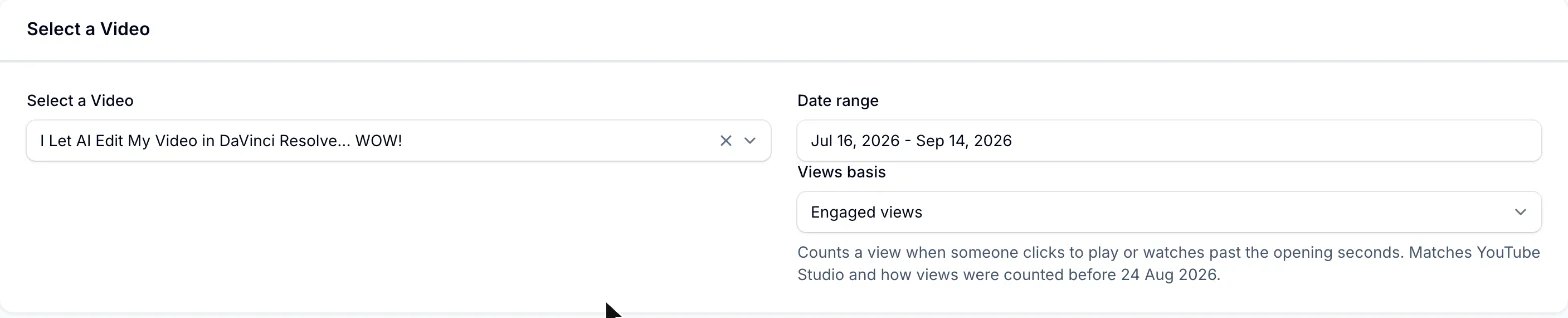
On any video's stats page, you can also flip the charts between engaged and public views with the Views basis option:
The views chart shows both at once. On this Primal Video tutorial, published after the change, the dotted public line climbs well above the engaged line:
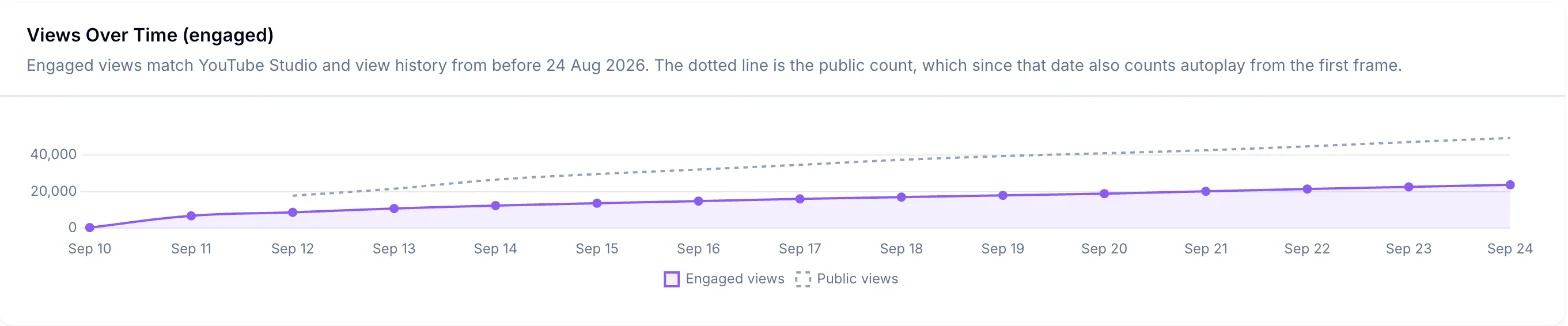
The gap between the lines is autoplay and brief plays that the public counter now includes. On this video, public views run about double the engaged count, well above the 30% average, which is why it's worth checking your own videos.
How Video Stats calculates engaged views. YouTube's standard video data only includes the public count. Engaged views come from YouTube's reporting feed instead, so Video Stats builds the engaged total in two steps:
- Before August 24, a video's engaged views equal its views, because they were the same measurement. Video Stats uses the view history it already collected.
- From August 24 on, it adds each day's engaged views from YouTube's reporting feed.
That keeps every video's engaged total continuous from its first day. Two limits, both from YouTube's side:
- Engaged data runs about 3 days behind. The most recent days show public views until YouTube's report arrives, and Video Stats tells you which number you're looking at.
- There's no channel-wide engaged total. YouTube only publishes a public total for a whole channel, so the channel views chart uses public views and says so.
The View Counting help article covers the setting in more detail.
Claude and ChatGPT get both view counts, clearly labeled
One of the most popular features of Video Stats is the MCP connection, which links your channel data to Claude, ChatGPT, Claude Code and Cursor. Every answer your assistant gives about your videos uses the right kind of view, and it knows which one it used.
That means when you ask Claude or ChatGPT about conversion rates or your best videos, it divides by engaged views by default instead of the inflated public count, so its answers stay comparable with your history.
Every video result Video Stats sends your assistant includes:
- views: the number under the view type you asked for, engaged by default
- views_basis: which view type that number actually used
- engaged_views and public_views: both numbers, every time
Engaged figures arrive about 3 days late. When they're not in yet for a video, the assistant gets the public number and views_basis says "public", so it never mistakes missing data for a video with zero views.
A few questions worth asking once you're connected:
- "Which of my videos published since August 24 have the biggest gap between public and engaged views?"
- "Rank my top 10 videos by engaged views this month, with public views next to each one."
- "Recalculate last month's link click rates using engaged views."
- "Did any video's conversion rate really drop after August 24, or is it the view count change?"
The MCP page shows what else you can ask, and the setup guide connects your assistant in a few steps.
FAQ
Did my YouTube views really go up after August 24?
Your public count did, because it now includes autoplay and brief plays. The number of people who chose to watch didn't change because of the switch. Check your engaged views in YouTube Studio to see your real trend.
Does the change affect how much I earn?
No. YouTube says engaged views are still how you qualify to earn, and Partner Program eligibility is unchanged. A higher public count doesn't raise your revenue.
Where can I see engaged views?
YouTube Studio reports engaged views, which is why its numbers now differ from the public counter on your video pages. Tools that connect to YouTube's reporting data, like Video Stats, can show both side by side.
Why is the gap bigger for Shorts?
Shorts play automatically as people swipe through the feed, so many plays start without anyone choosing to watch. Agentio estimated public Shorts views run about 65% above engaged views, against about 30% for long-form.
Should I show sponsors public views or engaged views?
Show engaged views, or both with clear labels. Engaged views match how you reported before the change, so your pricing stays consistent and nobody feels misled later.
Want your conversion rates to stay comparable across the change? Video Stats tracks every link on every video and divides by engaged views by default, so your numbers still line up with everything you tracked before.