Built by creators with 1.8M subscribers
Find out which YouTube videos actually
make you money
Views and likes don't pay the bills. Video Stats connects every video on your channel to the clicks, leads, and sales it produced — automatically, across every link in every description.
14 days free, then 30 days to change your mind.




Co-founded by YouTube experts with 1.8M+ subscribers and 190M+ views
MCP Server for AI
Ask
ChatGPT
which video to make next.
Video Stats runs an MCP server, so you can connect your channel to Claude, ChatGPT, or Cursor in a couple of clicks and just ask. Our MCP integration gives your assistant direct access to your real numbers — no exporting, no spreadsheets, no copying figures around.
"Which videos convert best for my checkout page?"
"Audit my thumbnails and tell me which to redo first."
"Where am I leaving money on the table?"
"Give me a Monday morning dashboard."
How it works
Set up in an afternoon. Then it runs itself.
Connect your channel
Sign in with YouTube once. We import every video, every description, and every link you've ever published — however many years deep that goes.
Paste our tracking code
Copy it from your dashboard and add it to your website, the same way you'd add Google Analytics. That's what turns a click into a tracked lead and a tracked sale.
See what each video earned
Every click, lead, and sale gets attached to the video that caused it. New uploads are picked up and tracked automatically, without you lifting a finger.
No link rewriting required
Your links. Your URLs. Tracked anyway.
Most trackers make you swap every link in every description for a shortened link. We don't have to. Install our tracking code and we attribute the click when the visitor lands on your site — so your links keep pointing at your own domain and your own page.
- No shortlinks in your descriptions unless you want them
- Nothing for your viewers to distrust — they see your real domain
- Still prefer shortlinks? Those work too — choose per domain
- Affiliate links keep working exactly as they do today
Everyone else
bit.ly/4kQm2Xp
Your link is gone — replaced in all 800 descriptions.
Video Stats
yoursite.com/free-guide?vsi=4827
Your domain, your page — plus one short tag on the end.
Real business metrics
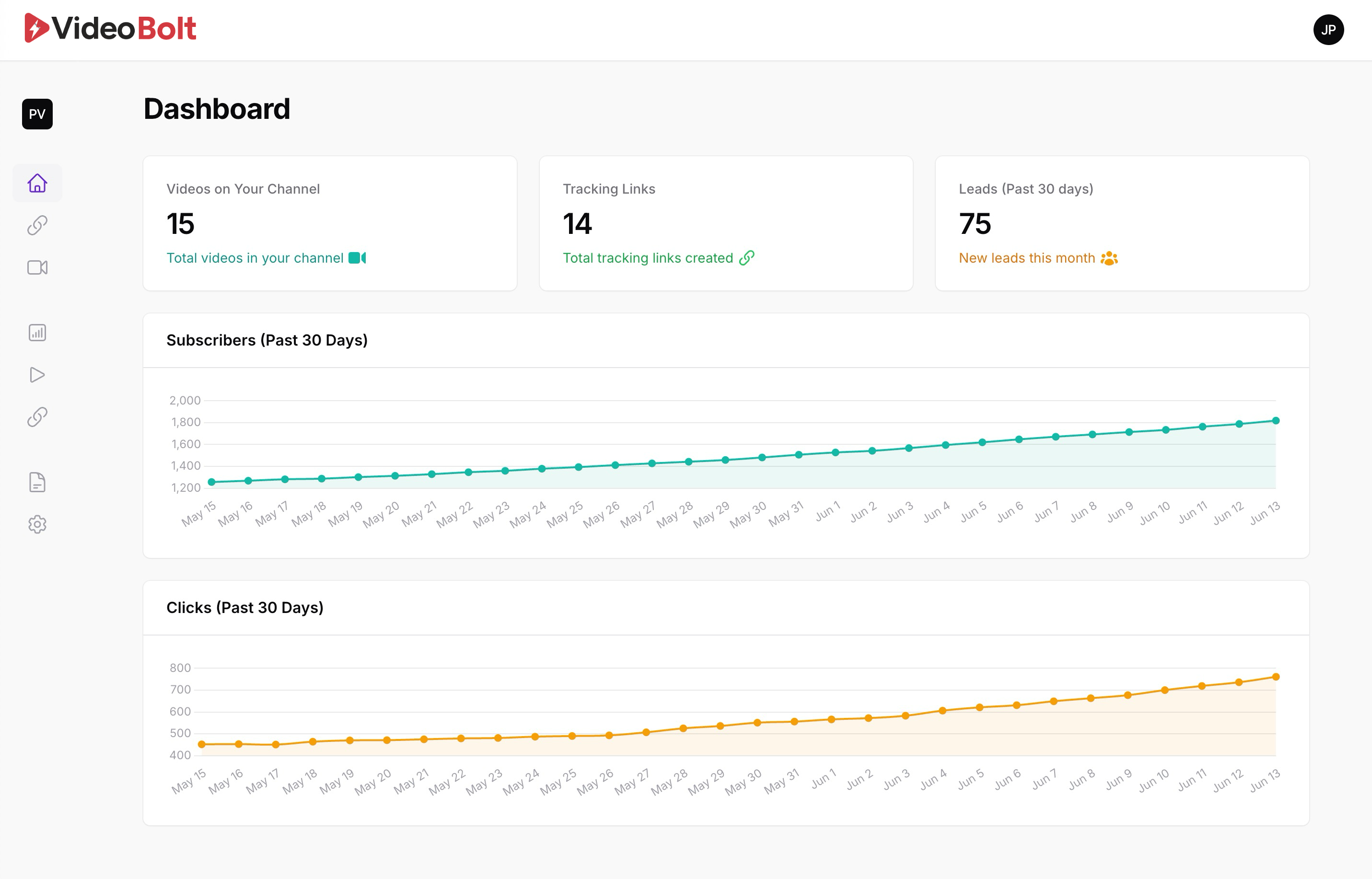
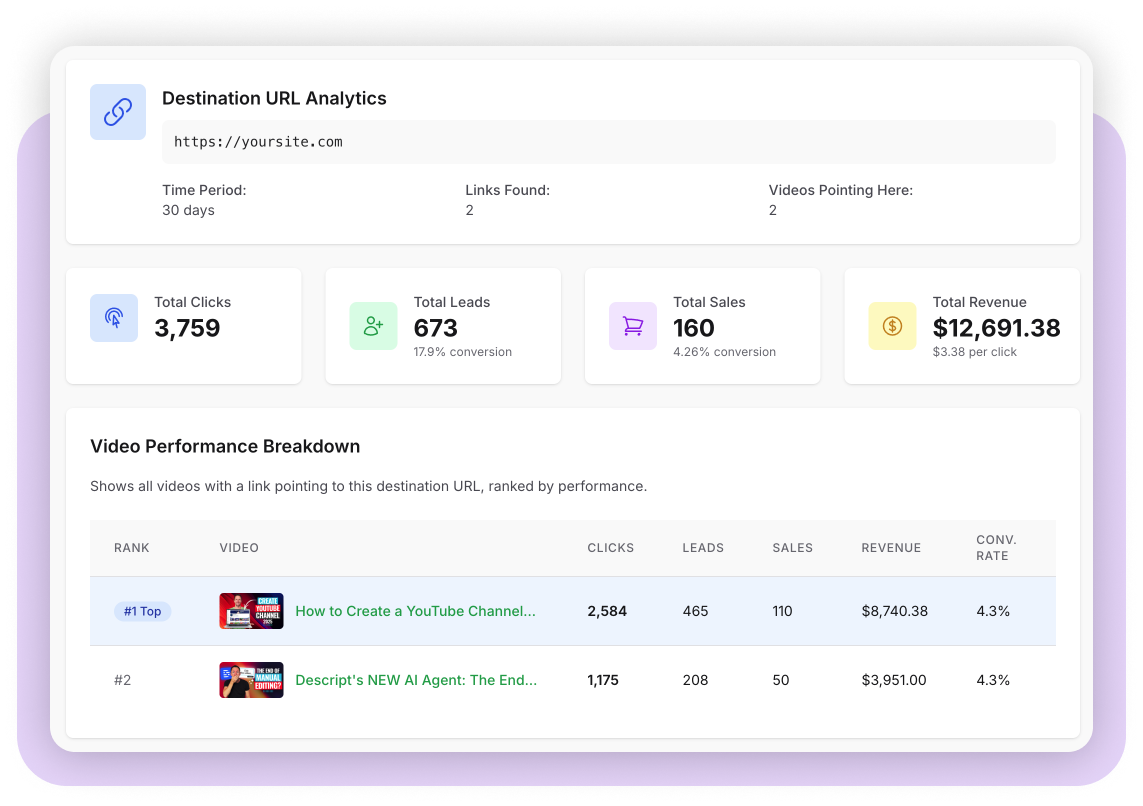
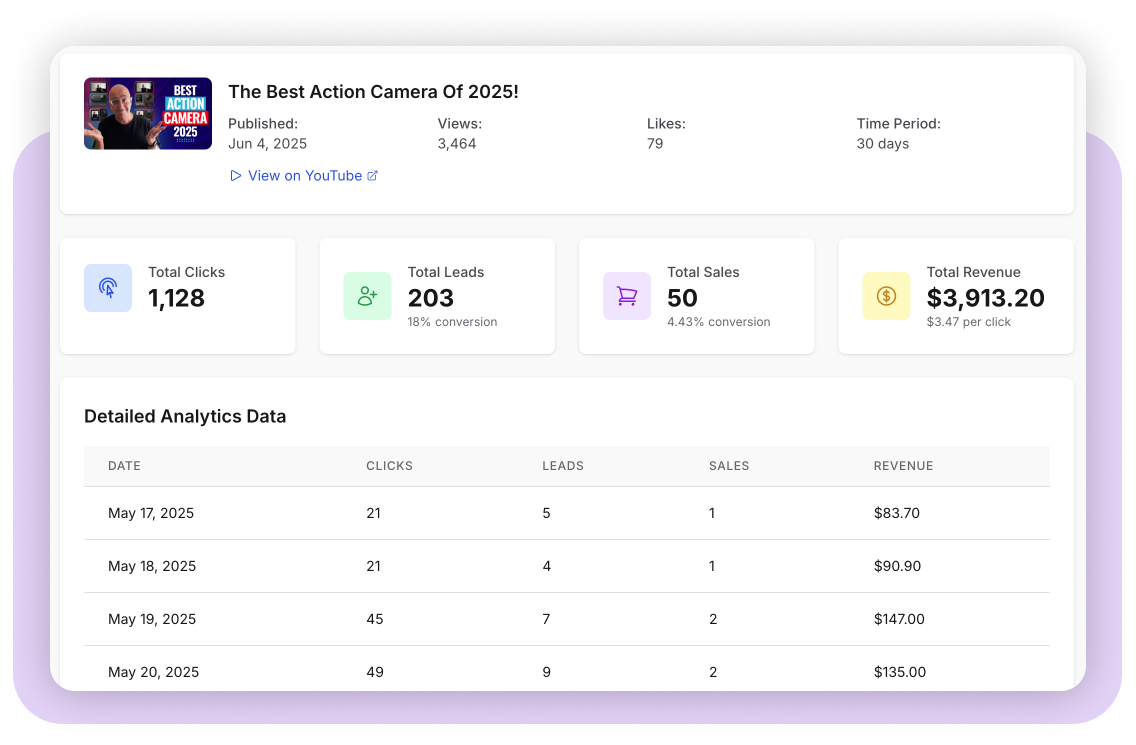
See which videos get the most leads and sales
Go beyond YouTube's views, likes, and subscribes. Get to the metrics that decide whether a video was worth making: clicks, leads, sales, revenue.
Simple to start. Easy to understand. And crazy powerful for your business.

Trends become obvious
Video performance over time
No more digging through Google Analytics in search of the numbers you need. The critical business metrics are right where you'd expect them.
Go deeper
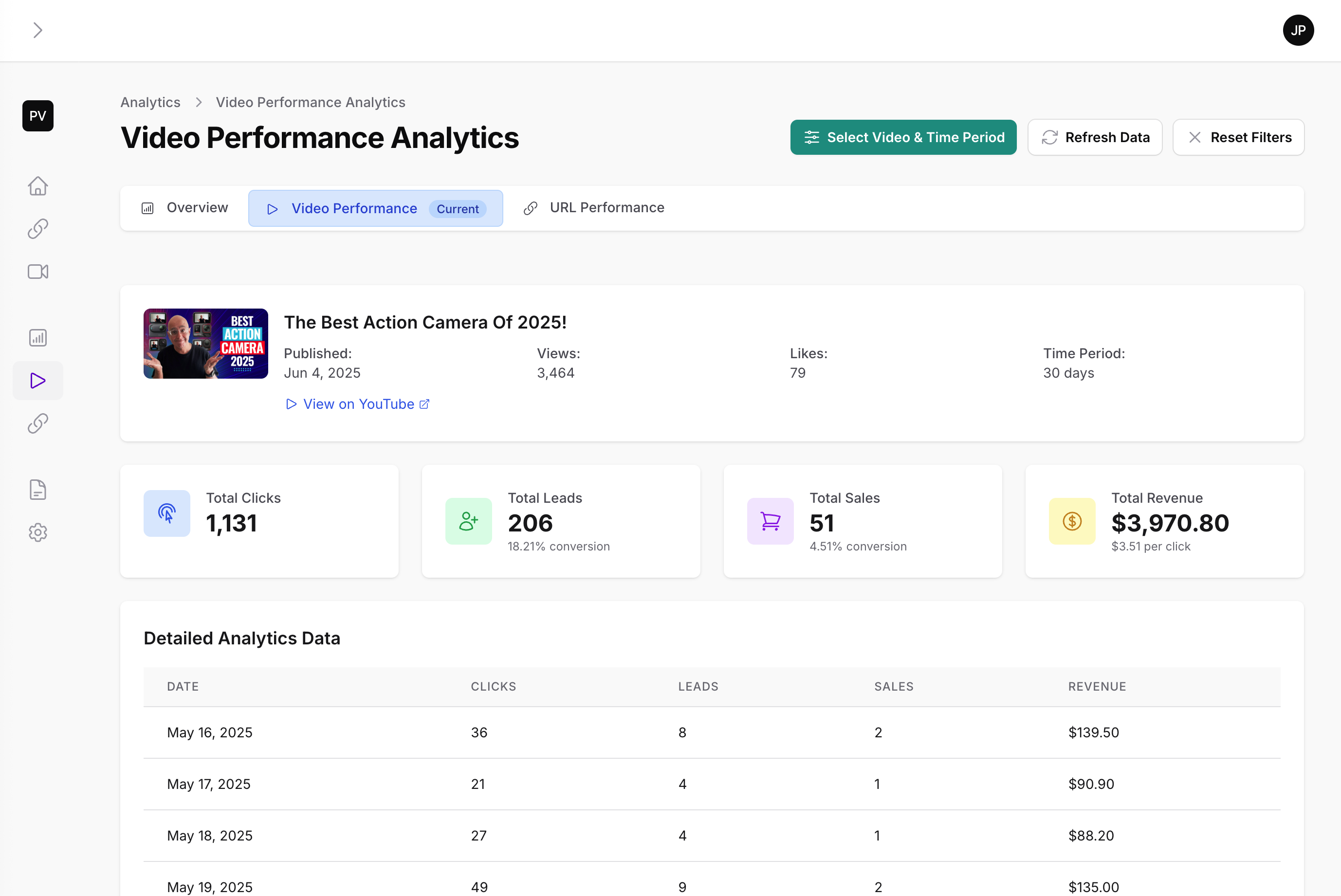
Open any video and see everything
Not just what happened, but whether it was good. Every number is measured against the rest of your channel, so you get an answer instead of another chart to interpret.
Audience retention, graded
See where viewers drop off — and whether that's good or bad compared to your other videos.
Impressions and click-through
How many people YouTube showed it to, and how many of them chose to watch.
Traffic sources
Browse, search, suggested, or external — find out where the views are really coming from.
Thumbnail benchmarking
Compare your best and worst performing thumbnails side by side to find the pattern.
Affiliate revenue
Tracks affiliate links too
You can't put tracking code on someone else's checkout, so most tools give up on affiliate links entirely. Video Stats tracks them as smart links instead, and counts every click back to the video that sent it.
Then let AI close the loop. Point Claude, ChatGPT, or Gemini at Video Stats and at your affiliate network — many run their own MCP connection now — or simply upload your monthly commission report. Your assistant lines those sales up against your click data and works out the ROI per video.
No tracking code will ever live on a vendor's checkout, so this is the closest anyone gets — and it's the difference between guessing and knowing which videos are actually moving your affiliate revenue.
- Every affiliate click credited to the video it came from
- Connect your network's MCP, or upload its report — either works
- ROI per video, worked out from both sides of the funnel
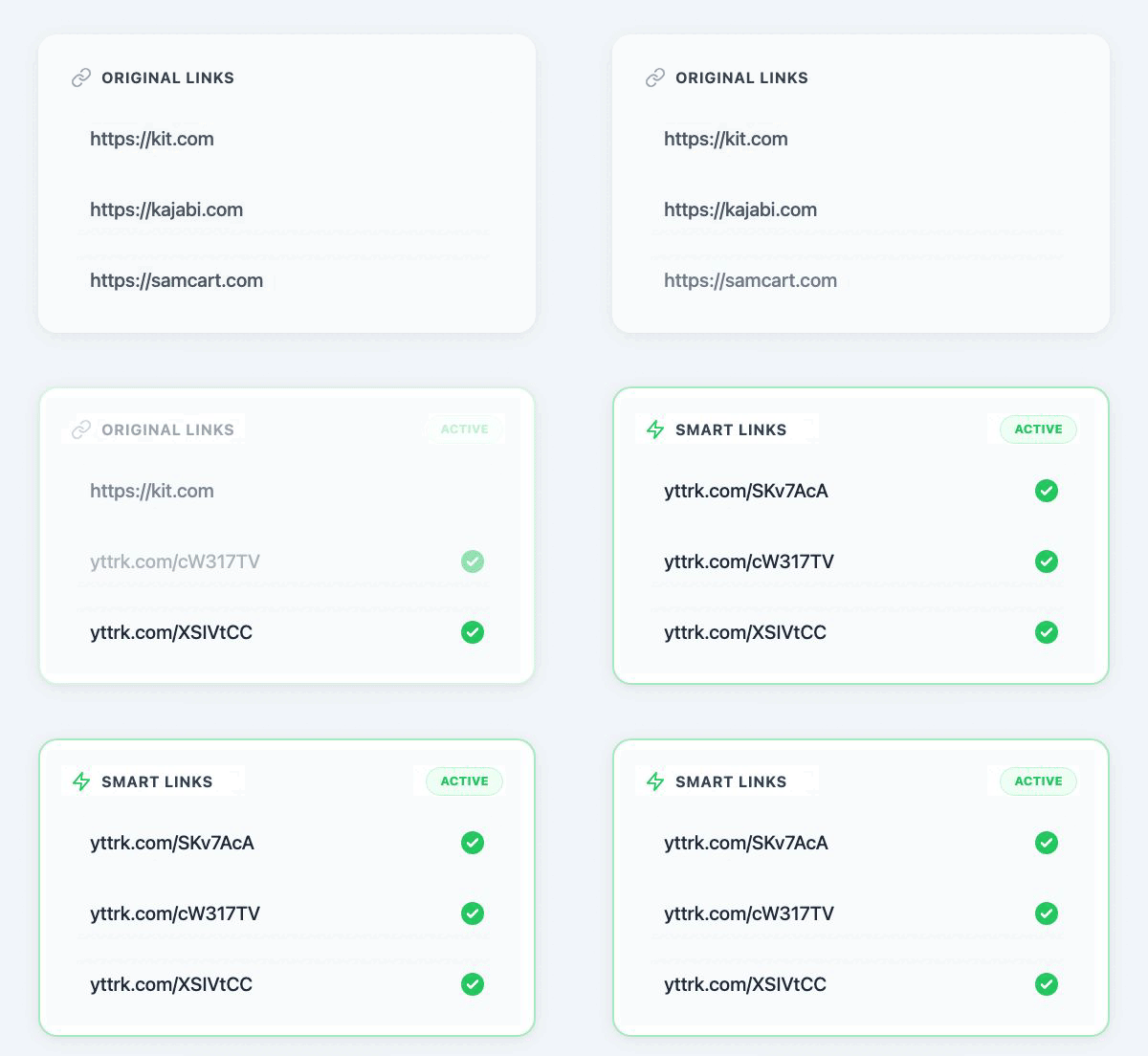
- Swap a dead affiliate link once and every video follows
Bulk editing
Update 800 videos in one move
A sponsor changes their URL. An affiliate program moves. A discount code expires. You should not have to open 800 videos to deal with it.
Find and replace, everywhere
Search every description on your channel and replace, append, or remove text across all of them at once.
Change a destination once
Point a tracking link somewhere new and every video using it follows automatically. No description edits at all.
Promo codes you can change later
Send viewers to a promo code page instead of reading a code out loud. Update the code any time — the three-year-old video keeps working.
Grow your list
Turn viewers into email subscribers
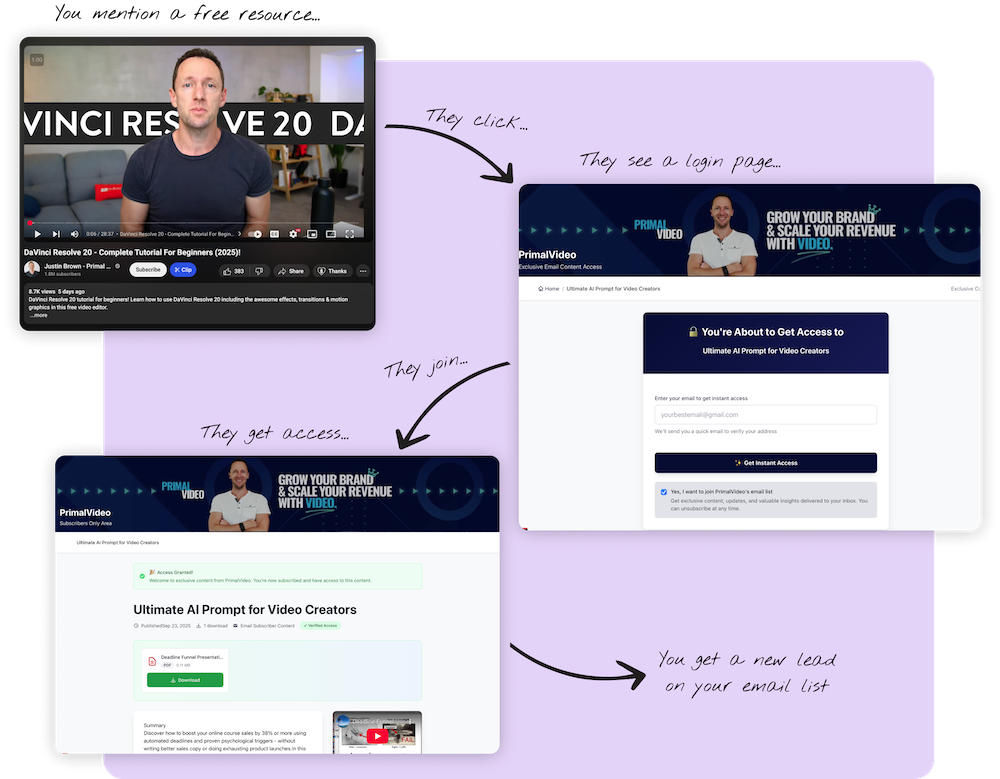
In a few minutes, create a download page that gives each video its own matched offer — instead of sending everyone to one generic signup form.
Optional, and fully yours
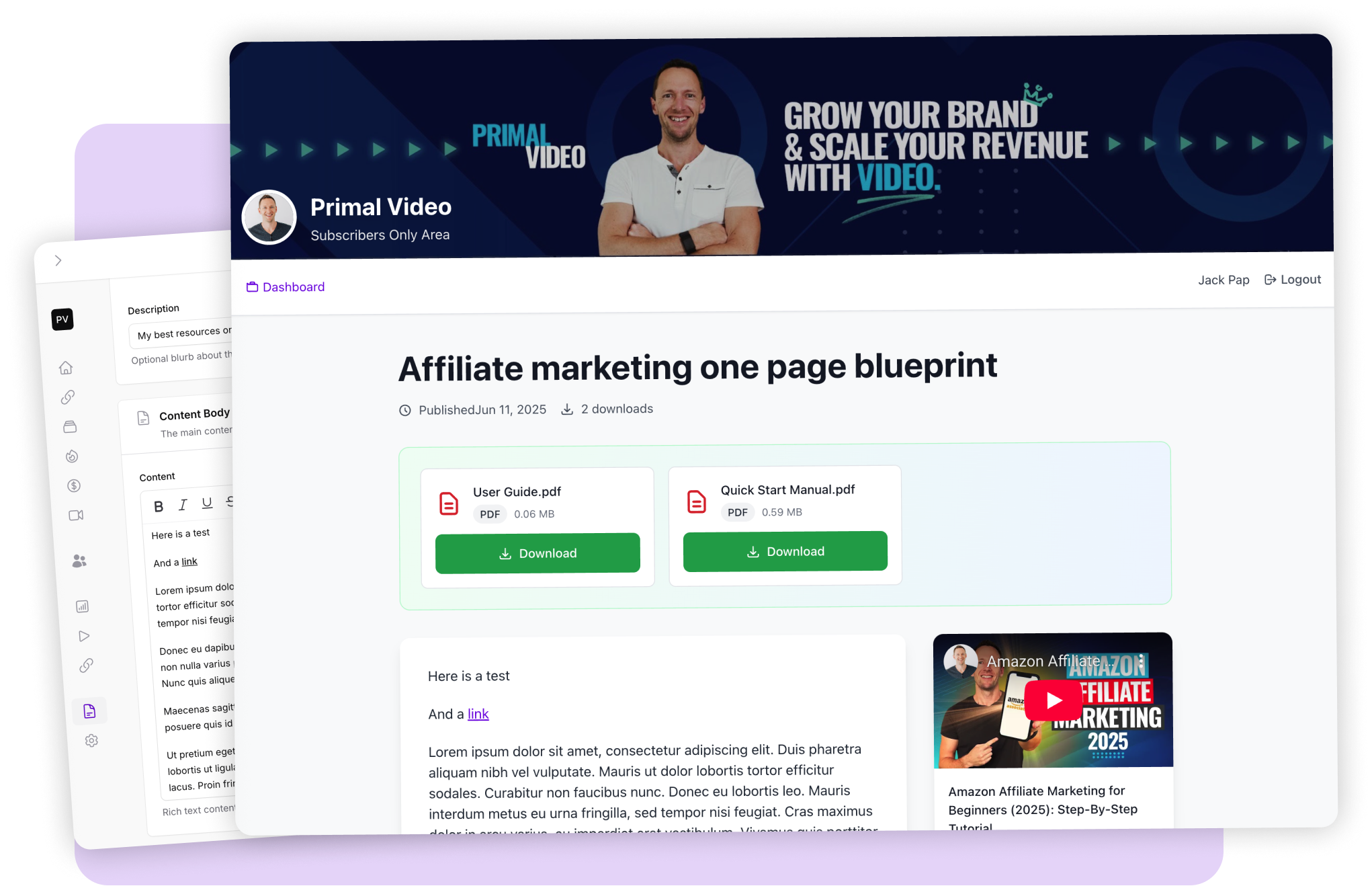
Email signup pages automatically created from your video content
Video Stats reads what a video is actually about and drafts a matching signup page in your own voice — so the offer fits the video instead of being the same generic form every time.
It's a starting point, never a finished page you're stuck with. Rewrite any of it inline, style it to your exact spec, and upload whatever you want to give away — a PDF, a checklist, a template pack, a bonus video. And if you'd rather not use signup pages at all, leave the feature switched off; the rest of Video Stats works exactly the same.
- Upload your own lead magnets — any file your viewers should get
- Edit every word inline, right on the page
- Gate content behind an email, or behind a verified YouTube subscription
- Serve pages from your own subdomain, like go.yourdomain.com
- Every signup is credited back to the video that produced it
Integrations
Grows your email list with the software you already use and love
Connect your email platform once and every subscriber flows straight into it, tagged and attributed.








Plus sale tracking for your checkout, so revenue lands next to the video that earned it.
Your brand
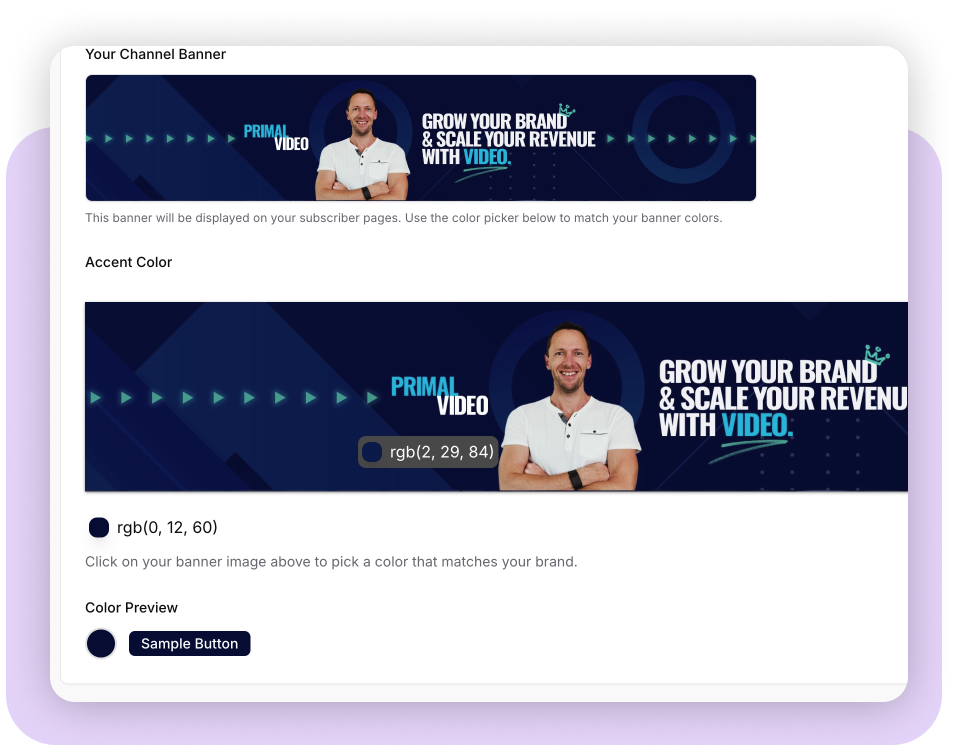
Automatically customized to your brand
Video Stats pulls in your YouTube banner, logo, and colors to personalize every page it creates for you — in seconds, without a designer.
Magic QR Codes
QR codes that know which video they came from
Put a QR code on screen and you hit a chicken-and-egg problem: you need the code while you're still editing, but the video it belongs to doesn't exist yet. So the scans can never be traced back to the video that earned them.
Video Stats fixes that. Generate the code before you film, then attach it to the video once it's published — and every scan from then on is credited to the right video.
- Scans, leads, and sales tracked for every code
- Change where it points long after the video is live
- Your colors and your logo, right in the code
- Works off-screen too — merch, flyers, live events, packaging
-
1
While you're still editing
Create the code and mark it "Video not yet uploaded." Drop it into your footage before you export.
-
2
Once the video is published
Your dashboard flags any code still waiting for a video. Pick the video, and the scans start counting against it.
-
3
Any time after that
Promoting a different product? Built a better landing page? Change the destination and the code already on screen follows — no re-upload, no re-edit.
Boosts your revenue
Earn passive revenue with your resource page
Video Stats builds a resource page you can link to from every video, so you earn affiliate commissions from the products you already recommend. No page builder required.
Disclaimer text is added for you automatically, and you can edit it to suit.
Built from what you already recommend
An AI wizard drafts new vendors and listings for you, so the page fills out in minutes rather than an afternoon.
Profile page
One link that points your subscribers at your socials, products, website, and podcast.
Got clients? We've got you covered
Built for agencies too
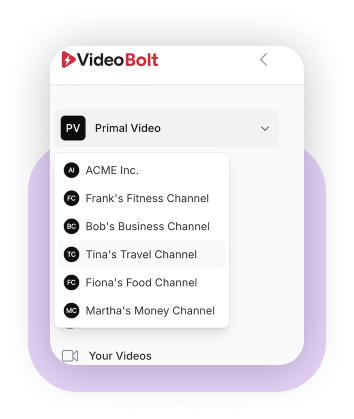
Run every client from one login, without ever asking one of them for a password.
Your client connects their own channel
Send a secure one-time invite link. Your client authorizes their own YouTube account on a clean branded page, the channel lands in your workspace, and you get an email the moment it's done.
A workspace for every client
Keep each client's channel, links, pages, and analytics completely separate — however many of them you take on.
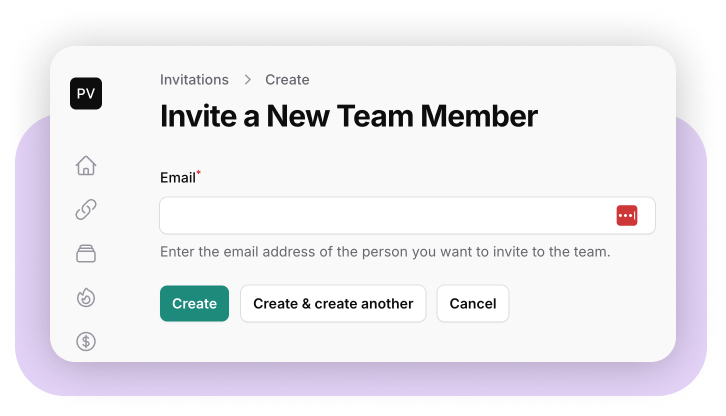
Team members and permissions
Invite your team, control what each person can reach, and revoke access the day someone moves on.
And the rest
Everything else in the box
Automatic video import
New uploads are picked up the moment you publish, and their links are tracked without you doing anything.
Pinned comment tracking
Links in your pinned comments get tracked too — and we can post the comment for you.
Time-expiring links
Perfect for Black Friday, launches, and any offer that has to end on a date.
Password-protected links
Put a password in front of a link, on a page that looks like your channel, not ours.
Custom shortlink domain
Use your own domain for tracking links, so everything stays on your brand.
Scheduled email reports
Your favorite videos and links, delivered weekly with week-over-week changes.
Video to blog post
Turn a video into a written post and publish it straight to your WordPress site.
Automatic transcripts
Every video transcribed, ready to reuse in pages, posts, and summaries.
Help assistant, built in
Ask a question anywhere in the app and get an answer from our documentation.
Who's behind this
Decades of experience in your corner
We built Video Stats because we needed it for our own channel first. As a client, you have us backing you up.
Justin Brown
Primal Video
- YouTube growth expert
- 1.8M subscribers, 800+ videos
- Organic growth specialist
Mike Brown
Primal Video
- Operations & business development
- Scaled Primal Video to 7 figures
- 12+ years in online business
Jack Born
SaaS Architect
- Founder of Deadline Funnel (acquired 2024)
- Built platforms used by tens of thousands
- SaaS architecture specialist
Combined: 12+ years in business · 1.8M+ subscribers · 190M+ views
Give it a go
Test drive Video Stats for a whopping 44 days
14 days free, then 30 days to change your mind. That's a month and a half to decide whether the numbers are worth it.

Choose your plan
Start Your 14-Day Free Trial
Every plan includes the full 30-day money-back guarantee on top of your trial.
Got a question?
The things people most want to know before they start.
Only if you want it to. Our default approach leaves your descriptions exactly as they are — you add our tracking code to your website and we attribute the click when the visitor arrives. If you do choose to convert links to tracking links, we save your originals first, record every change, and give you a one-click undo for any batch. You also review a preview before any bulk change is applied.
No. You can keep your own URLs in your descriptions and still get full click, lead, and sale attribution. Shortlinks remain an option — and they're useful for links you want to redirect later — but they are not a requirement, and you choose which of your domains use which method.
Video Stats is attribution software for YouTube. It's co-founded by YouTube experts Justin and Mike Brown of Primal Video, who have 1.8 million subscribers and over 190 million views. It tells you which of your videos are bringing in leads and sales, and it makes it easier to deliver downloads and bonus content that grow your email list at the same time.
We connect directly to ActiveCampaign, Kit, Mailchimp, MailerLite, Kajabi, Bento, and Systeme.io, so new subscribers flow into the tool you already use. We can also publish generated blog posts to WordPress. If your platform isn't on the list, get in touch and tell us — it genuinely shapes what we build next.
That's the situation Video Stats was designed for. We import your whole back catalogue, and the bulk tools let you find and replace text across every description at once, or change where a link points without editing a single video. Our own channel has 800+ videos, so nothing here assumes you're starting from ten.
Depending on which plan you choose, you get extra workspaces so you can run Video Stats on multiple YouTube channels. Agencies can also send a client a secure invite link so the client connects their own channel without sharing any login details.
No worries at all. You're in good company, because a lot of our clients say the same thing. Setup is signing in with YouTube and pasting our tracking code into your website — and if that last part is the bit that worries you, our support team will walk you through it.
There's also a help assistant built into the app that answers questions from our documentation, wherever you are.
Yes — a 14 day free trial on all of our plans.
Yes, we offer a 30-day money-back guarantee on top of the 14 day free trial. From the moment you start your trial you have 44 days to try Video Stats and make your decision.
Of course. We offer email support, there's extensive documentation, and you can contact our support team from inside the software.
Yes, extensive documentation is available to help you get started with Video Stats. You can find it here.
Stop guessing which videos are working
Video Stats is powerful enough for channels with millions of subscribers, and simple enough for the most tech-phobic newbie.
14 days free, then 30 days to change your mind.