YouTube Analytics for Business: What Studio Won't Show You
Your most-viewed YouTube videos probably aren't the ones making you money. In this case study, you'll learn the 7 numbers that show which videos pay you.
Justin Brown runs a YouTube channel with nearly 1.9 million subscribers. In one 30-day stretch, his most-viewed video (an OBS tutorial with 80,000 views) didn't make his top 10 for email sign-ups, while a CapCut tutorial with 12,400 views brought in 93. YouTube Studio would have told him to make more OBS videos.
That's the blind spot in YouTube analytics for business, and you can check your own channel for it. You'll see the seven numbers to track for every video, three ways to track them (one of them free), and the five changes Primal Video made once it could see them.
By the way, the first of those changes goes against advice you've probably heard about "best of" videos.
What YouTube Studio is built to measure
Studio's metrics help your videos perform in the algorithm, and help YouTube keep viewers on YouTube:
| What YouTube Studio shows you | What YouTube Studio can't show you |
|---|---|
| ✅ Views and engaged views | ❌ Which description links viewers clicked, per video |
| ✅ Impressions and click-through rate | ❌ Who joined your email list, and from which video |
| ✅ Watch time and audience retention | ❌ Which video led to a sale, and what the sale was worth |
| ✅ Subscribers gained and lost | ❌ Which videos send the most affiliate clicks |
| ✅ Traffic sources and search terms | ❌ How many people scanned an on-screen QR code |
| ✅ Ad revenue (in the Partner Program) | ❌ Your conversion rate from viewer to lead to customer |
You need the left column to grow on YouTube. You need the right column to grow the business behind the channel.
If you only watch algorithm metrics, you'll make the wrong videos
If views are the only number on your screen, you start chasing them. You make more of whatever got views, even when those videos bring nothing into the business.
That means every hour you put into those videos is an hour you didn't spend on the ones that fill your email list and pay for your channel.
Justin has published around 900 videos on Primal Video, so this comes from experience rather than theory. He admits he was once optimizing for views, subscribers and the algorithm. In the video above, he sums up the trap:
"When the only metrics you see are algorithm metrics, then you're likely going to make algorithm content."
A real example: top videos by views vs. top videos by leads
Justin compares two lists from the same 30 days.
The videos YouTube Studio ranked highest:
- An OBS Studio tutorial came first, with about 80,000 views in the period.
- A Canva video editing tutorial came second, with about 57,000.
- Both had healthy click-through rates and strong watch time. By YouTube's measures, Justin should have made more of them.
The videos that brought in email sign-ups (Primal Video's main business metric):
- Neither the OBS tutorial nor that Canva video made the top 10.
- The second-best converting video had about 11,000 views in the period. It produced 413 link clicks and 138 new email subscribers. Its opt-in link got 258 clicks, and 138 of those people signed up: a 53% conversion rate.
- A CapCut for iPad tutorial with 12,400 views produced 218 clicks and 93 sign-ups (42%).
Primal Video saw the same split over 90 days. Its top 15 videos by views had twice the views of its top 15 by leads, and produced 42% fewer leads. The full 90-day write-up is on Primal Video: YouTube Link Tracking Changes Everything.
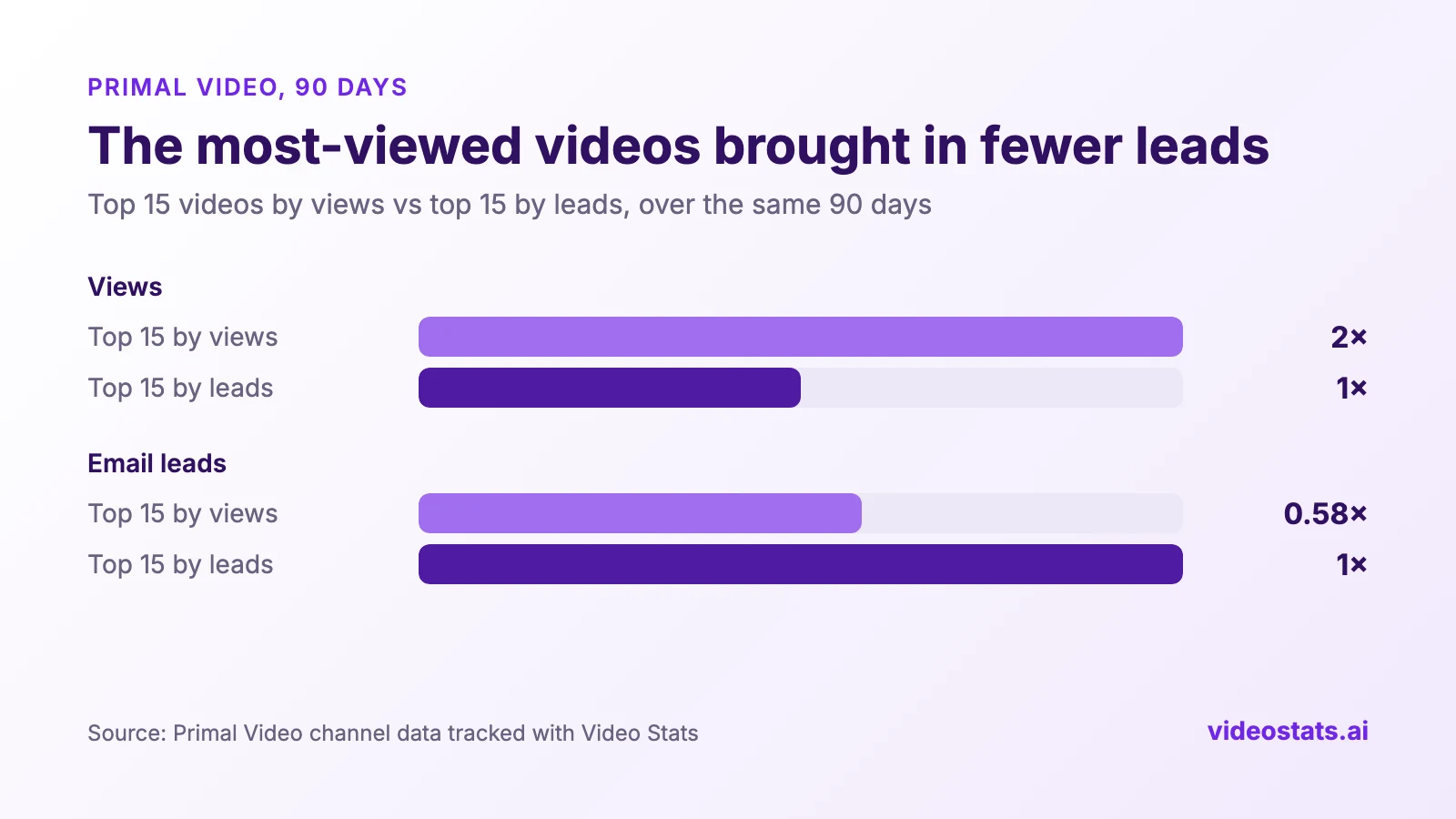
Over 90 days, Primal Video's most-viewed videos brought in 42% fewer leads than its best converters.
The OBS and Canva videos still earn ad revenue and help plenty of people. If Justin had picked his next topic from Studio alone, though, he'd have made more videos that don't grow the business.
The YouTube metrics that matter for a business
If your channel feeds an email list, a product, a service or affiliate income, track these numbers for every video:
- Link clicks per video. How often viewers clicked the links in a video's description and pinned comment. Clicks show you which videos make people want the next step.
- Click rate. Link clicks ÷ views. You can compare a 5,000-view video with a 500,000-view video on equal terms. Divide by engaged views, not public views (the FAQ explains why).
- Leads per video. Email opt-ins you can trace to the video that sent the visitor.
- Lead conversion rate. Leads ÷ link clicks. A low rate means the page doesn't deliver what the video promised.
- Sales and revenue per video. What viewers bought, and what they spent, after arriving from that video.
- Affiliate clicks by link and by video. Which products viewers click, and which videos send them.
- QR code scans. Scans of on-screen codes. They matter more as more people watch YouTube on a TV.
Views start the chain. Clicks, leads and sales finish it.
3 ways to see which of your videos bring in leads and sales
You have three options. The first two work, but each leaves you with a headache. Option C clears up both.
Option A: UTM parameters and Google Analytics
Add UTM parameters to every link in every description, and put the video's ID in utm_content. Google Analytics then reports sessions per video, plus conversions if you've set up goals.
- Good for: free, and it uses the analytics you already have.
- Watch out for: you edit every description by hand, back catalogue included, and each missed link leaves a gap. Affiliate links are a blind spot too: when a viewer clicks through to someone else's site, Google Analytics never sees the visit.
Option B: A separate shortlink for every video
Create a unique shortlink (Bitly, Dub and so on) for each link in each video.
- Good for: click counts per link, affiliate links included.
- Watch out for: a few hundred videos means thousands of links to create and keep up to date, and click counts won't tell you which videos brought in leads or sales.
Option C: A YouTube attribution tool that does the tracking for you
Option C takes away the work and the blind spots of A and B. Primal Video uses Video Stats, which Justin co-founded after years of stitching tools like these together. This is how it handles each problem above:
| The problem | How Video Stats handles it |
|---|---|
| Editing every description by hand, back catalogue included (A) | It converts the links on your existing videos for you |
| A missed link leaves a gap (A) | With automatic import on, it converts links on new uploads and edited descriptions within seconds |
| Google Analytics can't see affiliate clicks (A) | It counts affiliate clicks for every video and every link |
| Thousands of shortlinks to create and maintain (B) | It creates and manages the tracked links itself |
| Click counts don't show leads or sales (B) | Its tracking code credits each email opt-in and sale to the video and link that sent the visitor |
One thing it can't see is the sale on an affiliate partner's site, because that happens on their checkout. Your affiliate dashboard still reports those.
On top of that, you get your top converting videos and URLs in one place, and you can ask Claude, ChatGPT and other AI assistants plain-English questions about your channel's data.
Options A and B cost you time with every upload. Option C keeps tracking your channel after you've set it up once.
5 changes to make once you know which videos bring in leads
Primal Video made these five changes once it could see its attribution data, and you can copy each one:
- Pick topics by conversion rate as well as views. This is the one that goes against the usual advice. You've probably heard that "best of" roundups are a channel's money makers. For growing an email list, Primal Video found the opposite: its step-by-step tutorials turned 40–63% of link clickers into subscribers, while its "best software" comparison videos converted 14%. Tutorial viewers have already picked their tool. Comparison viewers are still shopping.
- Fix high-view, low-click videos. One video with 32,000 views got 16 link clicks. Check the description: where the links sit, what the text above them says, and whether viewers have a reason to click.
- Test new thumbnails on videos that already convert. If a video turns viewers into leads but few people click it in search and suggestions, a better thumbnail earns you more leads from traffic YouTube already sends.
- Report to sponsors and affiliate partners with real numbers. Instead of "the video got 40,000 views", tell them how many people clicked through, and from which videos.
- Judge videos by leads as well as views. Once you know a 12,000-view video grew your email list, you can make it without worrying about the view count.
FAQ
Does YouTube Studio track clicks on description links?
No. YouTube Studio doesn't report which description links viewers clicked, or what they did after leaving YouTube. It reports clicks inside YouTube, such as end screens, cards and impressions click-through rate. To count clicks on external links you need tracked links: UTMs, shortlinks or an attribution tool.
Can Google Analytics tell me which YouTube video sent a visitor?
Not on its own. Google Analytics usually labels YouTube traffic as coming from youtube.com, with no record of the video. Tag each link with the video's ID in utm_content, or use a tool that tags them for you.
What's a good conversion rate for YouTube description links?
It depends on the offer and the audience. Compare your own videos with each other before you compare yourself with other channels. For reference, Primal Video's tutorials converted 40–63% of link clickers into email subscribers for a free guide, and its comparison videos converted about 14%.
Do views still matter?
Yes. Views fill the top of the funnel and drive ad revenue. Track them alongside clicks and leads, and choose your next video by the metric closest to your business goal.
Should I use views or engaged views to calculate conversion rates?
Use engaged views. On August 24, 2026, YouTube started counting public views from the first frame, autoplay included, and renamed the old measure "engaged views". Public counts on long-form videos now run about 30% above engaged views, so rates based on public views look about 20–25% worse, even when nothing about the video has changed.
Want to see your own channel this way? Video Stats tracks every link on every video and shows clicks, leads and sales per video. You can connect your channel in a few minutes.