Which YouTube Videos Drive Leads? 90 Days of Real Data
It sounds backwards, but your smaller videos can bring in more leads than your biggest ones. In this case study, you'll see 6 findings from a 1.9M channel.
Justin Brown tracked every link on Primal Video, his channel of nearly 1.9 million subscribers, for 90 days. His 15 most-viewed videos had twice the views of his 15 best lead generators, and brought in 42% fewer leads.
If you've wondered which YouTube videos drive leads on your own channel, the answer is rarely the ones YouTube Studio puts at the top. You'll see the 6 findings from those 90 days, the numbers behind each one, and the 5 questions Justin asked his data, so you can ask them about your own channel.
By the way, finding 4 is about a video that looked like it had tanked. It brought in more leads per view than any other video in this case study.
Why a 90-day test on one channel tells you something about yours
Most advice about YouTube lead generation stops at "make tutorials". This case study shows what happened, video by video, on a channel big enough for patterns to stand out:
- Around 900 videos and 3.5 million views in the 90 days
- 77,000 description link clicks, about 850 a day
- Every click and email sign-up credited to the video that sent it, using Video Stats
With that many videos and clicks, a pattern that shows up here isn't one lucky upload. That makes the findings a fair starting point for testing your own channel.
| Finding | The number behind it |
|---|---|
| 1. Views don't predict leads | Top 15 by views: 2× the views, 42% fewer leads |
| 2. Tutorials convert, comparisons don't | 40–63% vs 14% of link clickers signed up |
| 3. Free-tool videos still grow the list | A DaVinci Resolve tutorial brought in 558 leads |
| 4. A "flop" can be a top converter | 3,644 views, 67 leads, 2.16% thumbnail CTR |
| 5. Spread-out affiliate clicks are safer | No video had more than 22% of Descript's clicks |
| 6. Views with no clicks need a fix | 32,000 views, 16 link clicks |
Finding 1: More views won't tell you which videos bring in leads
When you rank your videos by views, you're ranking them by how well they did on YouTube. The videos that grow your email list are often different ones.
That means if you plan your next video from the view count, you'll keep putting time into videos that grow YouTube's numbers more than yours.
Over the 90 days, Primal Video's DaVinci Resolve tutorial got about 115,000 views and brought in 558 leads. A Final Cut Pro tutorial got about 26,000 views and brought in 341. The Final Cut video had less than a quarter of the views and more than half the leads. Across the channel, the gap was wider still: the social media tutorials got 268,000 views between them and brought in 13 leads.
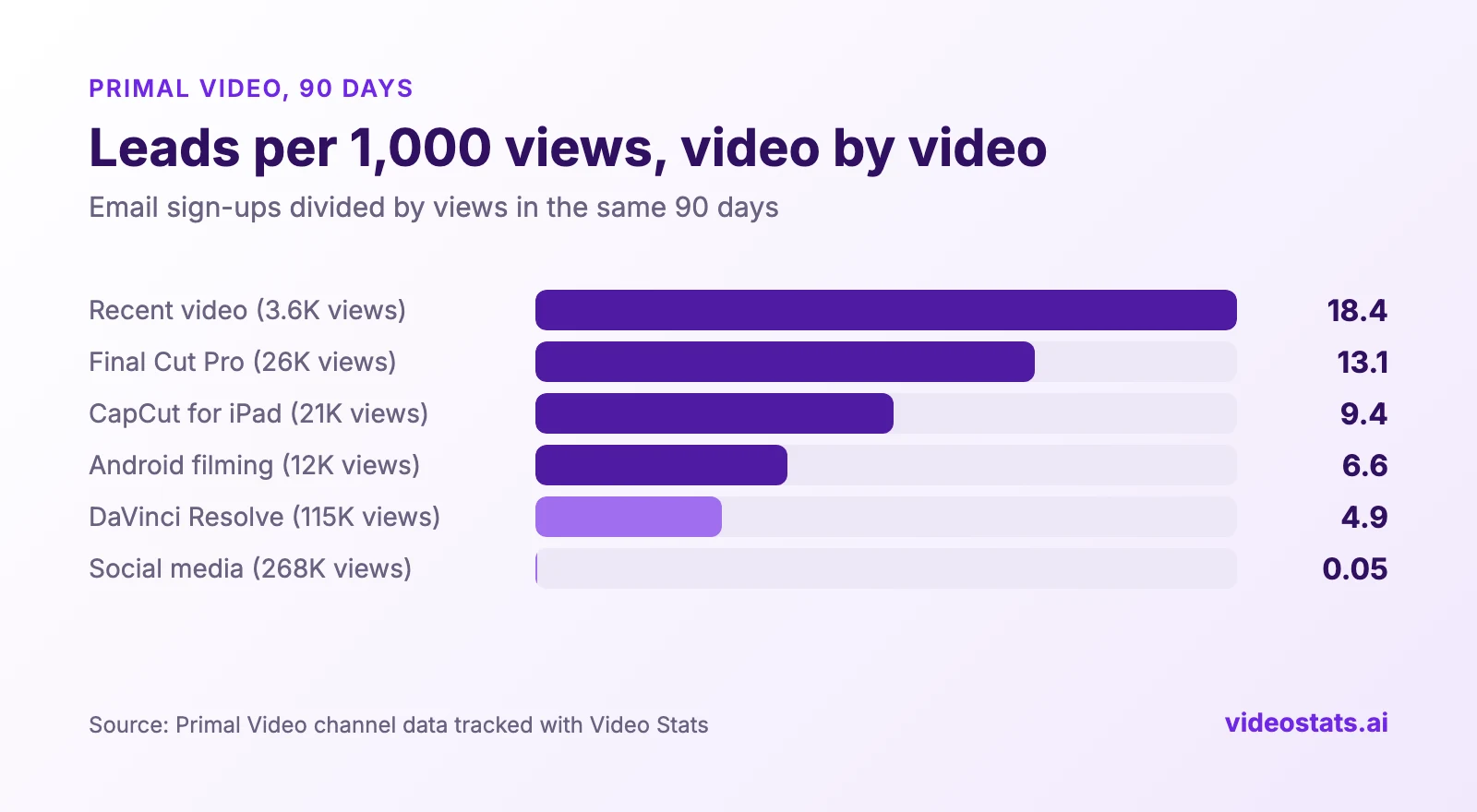
The most-viewed tutorial on this list brought in the fewest leads per 1,000 views, apart from the social media videos.
Plot those same six videos against their views and the pattern gets clearer. The two most-viewed videos had the lowest lead rates, and the least-viewed one had the highest.
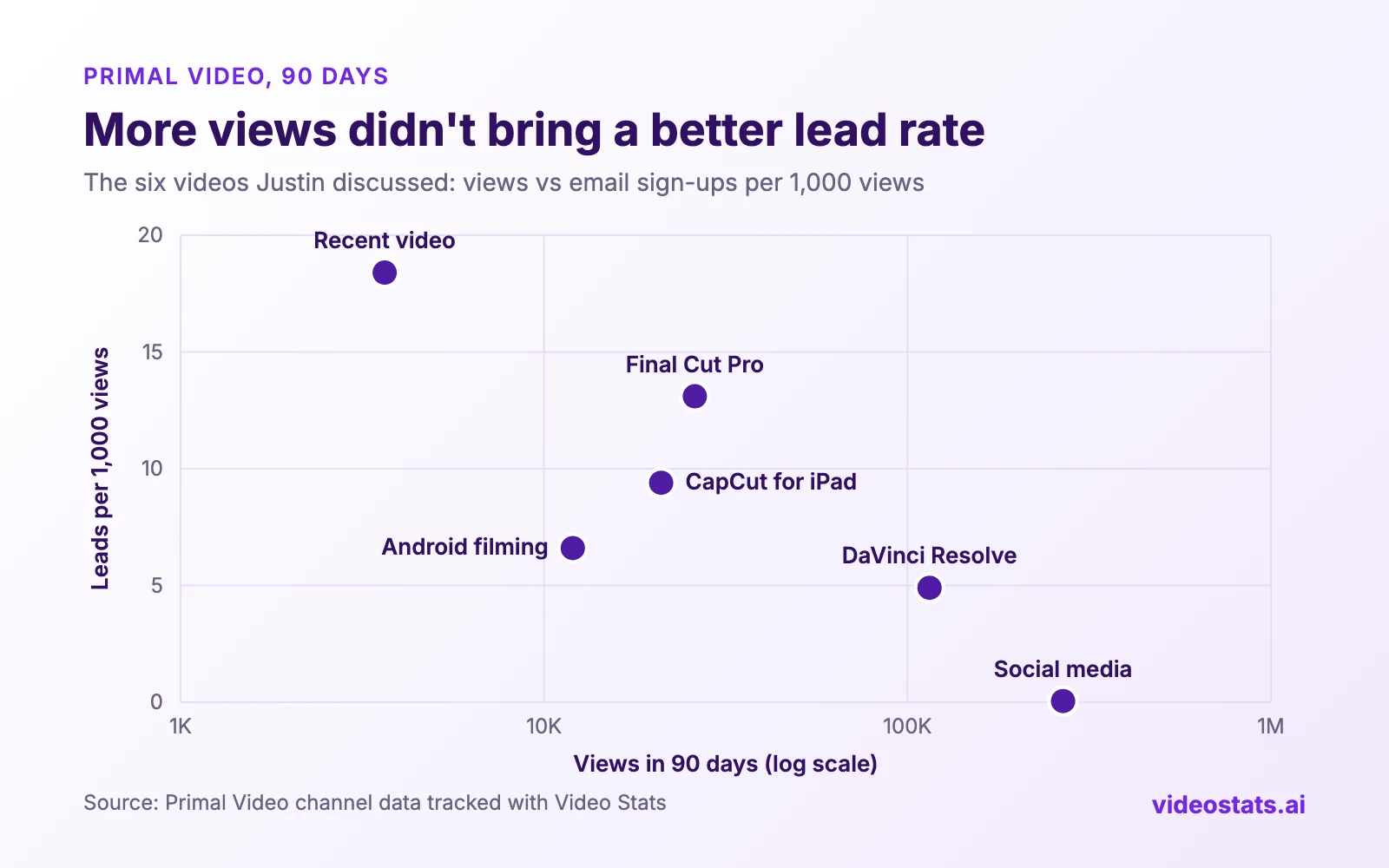
More views didn't bring a better lead rate. These are the six videos Justin talked about, not a random sample, so test the pattern on your own channel.
If you want the metrics behind this, and three ways to track them, read YouTube Analytics for Business: What Studio Won't Show You.
Finding 2: Tutorials turn viewers into subscribers, and comparison videos mostly don't
Viewers who watch a step-by-step tutorial have already picked their tool. Viewers who watch a "best software" roundup are still deciding, so fewer of them are ready for your next step.
That means a channel built on comparison videos can get plenty of views and still have an email list that barely grows.
On Primal Video, tutorials for a specific editing tool turned 40–63% of link clickers into email subscribers for the channel's free guide. The "best editing software for Mac or Windows" comparison videos converted 14%. The AI report Justin generated from his data summed it up: comparison viewers are window shopping, and tutorial viewers are invested.
The social media tutorials from finding 1 point the same way. Justin says they were the videos he enjoyed making least, and the data showed they were bringing almost nothing into the business.
Finding 3: Videos about free tools can still grow your email list
It's tempting to skip topics that don't have an affiliate program, because there's no commission on the click.
That means you could be skipping some of your best lead generators.
Several of Primal Video's most-clicked links pointed to free tools: DaVinci Resolve, the Blackmagic Camera app and OBS Studio. None of them pays a commission. But the same DaVinci Resolve tutorial from finding 1 brought in 558 leads, and the Blackmagic Camera app tutorial brought in 288. Viewers who came for a free tool still joined the email list.
Finding 4: A video that looks like a flop can be your best converter
This is the video from the top of this article. Judged by views, it failed. Judged by leads per view, it beat every other video here.
A low view count can hide a video that converts well but isn't getting clicked in search and suggestions. That means the fix is often the thumbnail, and not the video.
The video had 3,644 views in the 90 days and brought in 67 leads. The AI report flagged it as punching above its weight, converting at around 15%. It also found the reason for the low views: YouTube had shown the thumbnail 61,000 times, but only 2.16% of people clicked it, against a channel average of 8.6%.
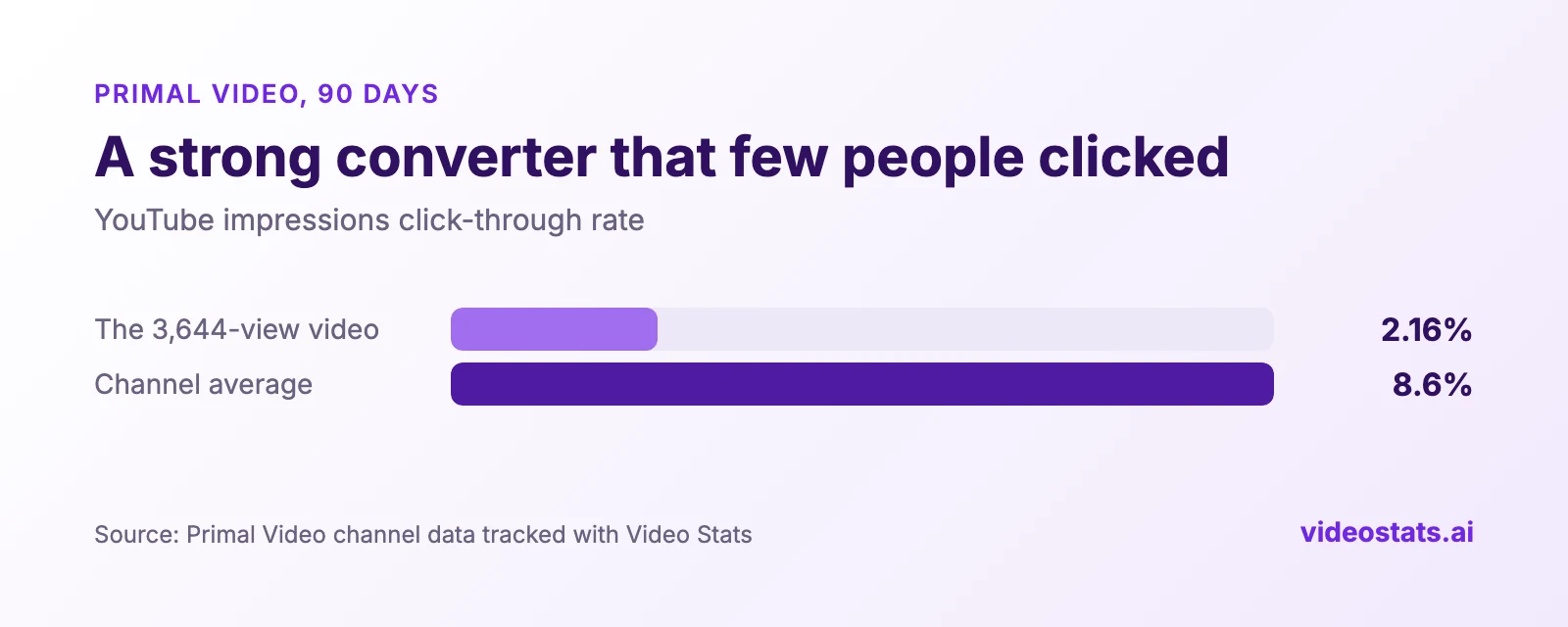
YouTube kept showing this video, and few people clicked. The ones who did signed up at a high rate.
"On YouTube, I would think that this video has tanked because it's not many views, but it's got 67 opt-ins."
That's how Justin put it in the video above. A new thumbnail on a video like this sends more viewers into a page that already converts.
Finding 5: Your affiliate income is safer when many videos share the clicks
If one video earns most of your affiliate clicks, one change in YouTube's recommendations can cut that income overnight.
That means spreading an affiliate link across many relevant videos protects the income as well as growing it.
Primal Video's Descript affiliate link got 2,765 clicks across 15 videos in the 90 days, and no single video accounted for more than 22% of them. If any one video lost its traffic, at least 78% of those clicks would carry on. Views were a poor guide here too: one video with about 3,000 views sent 211 clicks.
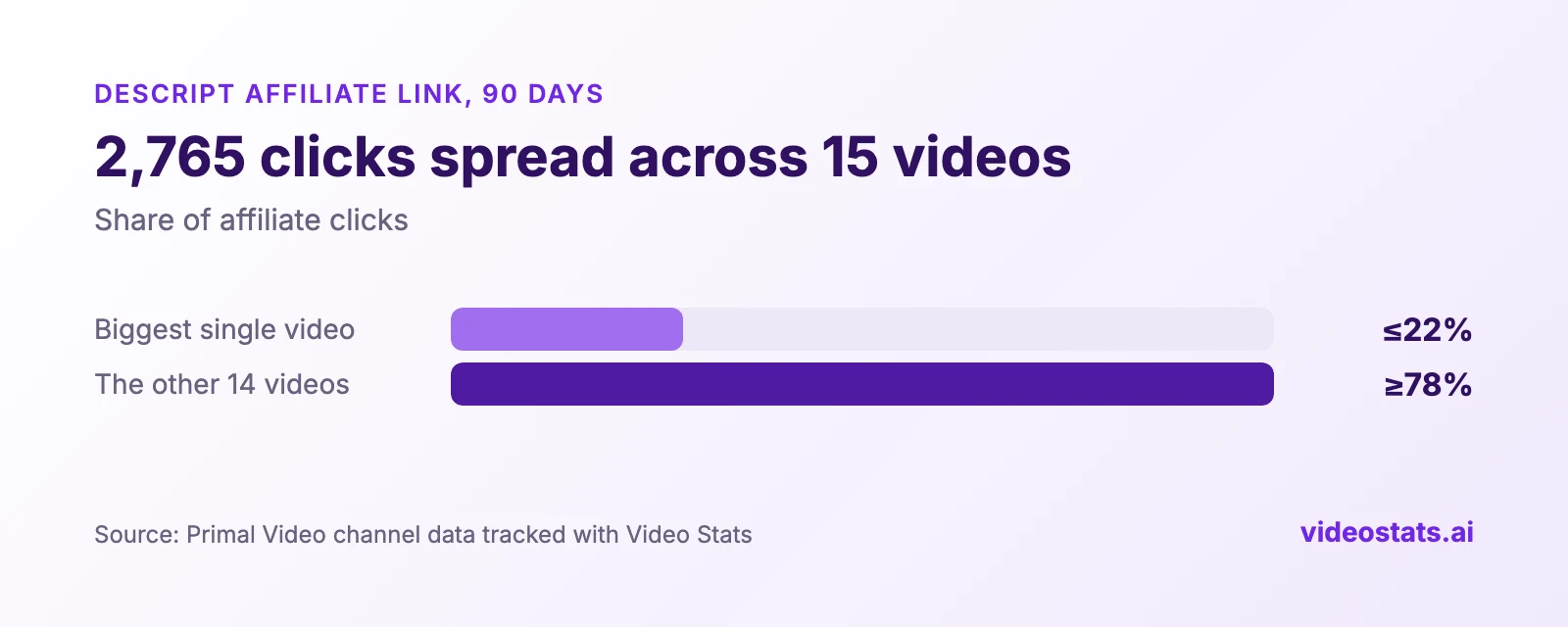
Descript's clicks came from 15 videos, so no single video decides the month.
Justin then asked his AI to find videos where Artlist, another affiliate partner, would suit viewers but wasn't in the description. It came back with a ranked list of candidates, including editing tutorials and livestream videos where music comes up.
Finding 6: Views with almost no clicks mean the description needs a look
A video can get plenty of views and still send almost nobody to your links.
That means some of your easiest wins are sitting in descriptions you've already published.
Primal Video's "how to create a YouTube channel with your phone" video got 32,000 views in the 90 days and 16 link clicks. Justin's checklist for a video like that: are the links there at all, where do they sit in the description, is there so much text above them that nobody scrolls, and does the wording give viewers a reason to click?
5 questions to find which YouTube videos drive leads on your channel
Justin found these patterns by connecting Video Stats to Claude through its MCP server and asking questions in plain English. These are the five that surfaced the findings above, reworded slightly:
- "Give me a detailed report for the last 90 days: clicks, leads, top URLs and top videos by leads."
- "Which videos got views but almost no link clicks?"
- "Which videos that bring in leads have a below-average thumbnail click-through rate?"
- "Did the videos about free products help the business in other ways, like leads?"
- "Which videos should mention [affiliate partner] in the description, but don't?"
You can ask the same questions in Claude or ChatGPT once your channel is connected. The setup guide takes you through it. Prefer dashboards? The same numbers are in Video Stats under video performance.
FAQ
Do more views mean more leads on YouTube?
Not reliably. Over 90 days on Primal Video, the 15 most-viewed videos had twice the views of the 15 best lead generators, and brought in 42% fewer leads. Views fill the top of the funnel, but the topic and the viewer's intent decide whether they sign up.
What kind of YouTube videos generate the most leads?
On this channel, step-by-step tutorials for a specific tool converted best, turning 40–63% of link clickers into subscribers. Comparison and "best of" videos converted about 14%. Test it on your own channel, because your audience and offer will shift the numbers.
Should I stop making videos that get views but no leads?
Not necessarily. Those videos still earn ad revenue and help viewers. Justin still values them. He stopped letting their view counts decide his content plan.
How do I find which of my own videos drive leads?
Give every description link a way to tell you which video it came from, then connect sign-ups back to those clicks. YouTube Analytics for Business compares three ways to do it, from free UTM tags to an attribution tool.
Want to see your own top 15 by leads? Video Stats tracks every link on every video and shows which ones fill your email list. Justin co-founded it to get exactly the numbers in this case study.
