Ask Your Channel · Part 5
30 ChatGPT and Claude Prompts for YouTube Analytics
Copy these 30 prompts into ChatGPT or Claude to find which of your YouTube videos bring in leads and sales. In this guide, you'll get them grouped by job.

The right question gets you an answer you can act on in seconds. A vague one gets you a summary of numbers you already knew. When your AI assistant is connected to your YouTube data, the wording of your question is the difference.
In this guide, you'll get 30 prompts for YouTube analytics, grouped into the 7 jobs they do, with real answers from Justin Brown's channel and 4 habits that make any question work better.
By the way, one of these prompts showed Justin that last year's version of his OBS tutorial still pulls in thousands of views a month, and almost no leads.
Connect your assistant to your data before you ask
These prompts work in ChatGPT, Claude, Claude Code and any assistant connected to Video Stats. Without that connection, your assistant can only guess, because YouTube's own numbers stop at views and watch time.
Video Stats adds the link clicks, leads and sales behind every video and every page your videos link to, which is what most of these questions need. If you haven't connected yet, Part 2 covers ChatGPT, Part 3 covers Claude, and Part 4 covers Claude Code.
4 habits that get better answers from your AI
- Name the period. Say "in the last 30 days" or "over the last 90 days". Video Stats looks back 7, 30 or 90 days, so "last month" becomes the last 30 days.
- Name the metric that matters to you. "Which videos bring in the most leads?" beats "Which videos perform best?", because "best" usually means views.
- Ask a follow-up. The first answer is a starting point. Ask why, ask what to do about it, or ask for the videos behind a number.
- Ask for the format you need. A table, a one-page report, a list of five actions, or (in Claude Code) a file on your desktop.
30 prompts for YouTube analytics, grouped by the job they do
Copy them as they are, or swap in your own topics, pages and numbers.
Job 1: Find the videos that make you money
- "Which 10 videos brought in the most leads in the last 30 days, and how do their views compare?"
- "Rank my videos by sales over the last 90 days."
- "Which videos turn the highest share of clicks into leads?"
- "Compare my last 3 videos head to head on views, clicks, leads and sales."
- "Give me a deep dive on my video about [topic]: what's working and what I should change."
Here's question 1 asked in Claude Code on Primal Video's channel:
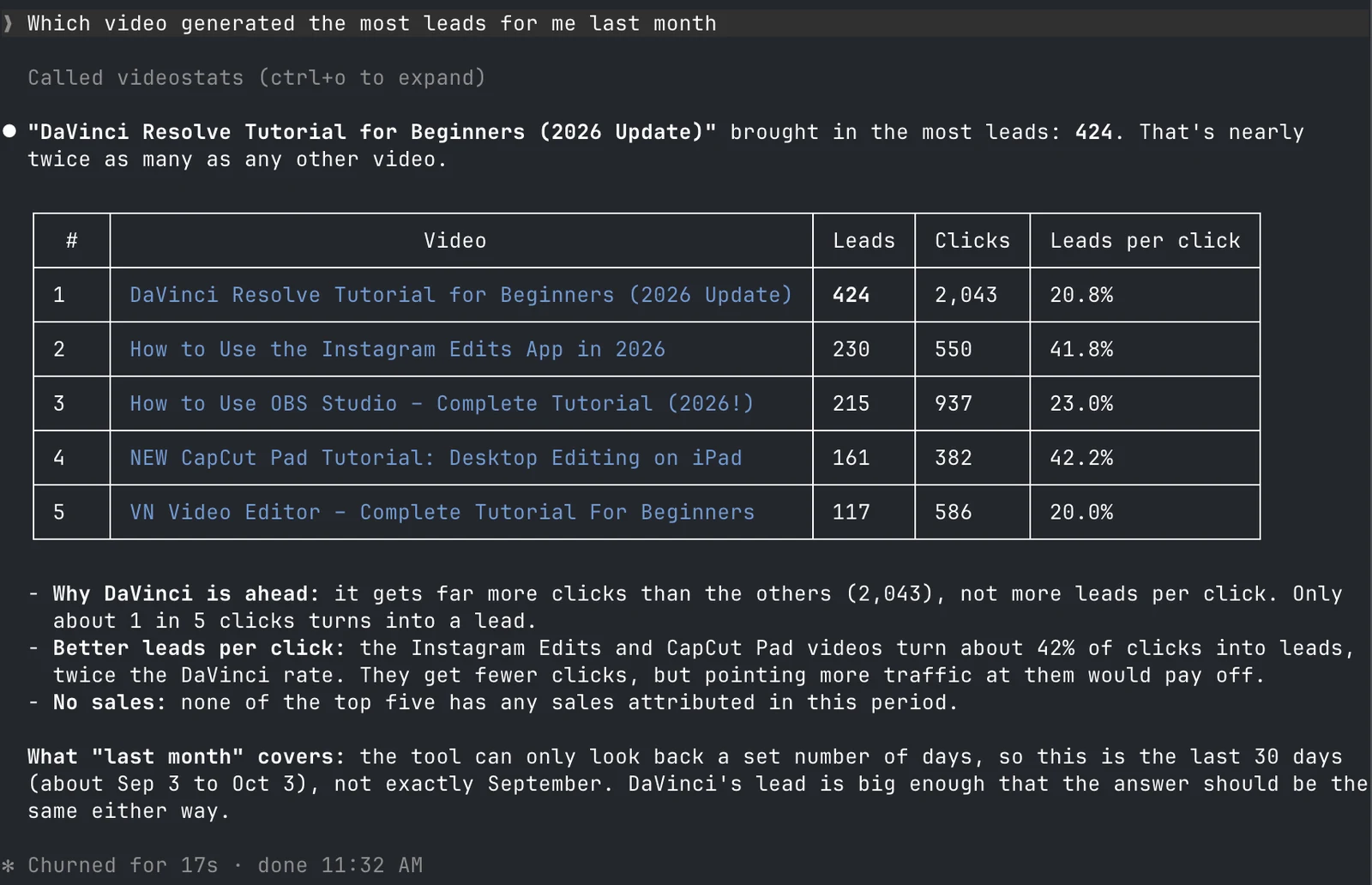
The top video by leads gets its lead through traffic. Two smaller videos turn about 42% of their clicks into leads, twice its rate.
Job 2: Find out which pages and offers your videos sell
- "Which of my landing pages bring in the most leads from YouTube?"
- "Which videos send the most traffic to [your page or offer]?"
- "Which affiliate links get the most clicks, and which videos are they in?"
- "Which videos should mention [product] in the description, where it's a fit for the viewer but isn't listed yet?"
Question 9 is one Justin asked Claude about Artlist, a music service he's an affiliate for. It sorted his videos into three tiers where Artlist would fit the viewer but wasn't in the description yet, such as live streaming and editing tutorials.
Job 3: Fix videos that get traffic but don't convert
- "Find my videos with lots of views but weak conversion over the last 30 days."
- "Which of those would gain the most if I fixed them?"
- "Which popular videos get almost no link clicks?"
- "Compare [old video] with [newer video] on the same topic. Why does one convert better?"
On Primal Video, question 10 put last year's OBS Studio tutorial at the top of the list:
| Video (last 30 days) | Link clicks | Leads | Clicks that became leads |
|---|---|---|---|
| How to Use OBS Studio (2025) | 239 | 1 | 0.4% |
| How to Use OBS Studio (2026) | 937 | 215 | 23.0% |
Primal Video's Video Stats data, 30 days to October 3, 2026. Channel average: 9.6%.
Both videos teach the same software. The newer one turns 23% of its clicks into leads, and the older one, still pulling more than 38,000 engaged views a month, turns almost none. That's what question 13 is for: when two videos on the same topic perform this differently, the description links are the first thing to compare. The same list flagged the "best free video editing software" roundup, with 2,191 clicks and 19 leads, most likely because viewers click straight through to the free tools.
Job 4: Judge your thumbnails by results
- "Compare the 5 videos with the highest click-through rate and give an analysis."
- "What do the thumbnails on my best videos by leads have in common?"
- "Analyze the thumbnail on my latest video and suggest improvements."
- "Which videos have good results but a weak thumbnail I should redesign?"
Here's question 14 in Claude:
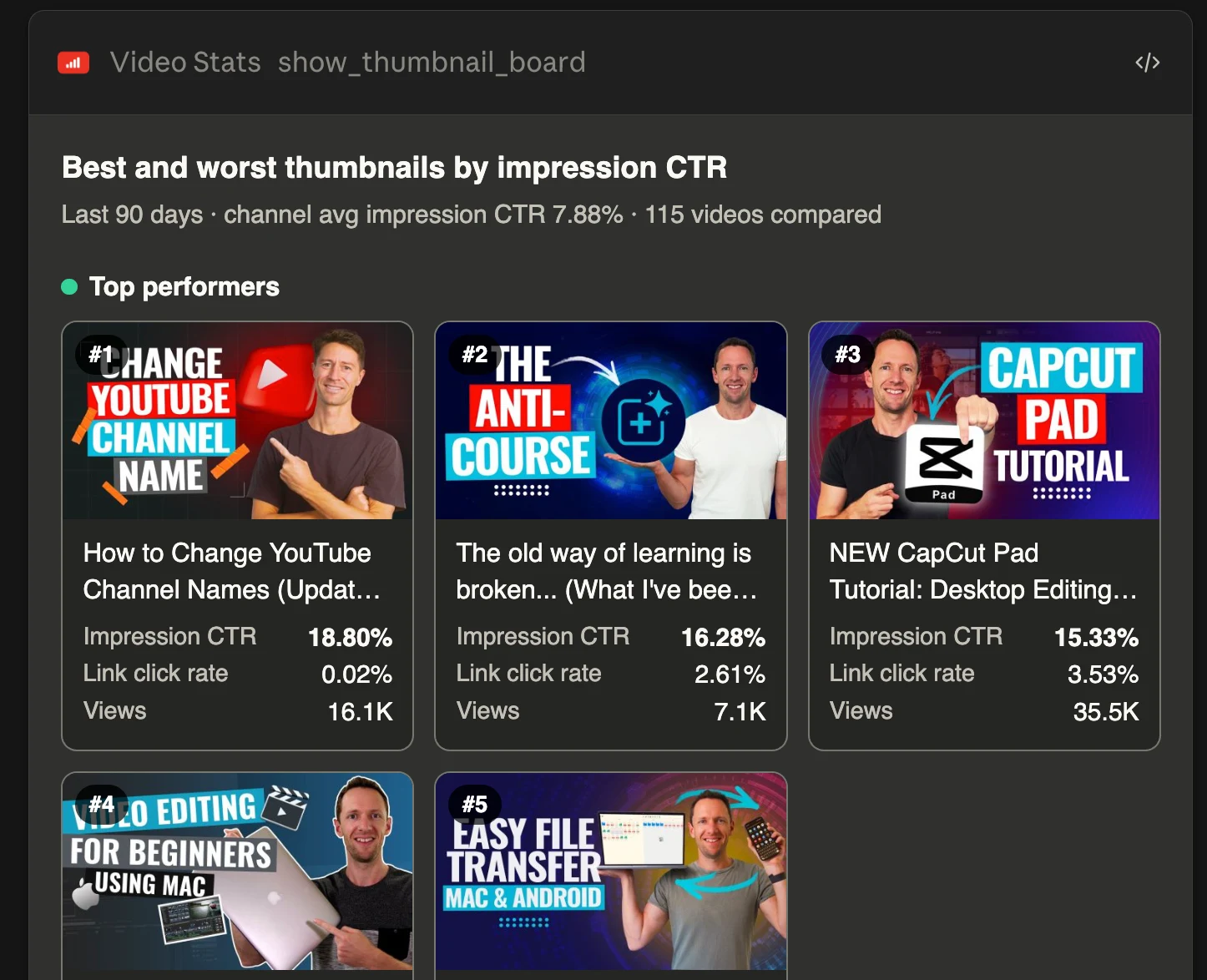
The thumbnail with the highest click-through rate sent almost nobody to Justin's site, so judge thumbnails on clicks and leads together.
Job 5: Track how your channel is trending
- "How are my clicks and leads trending compared with the previous 30 days?"
- "Show me daily clicks and leads for the last 30 days. Which days stand out?"
- "Give me a weekly report comparing this week with my monthly average."
- "Which videos brought in the most clicks in the last 7 days?"
When we asked question 18 on Primal Video, clicks were down 27.5% against the previous 30 days, but leads were almost level, down 2.4%, at 2,200. A drop in clicks isn't bad news when leads hold, and your assistant spots the difference in seconds.
Job 6: Decide what to make next
- "Which videos have been live for more than a year, still bring in leads, and are due for an update?"
- "Based on my top 15 videos for leads, suggest related topics my viewers would want."
- "What type of content drives the most leads on my channel: tutorials, comparisons or something else?"
- "Which of my topics get views but no leads, so I should make fewer of them?"
- "Write a 90-day report on my channel with the five things I should do next."
Justin uses question 22 to plan remakes. Some of Primal Video's biggest videos are updated every year, like the best editing software roundups, and viewers come back to see what's changed.
Job 7: Create and track QR codes
- "Make a QR code for [your page] and tie it to my latest video."
- "How are my QR codes performing over the last 30 days?"
- "Which QR code has the highest conversion rate?"
- "Do I have any QR codes waiting for a video I haven't uploaded yet?"
How to Analyze Your YouTube Channel With AI explains each of these 7 jobs in more depth.
Ready-made prompts for a full analysis in one request
Video Stats also includes ready-made prompts that combine several questions into one analysis:
- Channel Health Check: your channel's overall results, top content and best-converting pages
- Weekly Performance Report: this week against your monthly baseline, ready to share with your team
- Thumbnail Audit: the visual patterns behind your best and worst thumbnails
- Underperformer Audit: the high-traffic videos with the biggest conversion gap
- Video Deep Dive: a full analysis of one video
- Content Strategy Analysis: what to make more of, based on your results
Some apps list them in a menu once Video Stats is connected. In any app, asking for "a channel health check" or "a weekly performance report" in plain English gets you a similar analysis.
Get your favorite questions answered automatically
Some of these questions are worth asking every week: how your channel is trending, which videos brought in leads, and which ones need attention. You don't have to remember to ask them.
In the next part of this series, you'll see how to have an AI assistant run your questions on a schedule and send you the answers, so your weekly report arrives on its own.
FAQ
What are the best ChatGPT prompts for YouTube analytics?
The best prompts name a period, name the metric you care about, and ask for a format: "Which 10 videos brought in the most leads in the last 30 days, as a table?" They only work well when ChatGPT is connected to your data, including clicks, leads and sales.
Can ChatGPT analyze my YouTube analytics without a connection?
Only what you paste in. An export from YouTube Studio covers views, watch time and subscribers, but not the clicks, leads and sales behind each video, and it's out of date as soon as you've pasted it.
Why does my assistant say it can only look back 7, 30 or 90 days?
Video Stats reports most numbers over those three periods. Ask for "the last 30 days" instead of a calendar month, and your assistant will tell you which dates it used.
Do these prompts work in Claude and other assistants?
Yes. They're plain English, so they work in ChatGPT, Claude, Claude Code and any assistant connected to Video Stats.
Want your assistant to answer these from your own numbers? Video Stats tracks every link on every video and connects the results to ChatGPT, Claude and Claude Code. Start your free trial, then copy your first prompt.


