Ask Your Channel · Part 4
How to Use a YouTube MCP Server in Claude Code and Cursor
Connect Claude Code to your YouTube stats with one command and a sign-in, then save reports straight to files. In this guide, you'll set it up in 2 steps.

You can ask Claude Code for a 90-day report on your YouTube channel and have it saved as a file on your desktop, built from your real views, clicks, leads and sales. All it takes is one command and a sign-in, using the Video Stats YouTube MCP server.
In this guide, you'll learn how to connect Claude Code in 2 steps, plus Codex and Cursor, and 4 jobs that developer tools handle better than chat apps.
By the way, the first report Justin Brown generated this way showed that several of his most-clicked links pointed to free tools that pay no commission, and what those videos earned instead.
What a YouTube MCP server gives Claude Code and Cursor
An MCP server is a connection point that AI tools use to read data from another service. Video Stats runs one for your YouTube channel, so your assistant can look up your views and watch time alongside the link clicks, leads and sales behind every video.
Chat apps like Claude and ChatGPT can use the same connection, and Part 2 and Part 3 of this series cover them. Developer tools add something chat apps can't: they work with files on your computer. That means your assistant can write a full report to a document, export a spreadsheet, or combine your channel data with other files in the same folder.
Once you're connected, Claude Code gets 18 Video Stats tools, from ranking your videos and pages to analyzing thumbnails and creating QR codes. All but two only read your data:
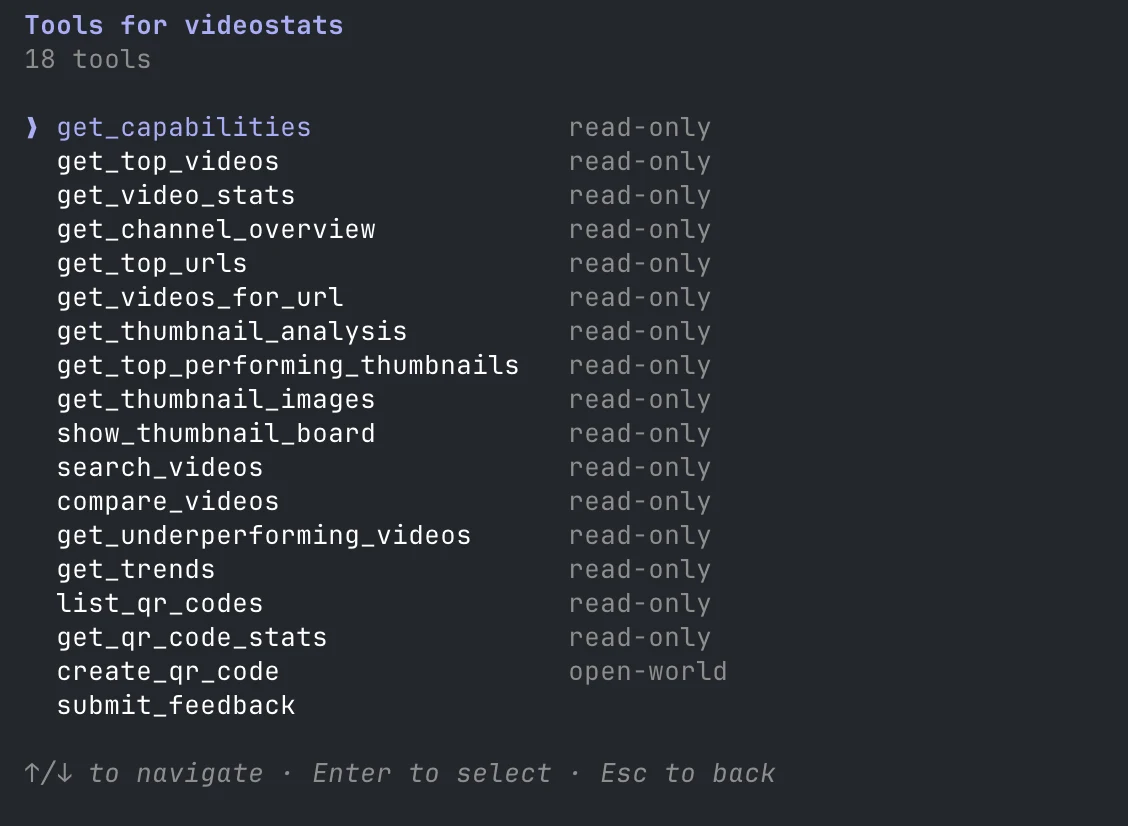
Justin Brown, who co-founded Video Stats, uses Claude Code this way to analyze his Primal Video channel. In his words: "I've asked it to generate a detailed report for the last 90 days. I have that. It's saved as a file on my desktop."
What you need before you connect
| You need | Why |
|---|---|
| Claude Code, Codex or Cursor | Claude Code and Codex sign in with the Video Stats URL. Cursor uses a Video Stats token for now |
| A Video Stats account that tracks your links | Clicks, leads and sales come from Video Stats. Leads and sales need the tracking code on your pages |
Claude Code and Codex don't need a token. They use the same server URL as everyone else and sign you in, and you choose which channel to connect when you approve it:
https://videostats.ai/mcp/video-stats-oauth
How to connect Claude Code to your YouTube analytics in 2 steps
Step 1: Add the Video Stats MCP server
In your terminal, run:
claude mcp add --transport http --scope user videostats https://videostats.ai/mcp/video-stats-oauth
The same command is on Settings → MCP in Video Stats, with a Copy button.
Claude Code confirms it. If you run claude mcp list now, Video Stats shows as needing sign-in, which is expected:
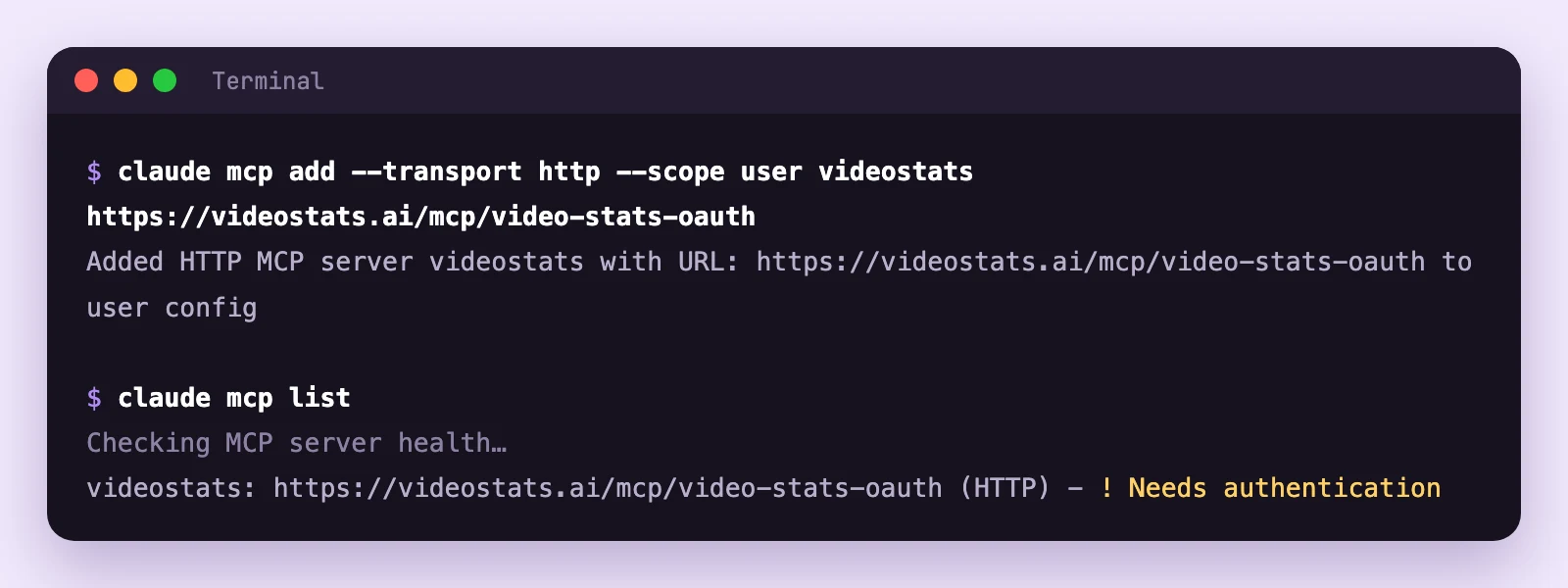
No token anywhere: Claude Code finds the Video Stats sign-in on its own.
--scope user makes Video Stats available in every project. Leave it out to connect it in the current folder only.
Step 2: Sign in and choose your channel
Start Claude Code and type /mcp. Video Stats is listed under User MCPs, marked "needs authentication". Select videostats.
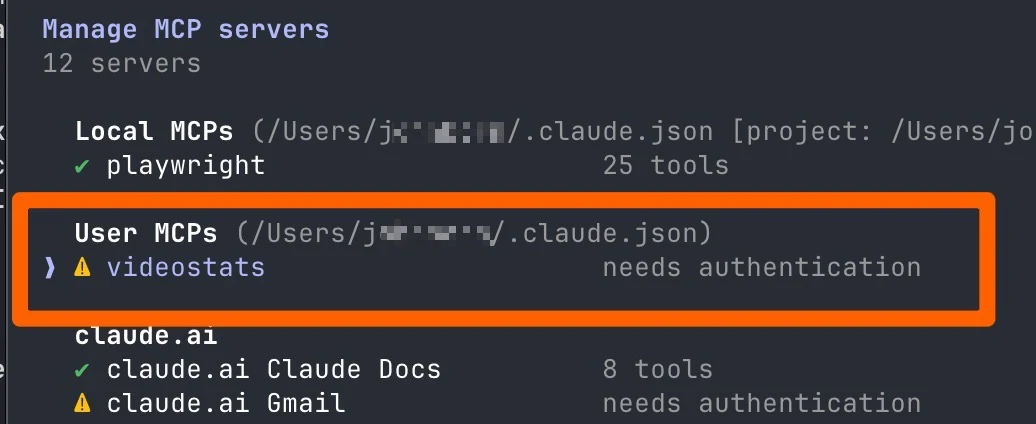
Choose 1. Authenticate. You can also run claude mcp login videostats in your terminal instead.
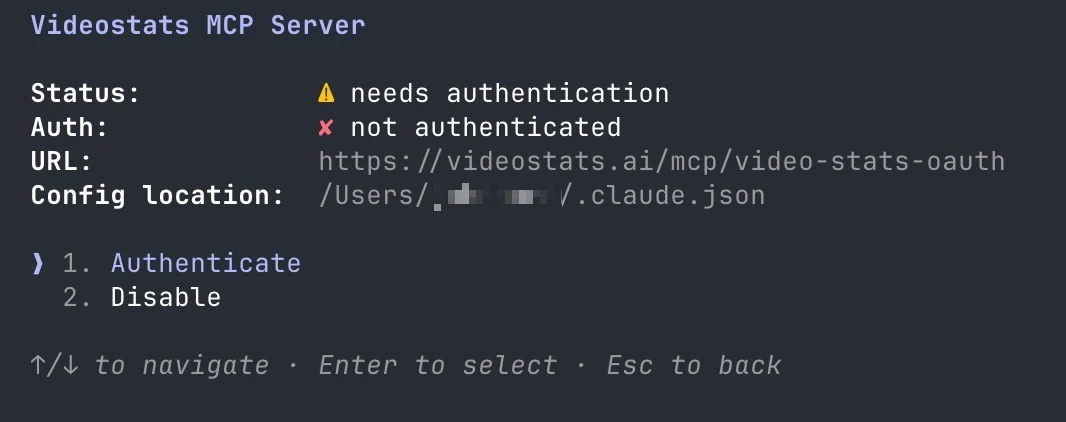
Your browser opens the Video Stats sign-in. Sign in if you need to, pick the channel under Workspace to connect, and click Authorize.
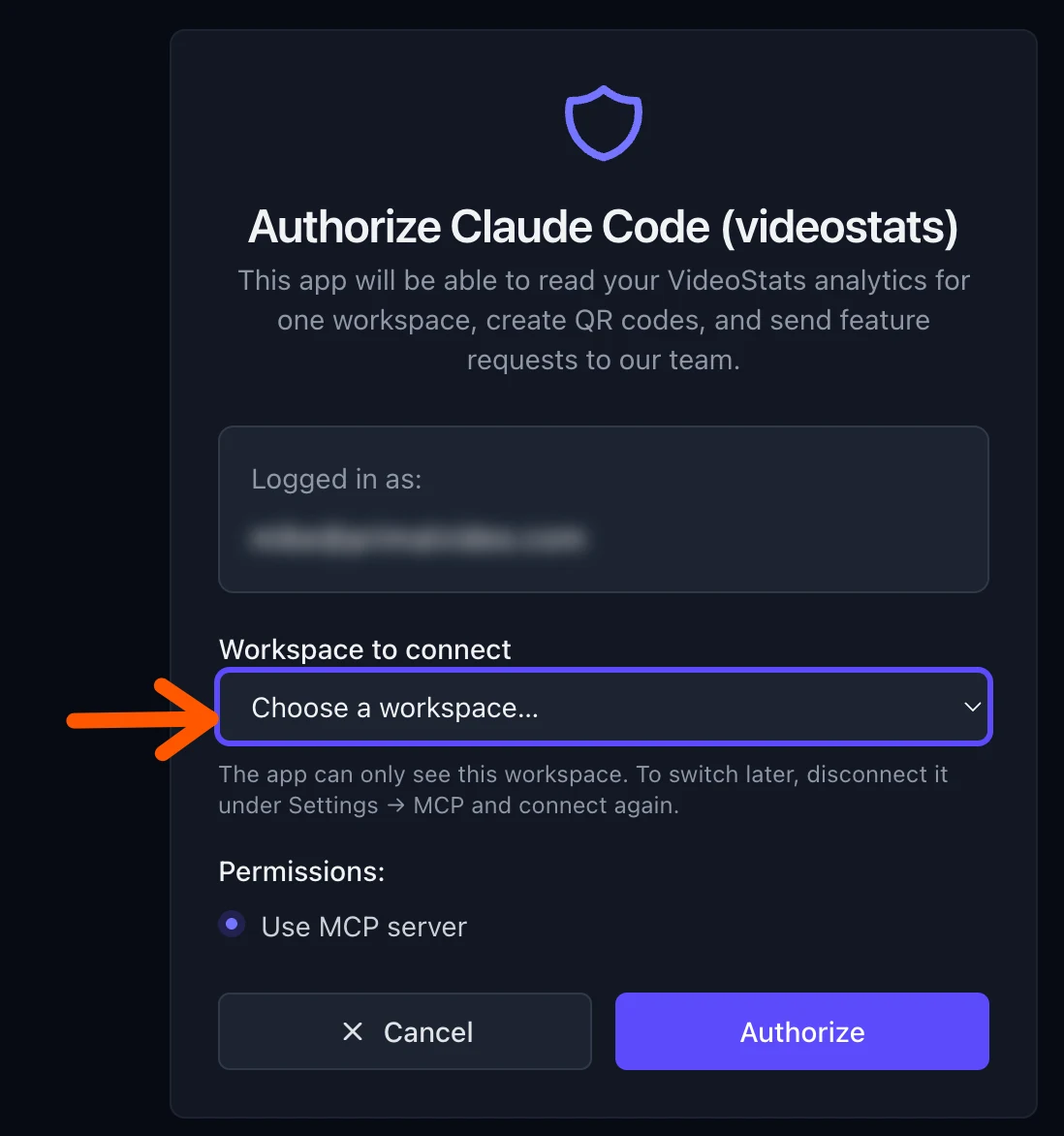
Claude Code can only see the workspace you choose. To switch later, disconnect it under Settings → MCP in Video Stats and sign in again.
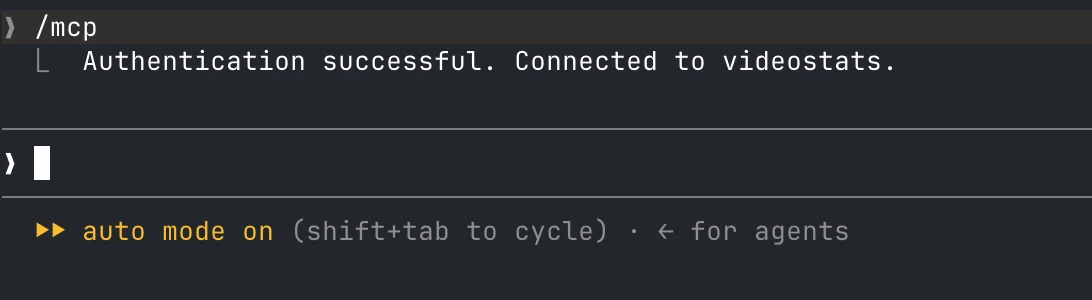
Your browser says the sign-in worked, and Claude Code confirms it:
Now ask in plain English. Here's a real first question on Primal Video's channel:
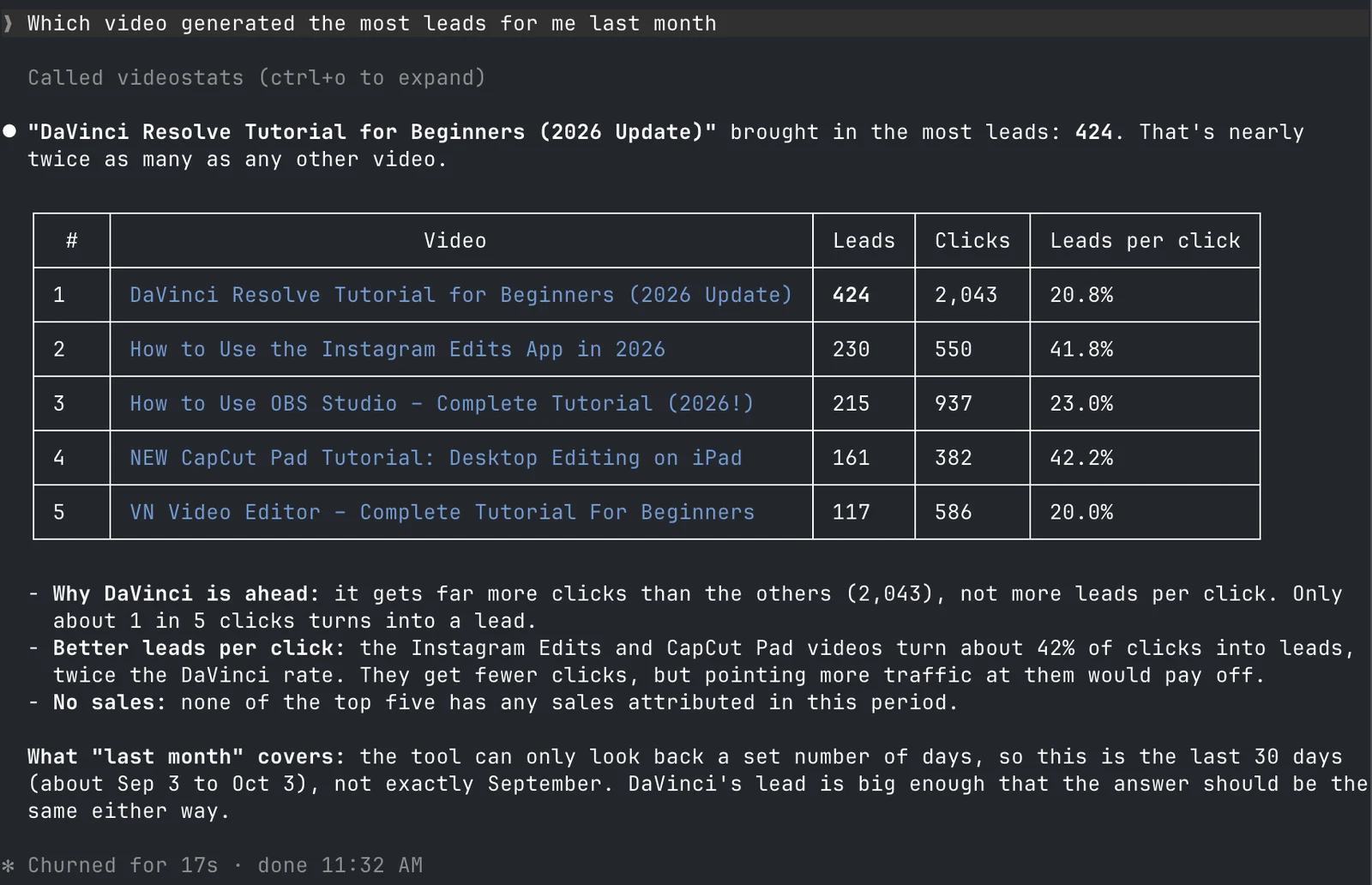
Claude Code didn't stop at the ranking: it pointed out that two smaller videos turn about 42% of their clicks into leads, twice the rate of the top one.
How to connect Codex or Cursor
Codex uses the same URL and sign-in. Run these two commands:
codex mcp add videostats --url https://videostats.ai/mcp/video-stats-oauth
codex mcp login videostats
Codex may start the sign-in as soon as you add the server. Either way, your browser opens the Video Stats sign-in, where you choose your channel and click Authorize.
Cursor connects with a Video Stats token for now. In Video Stats, go to Settings → MCP, open MCP tokens (advanced), create a token and click Connect, then choose the Cursor tab and copy the settings into Cursor's MCP settings. The setup guide walks through it.
4 things to do with your YouTube data in Claude Code
These are the jobs where a developer tool beats a chat app, because it can work with files and keep going.
1. "Write a 90-day report on my channel and save it to my desktop."
This is what Justin asked for. Claude Code summed up his YouTube metrics, leads and affiliate link clicks, then wrote them up as a document he could open, share and come back to. A chat app can give you the same analysis, but you'd copy it out by hand.
2. "The report says some top-clicked links go to free tools. Do those videos bring in leads?"
A report is a starting point. In the same session, Claude Code can dig into anything it found. Justin's report flagged that several of his most-clicked links pointed to free tools with no affiliate commission, like DaVinci Resolve and OBS Studio. "Not every link needs to be an affiliate link," he said, and asked whether those videos helped the business another way.
They did. His DaVinci Resolve tutorial, one of the most-clicked free-tool videos, was turning 12.2% of its clicks into leads: 559 leads in 90 days. A video that looked like it earned nothing from its links was one of his better lead sources.
3. "Export my top 50 videos by leads to a CSV."
Claude Code writes the file for you, ready for a spreadsheet, a client report or another script.
4. "Make a QR code for my free guide and tie it to my latest video."
Video Stats can create trackable QR codes from any connected assistant. In Claude Code you can make several in one go, for example one per video in a series, and ask for their scans later.
How to Analyze Your YouTube Channel With AI covers all 7 kinds of questions you can ask.
When you'd still use a Video Stats token
For Cursor, and for scripts or tools that can't sign in with OAuth. You'll find tokens under Settings → MCP → MCP tokens (advanced) in Video Stats, and the setup guide walks through them. Tokens you've already made keep working.
If Claude Code doesn't use your Video Stats data
- It still says "Needs authentication". Run /mcp, select videostats and choose Authenticate.
- Video Stats only works in one folder. You added it without
--scope user. Remove it withclaude mcp remove videostatsand add it again with--scope user. - You see the wrong channel's data. Each connection covers the channel you chose when you authorized. Run
claude mcp logout videostats, then sign in again and choose the right channel. - Clicks, leads and sales are all zero. Video Stats needs to be tracking the links in your descriptions, and leads and sales need the tracking code on your pages.
FAQ
What is a YouTube MCP server?
It's a connection that lets AI tools read your YouTube data. The Video Stats MCP server adds what YouTube doesn't track: link clicks, leads and sales for every video, plus thumbnails and QR codes.
Do I need an API key or token to connect Claude Code?
No. Add the server URL, sign in to Video Stats in your browser, and choose your channel. Tokens are only for Cursor, scripts and tools that can't sign in.
Can I connect more than one channel?
Yes. Each connection covers one channel. To have several at once, copy the workspace-specific URL from Settings → MCP in Video Stats ("Need several workspaces connected in the same app at once?") and add it as a second server with its own name, such as videostats-second-channel.
Can Claude Code change my YouTube videos?
No. It can read your Video Stats data, create QR codes and send feature requests, but it can't change your videos or your YouTube channel. You can disconnect it at any time under Settings → MCP in Video Stats.
Should I use Claude Code or the Claude app?
Use the Claude app if you want to chat about your numbers. Use Claude Code when you want files: reports, spreadsheets or anything you'll reuse. How to Connect Claude to Your YouTube Analytics covers the app.
Ready to put your YouTube data in your terminal? Video Stats tracks every link on every video and connects the results to Claude Code, Cursor, Codex, Claude and ChatGPT. Start your free trial, then run the command above.


