Ask Your Channel · Part 7
How to Connect Grok Bot to Your YouTube Analytics
Ask Grok Bot which of your YouTube videos bring in leads and sales, from your phone or desktop. In this guide, you'll connect your channel in 3 steps.

You can now ask Grok Bot which of your YouTube videos bring in leads and sales, from your phone, and get answers from your real numbers. Grok Bot, the new app from xAI and Cursor, connects to Video Stats when you ask it to, with no settings screens.
In this guide, you'll learn how to connect Grok Bot to your YouTube analytics in 3 steps, and see what it can do with your channel, including showing you your best thumbnails right in the chat.
By the way, when we asked Grok Bot about Justin Brown's thumbnails, it noticed two of his biggest lead earners use the same thumbnail system.
What Grok Bot is, and why it's worth connecting
Grok Bot is an AI agent app from xAI and Cursor, available on iPhone and Mac, with Windows and Android apps too. It runs on its own computer in the cloud, so it can keep working while you're away, and the phone and desktop apps share the same conversations and connections.
That last part is what makes it useful for your channel. Connect Video Stats once, on either device, and you can ask about your views, link clicks, leads and sales from wherever you are.
Video Stats adds what YouTube's own app can't show you: which videos send people to your site, and which of those people become leads and customers. How to Analyze Your YouTube Channel With AI covers every kind of question you can ask.
What you need before you connect
| You need | Why |
|---|---|
| Grok Bot on your phone or computer | Grok Bot is in beta. See x.ai/bot for the plans that include it |
| A Video Stats account that tracks your links | Clicks, leads and sales come from Video Stats. Leads and sales need the tracking code on your pages |
You don't need a token or any settings. Grok Bot uses the same connection URL as every other app:
https://videostats.ai/mcp/video-stats-oauth
How to connect Grok Bot to your YouTube analytics in 3 steps
Step 1: Ask Grok Bot to add a custom MCP server
Start a new chat with Grok Bot and tell it you'd like to set up a custom MCP server. It asks for the URL. Paste the Video Stats URL above, and confirm when it asks whether to add it.
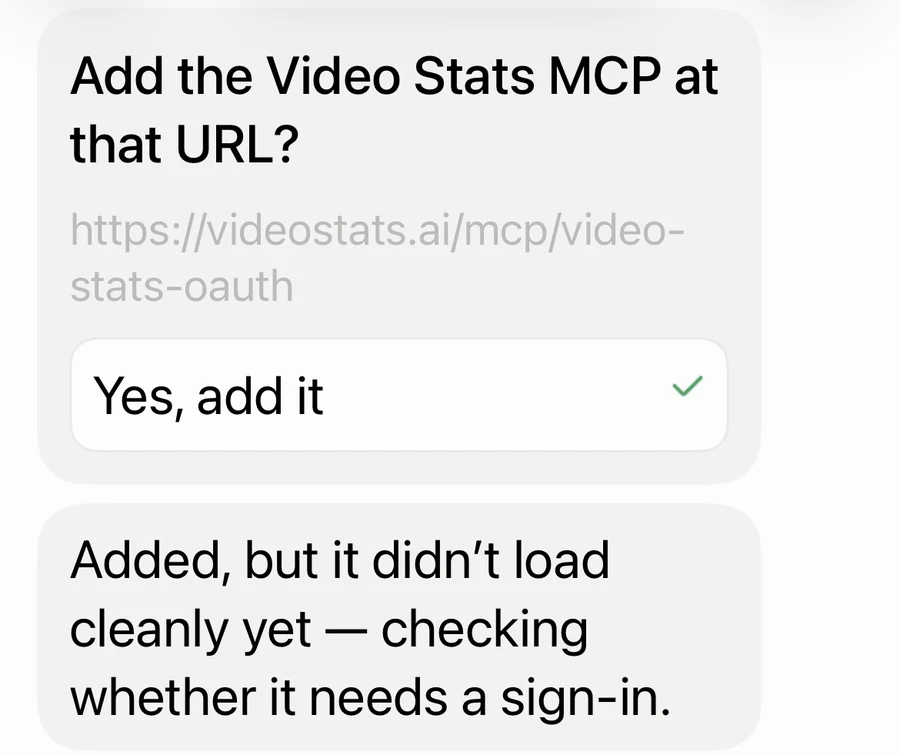
No settings screens: you set up the connection by chatting.
Step 2: Tap the card and authorize Video Stats
Grok Bot gives you a card to sign in. Tap it, and a browser opens the Video Stats sign-in. Sign in if you need to, choose the channel you want Grok Bot to see, and tap Authorize.
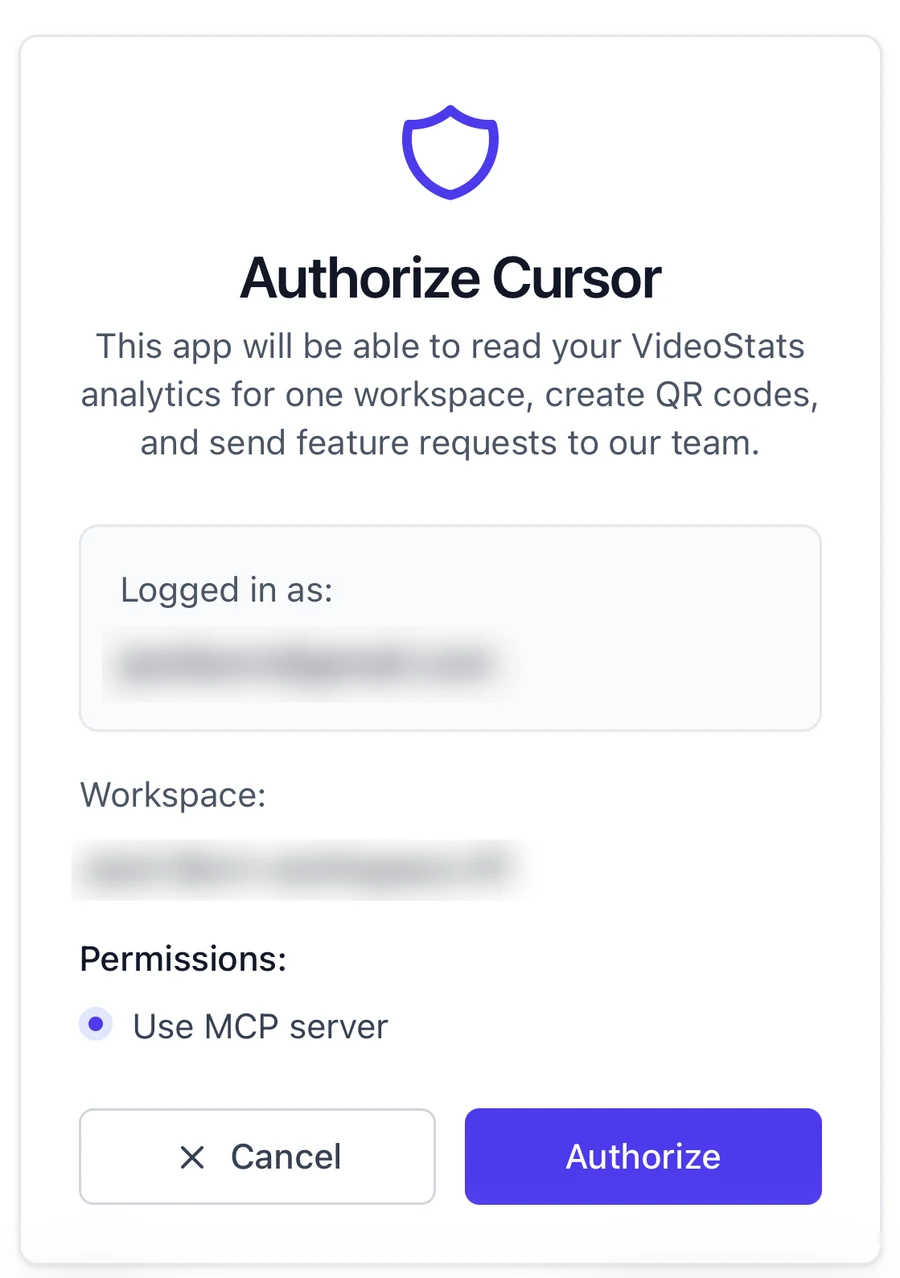
The screen says "Authorize Cursor" because Grok Bot is built with Cursor and signs in through it. That's expected.
Step 3: Ask your first question
As soon as you authorize, Grok Bot confirms the connection and suggests where to start.
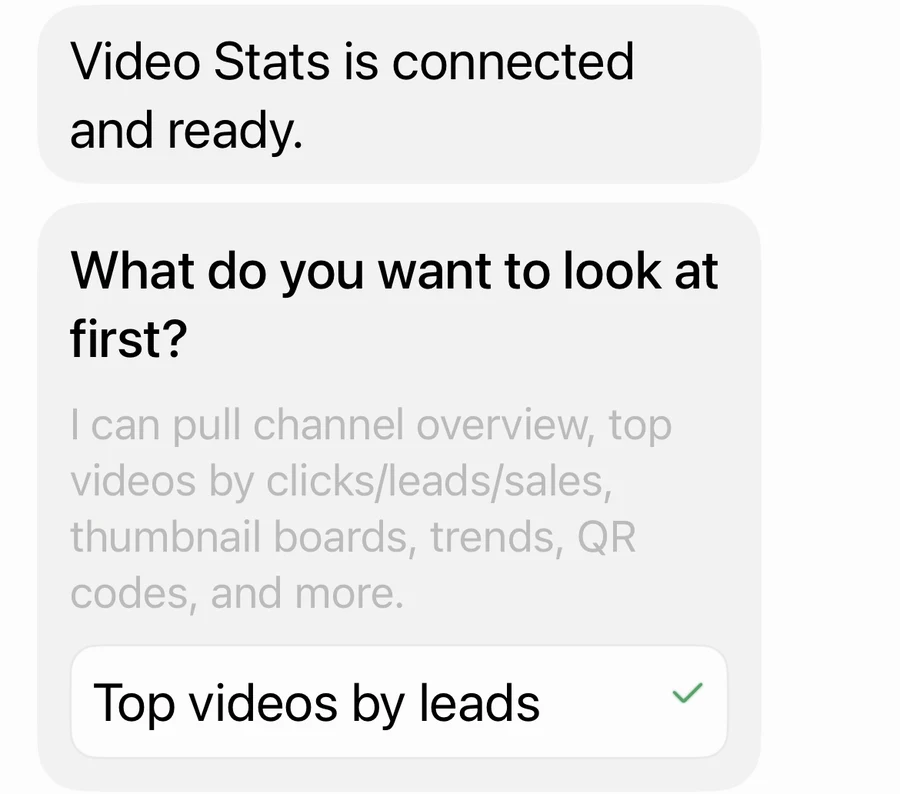
You only connect once. Because Grok Bot's phone and desktop apps share their connections, Video Stats is available on both from then on.
What Grok Bot can do with your YouTube data
Check your best videos from your phone
On Justin Brown's Primal Video channel, "Top videos by leads" came back like this on the iPhone, with every number from Video Stats:
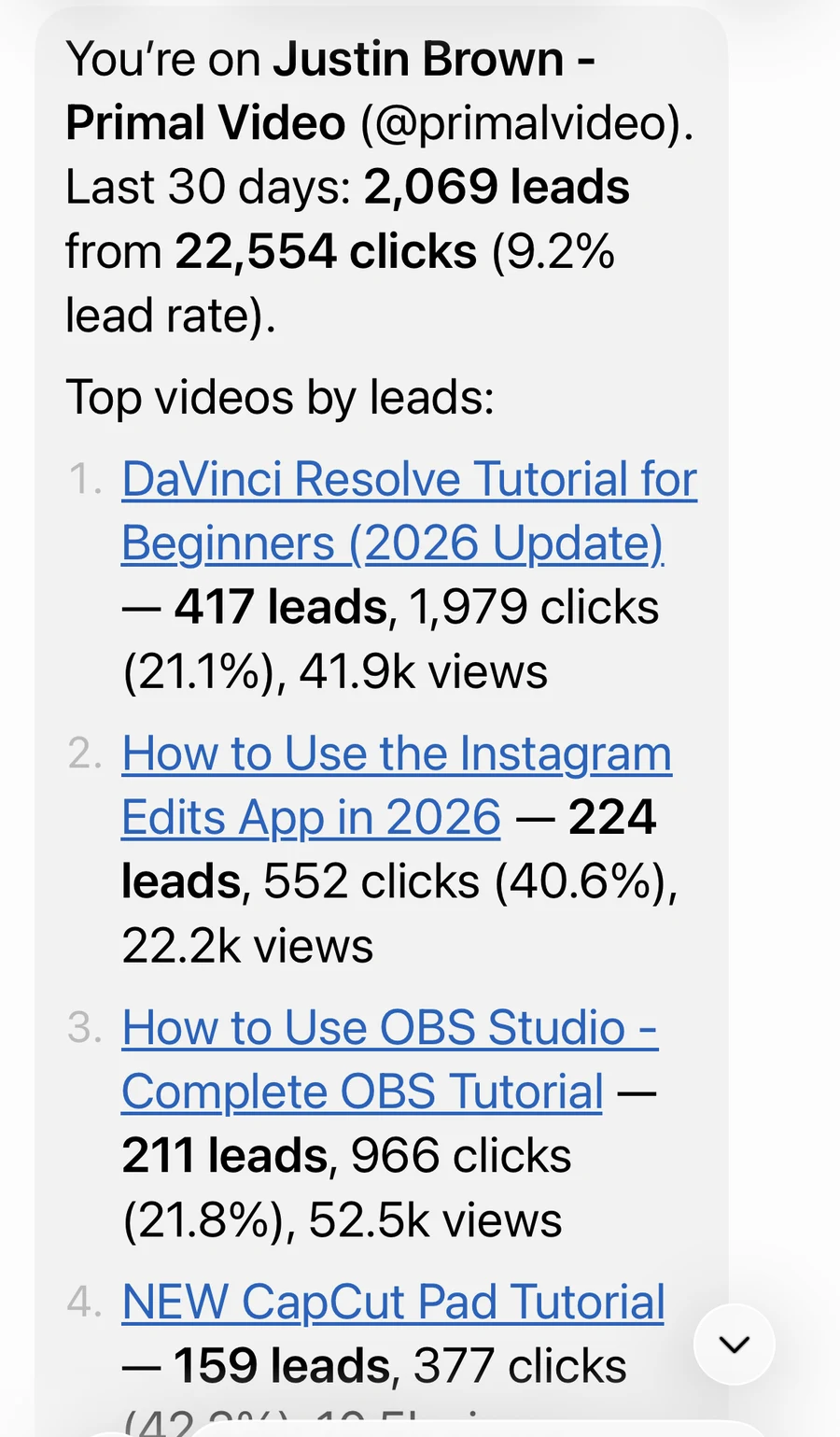
Primal Video's real numbers on a phone: the kind of check you can do between uploads.
The DaVinci Resolve tutorial brought in the most leads, but the Instagram Edits tutorial turned 40.6% of its clicks into leads, almost twice the rate. That's the difference between a video that wins on traffic and one that wins on conversion, and it's worth knowing both.
See your best thumbnails right in the chat
Video Stats can hand Grok Bot the thumbnail images along with each video's results, so Grok Bot can look at them and show them to you. We asked it on the desktop app:
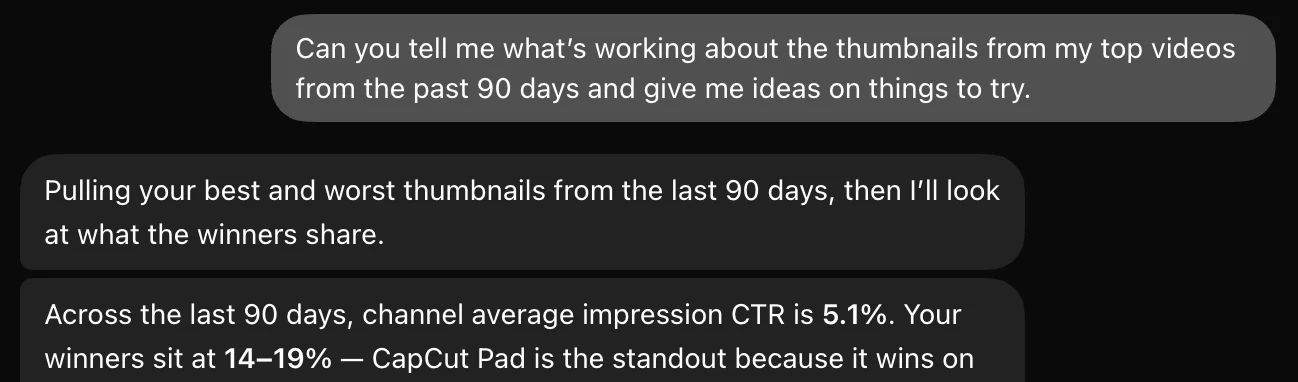
It compared the winners with the channel average, then offered to sketch new thumbnail ideas, showing the thumbnails it meant:
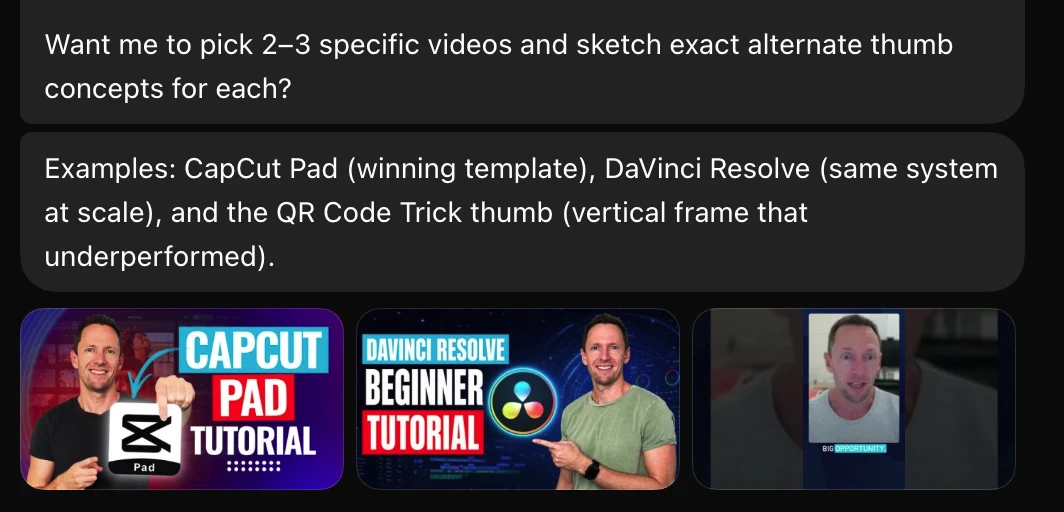
Grok Bot spotted that the CapCut Pad and DaVinci Resolve thumbnails use the same system, and flagged the one that broke the pattern.
More questions to try
- "Which of my landing pages bring in the most leads from YouTube?"
- "Find my videos with lots of views but few leads in the last 30 days."
- "How are my clicks and leads trending compared with the previous 30 days?"
- "Make a QR code for my free guide and tie it to my latest video."
30 ChatGPT and Claude Prompts for YouTube Analytics has 30 more, and they work in Grok Bot too.
If Grok Bot can't connect to Video Stats
- The sign-in card shows an error. Tap Retry on the card. If it keeps failing, remove the connection in Grok Bot and ask it to add the custom MCP server again.
- You see the wrong channel's data. Each connection covers the channel you chose when you authorized. Disconnect it under Settings → MCP → Connected apps in Video Stats, then connect again and choose the right channel.
- Clicks, leads and sales are all zero. Video Stats needs to be tracking the links in your descriptions, and leads and sales need the tracking code on your pages.
FAQ
Can Grok Bot analyze my YouTube channel?
Yes, once it can see your data. Connect Grok Bot to Video Stats, and it can answer from your current views, link clicks, leads and sales, including which videos and pages bring in customers.
Why does the sign-in say "Authorize Cursor"?
Grok Bot is built by xAI and Cursor, and it signs in to apps through Cursor. The connection still belongs to your Grok Bot account.
Do I have to connect again on my phone?
No. Grok Bot's phone and desktop apps share their connections, so connecting on one makes Video Stats available on the other.
Is it safe to connect Grok Bot to my YouTube data?
Grok Bot can read your Video Stats data and create QR codes, but it can't change your videos or your YouTube channel. You approve the connection when you add it, and you can remove it at any time under Settings → MCP in Video Stats.
Can I use Grok on the web instead?
Grok on grok.com lists custom connectors too, under Connectors → New Connector → Custom, but at the time of writing they aren't available on every account. If yours has them, paste the same Video Stats URL there. Grok Bot is the route we tested.
Ready to ask Grok Bot which videos pay you? Video Stats tracks every link on every video and connects the results to Grok Bot, Claude, ChatGPT and Claude Code. Start your free trial, then ask your first question.


