How to Track YouTube Affiliate Links, Video by Video
Your affiliate dashboard counts clicks but can't say which video sent them. In this guide, you'll learn 3 ways to track YouTube affiliate links by video.
Your affiliate dashboard can tell you how many people clicked your link and how many bought. It can't tell you which of your videos sent them, because the same link sits in a dozen descriptions. So you can't tell which videos earn your commissions, and which ones carry a link nobody clicks.
In this guide, you'll learn 3 ways to track your YouTube affiliate links video by video, what Primal Video's affiliate clicks showed over 90 days, and how to see commissions by video with a sub-ID.
By the way, the video that sent Primal Video the most Descript clicks doesn't mention Descript in its title.
Why your affiliate dashboard can't tell you which video earned the commission
An affiliate network tracks the link you give it. When you paste that one link into 20 video descriptions, every click and every sale lands on the same line of your report. YouTube Studio doesn't help either: it reports clicks on cards and end screens, not on the links in your description.
That means you don't know which videos to promote, which brands to pitch, or which descriptions to fix. Justin Brown, whose channel has 1.9 million subscribers, puts it plainly in the video above: "A big revenue stream for us is affiliate marketing." The videos sending that revenue are "not the ones that we always think that they would be based on what YouTube is telling" him.
3 ways to track YouTube affiliate links by video
The first two work, but each leaves you with a headache. Option C clears up both.
Option A: A separate affiliate link for every video, with a sub-ID
Most affiliate networks let you add your own label to a link, called a sub-ID. Put the video's name or ID in it, and the network's report shows clicks and sales per label.
Good for: seeing commissions by video, straight from the network's own report.
Where it falls short:
- You build a new link for every video and every program, by hand.
- Each network has its own report, so your data is split across five dashboards.
- The report shows clicks and sales, but not the video's views, so you can't tell a video with a strong click rate from a video with lots of traffic.
- When a program changes its link, you update every video's description.
Option B: A link shortener with one link per video
Tools like Bitly, or a WordPress plugin like Pretty Links, give you a short link with a click count. Make one per video per product, and you can compare them.
Good for: click counts for any link, including programs without sub-IDs.
Where it falls short:
- You create and name a short link for every video and every product, by hand.
- The counts sit apart from your YouTube stats, so you still can't see clicks against views.
- When a program changes its link, you update every short link.
- It only counts clicks. The sale still happens on the merchant's site.
Option C: Video Stats tracks every link in every description
Video Stats, which Justin co-founded, reads the links in your video descriptions and converts each one into a tracking link that knows which video it's in. Your existing affiliate links keep working, and you don't build anything per video.
| The problem | How Video Stats solves it |
|---|---|
| A new link for every video and program, by hand (A, B) | It converts the links already in your descriptions, and can convert each new upload's links as soon as it's published |
| Data split across dashboards (A) | Clicks for every affiliate program sit in one place, next to each video's views |
| No views next to clicks (A, B) | Each video shows its views, link clicks and click rate together |
| Updating every video when a program changes its link (A, B) | Each destination has one tracking link, so you change it once and every video follows |
Pick any link, and Video Stats lists the videos that send it traffic, with each video's views next to its clicks:
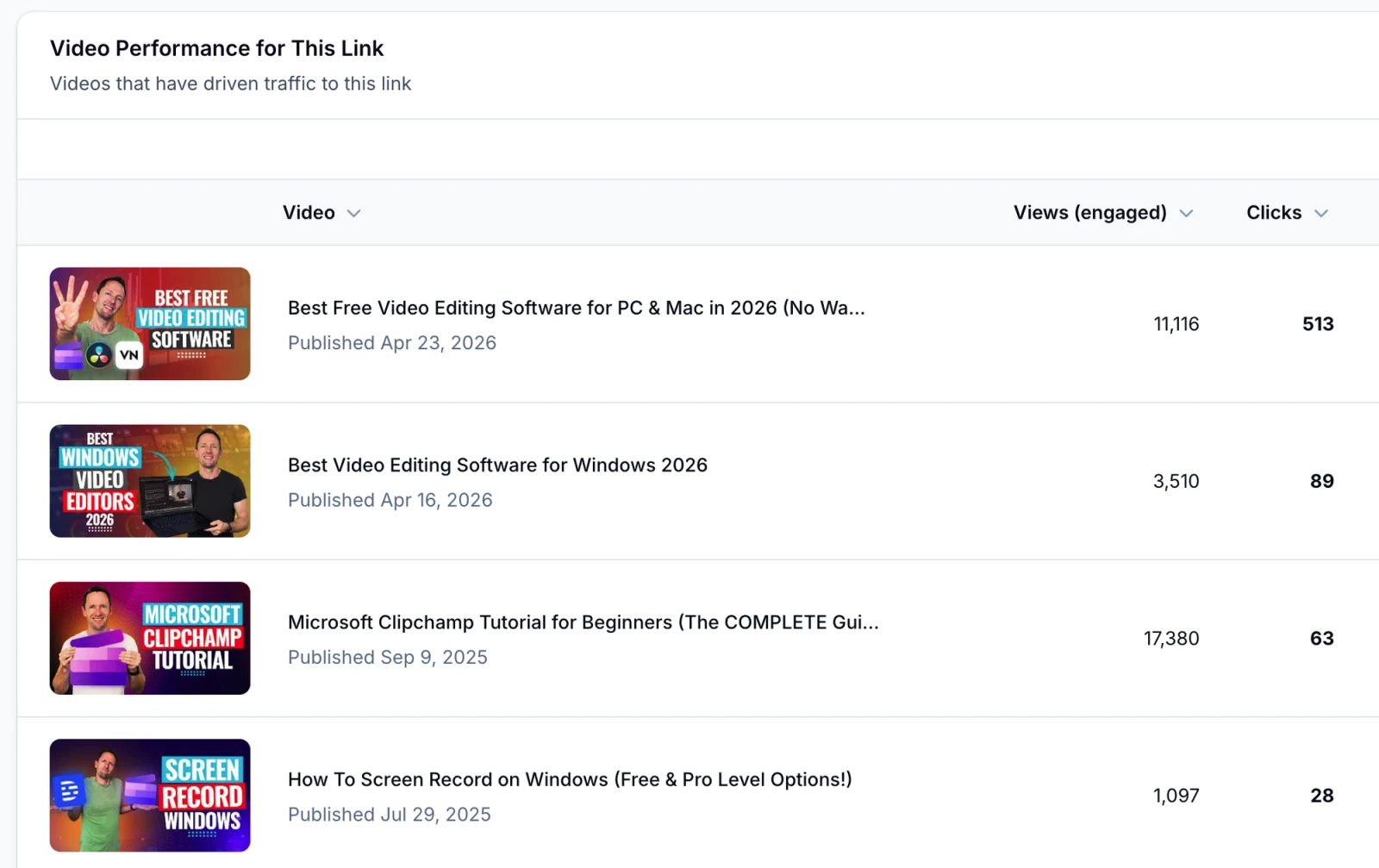
The Clipchamp tutorial had the most views but sent the link 63 clicks. A "best free editing software" roundup sent 513.
People watching a tutorial for a tool usually have it already. People watching a roundup are still choosing, so a roundup is where a link to the tool gets clicked.
One thing it can't see is the sale itself. The purchase happens on the merchant's site, where you can't add tracking code, so Video Stats counts affiliate clicks, not commissions. Sub-IDs fill that gap, and the section after next shows how.
Options A and B cost you time with every upload. Option C keeps tracking your channel after you've set it up once.
What 90 days of affiliate clicks showed on Primal Video
Primal Video links to dozens of tools, and some of them pay a commission. Over the 90 days to October 13, 2026, Video Stats tracked which videos sent clicks to each one. Two of them, Descript and Artlist, show why the video-by-video view matters.
This is the one with the surprising top video. Descript is an AI video editor, and the video that sent it the most clicks is "How To Remove Video Background - Top 3 AI Tools!", where Descript is one of three tools covered. The top 5:
| Video (last 90 days) | Views | Descript clicks | Clicks per 1,000 views |
|---|---|---|---|
| How To Remove Video Background (Top 3 AI Tools) | 9,741 | 269 | 27.6 |
| Best Video Editing Software for Windows 2026 | 13,741 | 207 | 15.1 |
| Best Video Editing Software for Mac 2026 | 14,212 | 152 | 10.7 |
| How To Screen Record On Mac | 10,473 | 88 | 8.4 |
| YouTube Create App Beginner's Guide | 17,531 | 83 | 4.7 |
Views are engaged views. The video with the most views sent the fewest clicks of the five.
Clicks per 1,000 views shows how well a video sells a link, whatever its traffic. A caption generator video with 1,146 views sent 52 Descript clicks, 45 per 1,000 views, almost 10 times the rate of the YouTube Create guide.
Spread your affiliate clicks across many videos
Descript's 1,336 clicks came from 20 videos, and no single video sent more than about a fifth of them. Artlist, a music library, got 381 clicks from 15 videos, but 61% came from two: a Clipchamp tutorial and a CapCut tutorial.
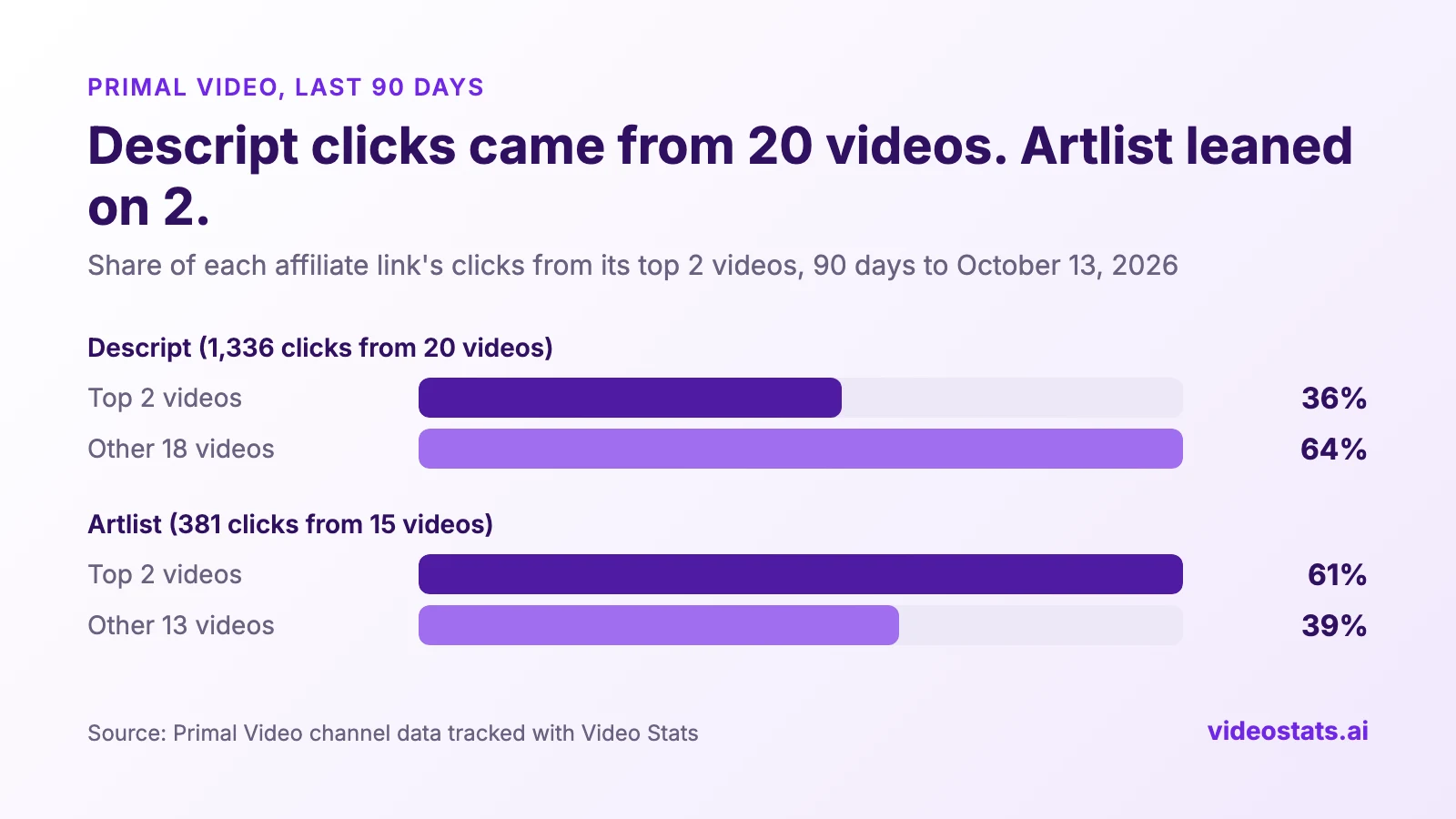
If either of the top two videos loses traffic, Artlist clicks fall by about a third.
Justin made the same point about Descript in his 90-day video: with clicks spread across so many videos, "if any one video gets suppressed by the algorithm, 78% of Descript traffic is unaffected." A link that depends on two videos is a risk to your income.
Find the videos where an affiliate link sits unclicked
The same data shows where a link is in place but isn't working. Artlist's link sits in the 2025 Instagram Edits tutorial, which had 42,910 views, and got 8 clicks. The Clipchamp tutorial sent it 126.
A gap like that is worth checking: where the link sits in the description, what the text above it says, and whether the video mentions the tool at all. Justin found a non-affiliate example the same way, "How to create a YouTube channel with your phone. 32,000 views, only 16 link clicks."
How to see which videos earn commissions with sub-IDs
Clicks tell you which videos send traffic. To see which ones bring in commissions, add a sub-ID to each video's affiliate link. The network records it with the click and reports it next to every sale.
- Find your network's sub-ID parameter in the table below.
- Add it to the end of the link in each video's description, with the video's YouTube ID as the value. The ID is the part after
v=in the video's URL. If Video Stats has converted the link, it already ends with?utm_content=and the video ID, so add&and the sub-ID after it, for examplego.yourbrand.com/abc123?utm_content=kdemy_L-n3s&subId1=kdemy_L-n3s. The tracking link passes the sub-ID on to the affiliate link. - Download the network's commission report after a few weeks, and group the sales by sub-ID.
Using the YouTube ID as the sub-ID means the network's report and Video Stats name each video the same way, which makes the two easy to match. If your affiliate links go through your own redirect first, such as a WordPress link plugin, click one to check that the sub-ID reaches the affiliate site.
| Network | Sub-ID parameter | Example |
|---|---|---|
| Impact | subId1 (also subId2, subId3) |
...?subId1=kdemy_L-n3s |
| CJ | sid |
...?sid=kdemy_L-n3s |
| Awin (now includes ShareASale) | clickref (up to clickref6) |
...?clickref=kdemy_L-n3s |
| PartnerStack | sid |
...?sid=kdemy_L-n3s |
| Rakuten Advertising | u1 |
...&u1=kdemy_L-n3s |
| Amazon Associates | No sub-ID; create a tracking ID per video instead | Up to 100 tracking IDs per account by default |
Parameter names from each network's help pages, October 2026. Some brands on a network turn sub-IDs off, so test one link first.
ShareASale closed on October 6, 2025, and its programs moved to Awin. Impact's partner guide explains how its sub-IDs show up in your reports, and PartnerStack's guide covers its version.
A sub-ID report gives you commissions per video, and Video Stats gives you views and clicks per video. Put them together and you get earnings per click and per 1,000 views for every video. In a follow-up guide, you'll see how to upload your network's commission report to Claude or ChatGPT and have it do the matching for you.
4 ways to earn more from the affiliate links you already have
- Add the link where it fits but isn't listed. Justin asked Claude: "Which videos do you think should have Artlist mentioned in the video description where it's obviously a fit for the viewer, but it's not already listed in there?" It sorted his videos into three tiers.
- Fix videos with views and no clicks. Move the link higher in the description, and say in one line why the viewer would want it.
- Spread a top program across more videos. If two videos send most of a program's clicks, mention it in more videos where it fits, so one video's drop doesn't take your income with it.
- Show brands what you send them. Clicks per video turn a sponsorship pitch into a report. As Justin put it, "you can pass this detail back to them and give them real meaningful stats as to what's working."
YouTube Analytics for Business covers the other numbers that show which videos pay you, and Best Performing YouTube Videos shows how to rank your videos by leads and sales.
FAQ
Can you track affiliate links on YouTube?
Yes. YouTube Studio doesn't report clicks on description links, so you need a tracking link per video, a sub-ID per video in your affiliate network, or a tool like Video Stats that tracks every link in every description by video.
Does YouTube Studio show clicks on description links?
No. YouTube Studio reports clicks on cards and end screens, but not on the links in your video description. To count those clicks by video, the link itself has to be a tracking link.
What is a sub-ID in affiliate marketing?
A sub-ID is your own label added to an affiliate link, such as a video ID or a placement name. The network records it with each click and shows it next to each sale in your reports, so you can see which video or placement earned the commission.
Can I use a tracking link with Amazon affiliate links?
Check Amazon's current Associates Program Policies first. They don't allow a shortened link that makes it unclear you're linking to Amazon, so say it's an Amazon link in the text next to it. For sales by video, Amazon lets you create separate tracking IDs instead of sub-IDs.
Which YouTube videos make the most affiliate money?
Usually not the most-viewed ones. On Primal Video, a background removal video with 9,741 views sent Descript more clicks over 90 days than videos with nearly twice the views. Track clicks per video, then add sub-IDs to see commissions.
See which videos send your affiliate clicks
Connect your channel to Video Stats, and it converts the affiliate links already in your descriptions into tracking links. Within a few days you'll see which videos send clicks to each program, and which ones carry a link nobody clicks.