Link Performance
While Video Performance shows you how individual videos perform, Link Performance flips the perspective and shows you how your destination URLs are performing across all your videos. This is essential for understanding which offers, products, and landing pages resonate most with your audience.
Why Link Performance Matters
You likely promote the same URLs across multiple videos. For example, you might mention your main opt-in page in dozens of videos. Link Performance aggregates all the clicks, leads, and sales for each destination URL so you can see:
- Which offers get the most clicks across your entire channel
- Which landing pages convert the best
- Which affiliate products your audience is most interested in
- Where to focus your promotional efforts
Top Performing Links
Navigate to Analytics → Link Performance to see your top 25 destination URLs ranked by clicks.
Date Range
Use the date range picker at the top to filter data by time period. This lets you see performance over the past week, month, or any custom range you choose.
Links Table
The table shows your best-performing links with these columns:
- Destination URL: The page you are sending traffic to (your landing page, affiliate link, product page, etc.)
- Clicks: Total number of times this link was clicked across all your videos
- Leads: Number of conversions (email signups, opt-ins) from this link
- Sales: Revenue or transactions attributed to this link
- View Stats: Click to see detailed analytics for this specific link
Understanding the Data
Looking at the links table reveals important insights:
High Clicks, Low Leads
If a link has many clicks but few leads (like an affiliate product link), this is normal. Not every link is meant to capture leads. However, if it is a landing page that should convert, a low lead count might indicate the page needs improvement.
High Conversion Links
Links with strong lead numbers relative to clicks are your winners. In the example, primalvideo.com/primal-video-method has 888 clicks and 176 leads, giving it roughly a 20% conversion rate. This is a high-performing offer worth promoting more.
Traffic Distribution
The ranking shows where your audience's interest lies. If affiliate links for certain tools consistently outperform others, you know which products to feature more prominently in future videos.
Individual Link Stats
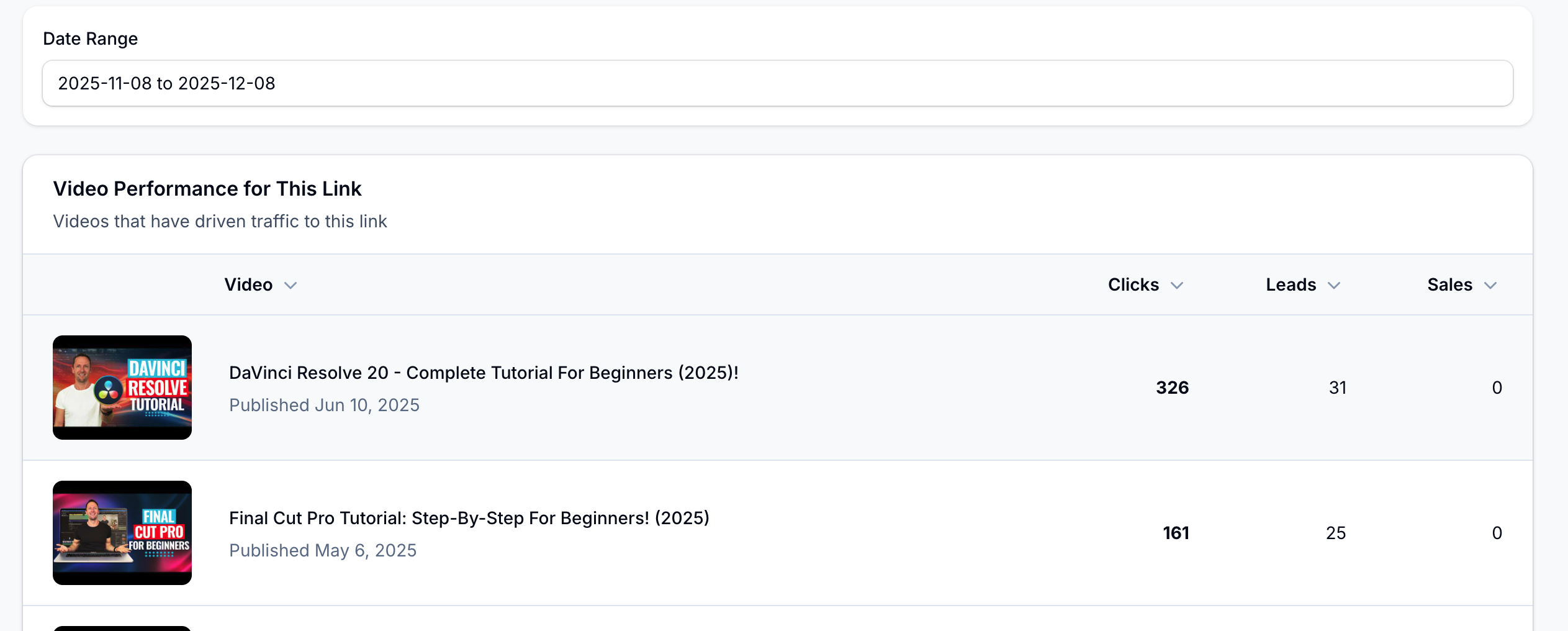
Click View Stats on any link to see detailed analytics for that specific destination URL.
Link Overview
See the complete details of the tracking link including the destination URL, when it was created, and total performance metrics.
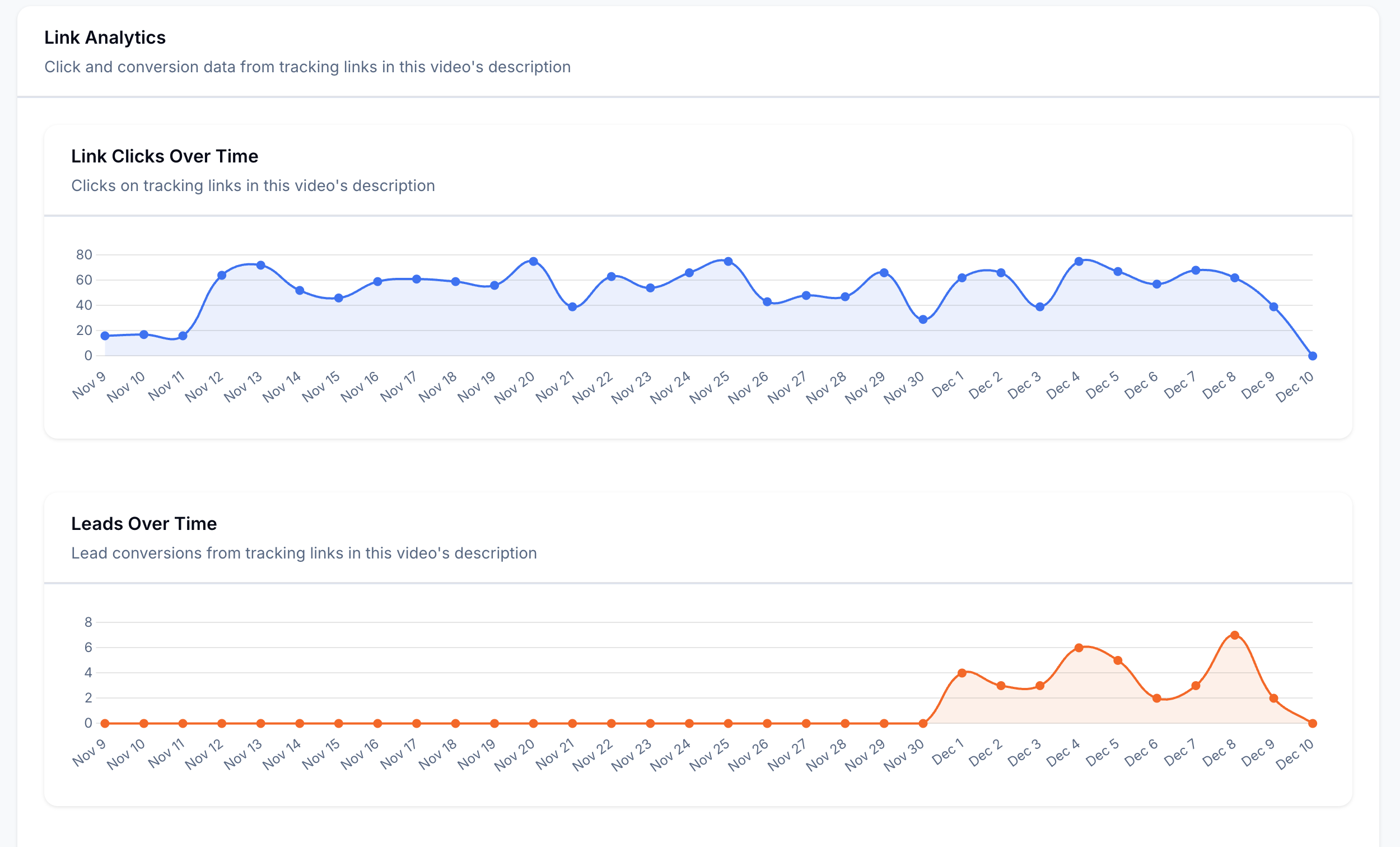
Clicks Over Time
A chart showing how clicks to this link have trended over time. Use this to:
- Identify when interest in this offer spikes
- See if clicks are growing, stable, or declining
- Correlate click patterns with video publishing or promotions
Leads Over Time
Track conversions from this link over time. This helps you understand if the offer's effectiveness is consistent or changing.
Videos Using This Link
See which of your videos include this link and how each video contributes to the link's performance. This reveals:
- Which videos drive the most traffic to this offer
- Whether certain video topics send more qualified traffic
- Opportunities to add this link to more relevant videos
Making Strategic Decisions
Use Link Performance to answer questions like:
- Which offers should I promote more? Links with high clicks and conversions deserve more visibility.
- Which landing pages need improvement? High-traffic pages with low conversions may need optimization.
- Which affiliate products resonate with my audience? Click patterns reveal what your viewers want to buy.
- Where should I negotiate better deals? If you are driving significant traffic to an affiliate, you may have leverage for better commission rates.
- Which links should I retire? Links with consistently low performance might not be worth promoting.
Link Performance vs Video Performance
These two reports complement each other:
- Video Performance: "How is this video performing?" - Shows all links within a single video
- Link Performance: "How is this offer performing?" - Shows a single link across all videos
Use Video Performance when you want to optimize a specific video's calls-to-action. Use Link Performance when you want to understand how well an offer or product is performing across your entire channel.
Tips
- Check Link Performance monthly to spot trends in what your audience clicks
- Compare similar offers (like competing affiliate products) to see which performs better
- If a link suddenly drops in performance, investigate if the destination page changed
- Use high-performing links more frequently in new video descriptions
- Consider creating dedicated content around offers that get lots of clicks