YouTube to Email · Part 1
How to Track Which YouTube Videos Bring In Email Subscribers
Your email tool shows how many people joined, not which video sent them. In this guide, you'll learn 3 ways to track sign-ups by video, one free.

You can see how many people joined your email list this week. What your email tool can't tell you is which YouTube video sent them, and that's the number that tells you what to make next.
In this guide, you'll learn 3 ways to track which YouTube videos bring in email subscribers, starting with a free one that uses Google Analytics and our free UTM link builder.
By the way, on Justin Brown's channel, the same opt-in page turns more than half the clicks from one video into subscribers, and about two in five from another.
Why an email list is the most valuable thing your videos can build
YouTube decides who sees your videos, and it can change its mind at any time. Your email list is an asset you control. You can write to the most engaged members of your audience whenever you want, about a new video, a launch or an offer, without waiting for an algorithm to show it to them.
That means every subscriber is someone you can reach again for free, which is why email tends to pay back more than any other channel. Independent research backs this up:
- About £41 back for every £1. UK marketers estimate a return of £40.96 for every £1 they spend on email, in the Data & Marketing Association's Marketer Email Tracker 2026, a survey of 250 marketers.
- $36 or more for over a third of marketers. In the Litmus 2025 State of Email survey of nearly 500 marketing professionals, 35% of marketing leaders said every $1 they spend on email brings back at least $36.
- Email beats social for creators. One in four full-time creators get their best audience engagement through email, ahead of social media, according to Kit's creator research.
An email list also lets you tailor what you send, using what you know about each subscriber: their interests, how they answered a question you asked, which emails they opened, which links they clicked, or their answers to a quiz or survey. That pays off. McKinsey found that 71% of consumers expect personalized interactions, and that faster-growing companies drive 40% more of their revenue from personalization than slower-growing ones.
Why you need to know which video brought in each subscriber
Tracking where your subscribers come from, in a way that's easy and not overwhelming, is one of the main reasons we created Video Stats. On Primal Video, the channel of Justin Brown, who co-founded Video Stats, a growing email list is one of the biggest signs that the business is moving forward.
YouTube Studio tells you a lot about your videos, but it can't show you two numbers that matter here: how many people clicked a link in a video's description, and how many of those people then joined your email list. Your email tool counts sign-ups but doesn't know which video sent them. Neither connects the two, so a video can bring in hundreds of subscribers and look no different from one that brings in none.
The number that connects them is the conversion rate: the percentage of people who clicked a link and then signed up. If 200 people click the link in a video and 50 of them join your list, that video's conversion rate is 25%.
Without these numbers, you're guessing about the decisions that grow your list: which videos to make more of, which lead magnet to offer where, and which calls to action work. Get it wrong and you keep making videos that get views but don't build your business.
When you can see sign-ups by video, the patterns show up fast. On Primal Video, five videos sent people to the same free guide page in the last 30 days. Together they brought in 1,479 subscribers from 3,523 clicks, but not equally:
| Video (last 30 days) | Clicks to the guide page | Subscribers | Conversion rate |
|---|---|---|---|
| How to Use the Instagram Edits App in 2026 | 425 | 226 | 53.2% |
| NEW CapCut Pad Tutorial: Desktop Editing on iPad | 300 | 156 | 52.0% |
| DaVinci Resolve Tutorial for Beginners (2026) | 914 | 417 | 45.6% |
| Final Cut Pro Tutorial for Beginners | 202 | 91 | 45.0% |
| VN Video Editor Tutorial for Beginners | 270 | 115 | 42.6% |
Primal Video's Video Stats data for the 30 days to October 6, 2026, for its Primal Video Method guide page.
Same page, same offer, and a 10-point gap between the videos. The two that convert best are short, specific app tutorials, which hints that a viewer who has learned one tool is the most ready for more. You'd never see that from your email tool's total.
3 ways to track which YouTube videos bring in email subscribers
The first two work, and the first is free, but each costs you time on every video. Option C does the tracking for you.
Option A: Unique UTM links and Google Analytics (free)
UTM tags are labels you add to the end of a link, such as ?utm_source=youtube&utm_content=.... Google Analytics reads them and remembers where each visitor came from. If every video gets its own link, you can see sign-ups by video.
1. Make a unique link for every video. Use our free YouTube UTM Link Builder. Paste your opt-in page and your video links, and it creates a tracked link for each video, with the video's ID in utm_content. It runs in your browser, needs no sign-up, and downloads the links as a spreadsheet.
2. Put each link in its own video's description. One link per video. A link copied into the wrong video sends its sign-ups to the wrong place.
3. Count sign-ups as a key event. In Google Analytics 4, a sign-up has to be an event marked as a key event (what GA4 used to call a conversion). If your opt-in form sends people to a thank-you page, the usual way is to create an event for views of that page, then mark it as a key event in Admin.
4. Build a report by video. GA4's standard reports don't show utm_content. Go to Explore, create a Free form exploration, add the dimension Session manual ad content (that's utm_content) and the metric Key events, and set the key event to your sign-up. Each row is a video ID with its sign-ups. Match the IDs to titles with the spreadsheet from the link builder.
- Good for: free, and you keep the data in your own Google Analytics.
- Where it falls short: every link has to be made and pasted by hand, video by video, including going back through old descriptions. The report shows video IDs, not titles. It only counts sign-ups on pages where you've set up GA4 and a key event, and visitors who block tracking or decline cookies don't show up.
Option B: A separate opt-in form for each video
Some creators skip Analytics and create a separate form, or a separate tag, for each video in their email tool, such as Kit or MailerLite. Each subscriber is then labelled with the video they came from.
- Good for: the answer lives in your email tool, next to the subscriber.
- Where it falls short: you build and maintain a form or tag for every video, which gets unwieldy after a few dozen. And you only see sign-ups, never the clicks, so you can't tell a video that sends few people from one where people click and don't sign up.
Option C: Video Stats
Video Stats tracks every link in every video description for you, and credits each sign-up to the video and link it came from. There are two ways to use it.
1. Track the opt-in pages you already have. Add the Video Stats tracking code to your site once. It detects opt-in forms on its own, so there's nothing to set up per form or per video, and it works with page builders like Kajabi, ClickFunnels and WordPress. Video Stats also tags the links in your descriptions automatically, including your older videos.
2. Let Video Stats create the opt-in page for you. If you don't have an opt-in page yet, Video Stats opt-in pages give viewers a guide, template or other download in exchange for their email. Each page uses your channel's banner and colours, adds new subscribers to your email tool with a tag (Kit, MailerLite, Mailchimp, ActiveCampaign, Bento, Kajabi and systeme.io are supported), and has tracking built in.
You don't have to write the guide yourself. Choose one of your videos, and the AI wizard turns it into an opt-in page with a download based on that video.
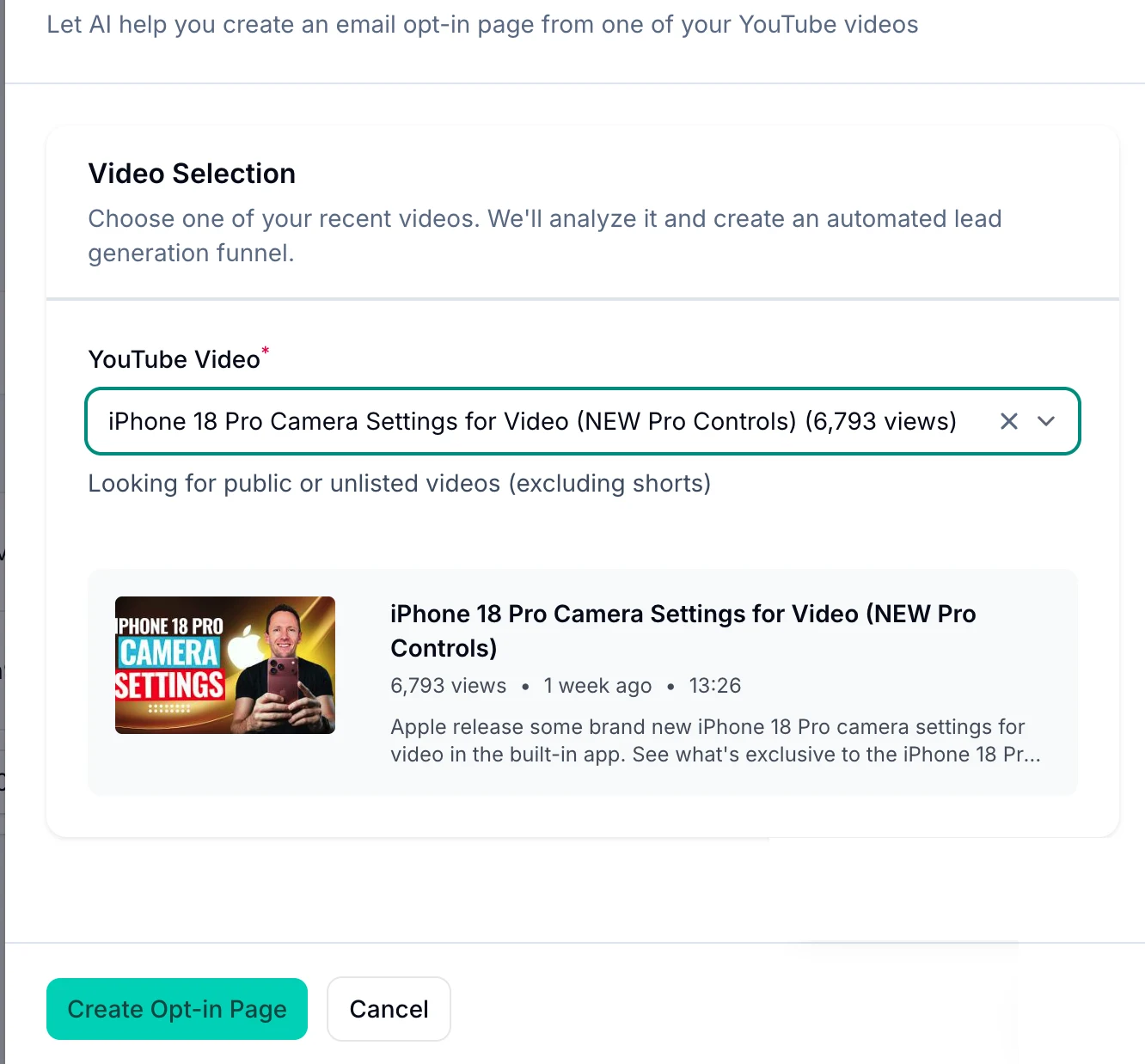
Pick a video, click Create Opt-in Page, and Video Stats drafts the page and its download.
Here's one of Primal Video's opt-in pages, as a viewer sees it:
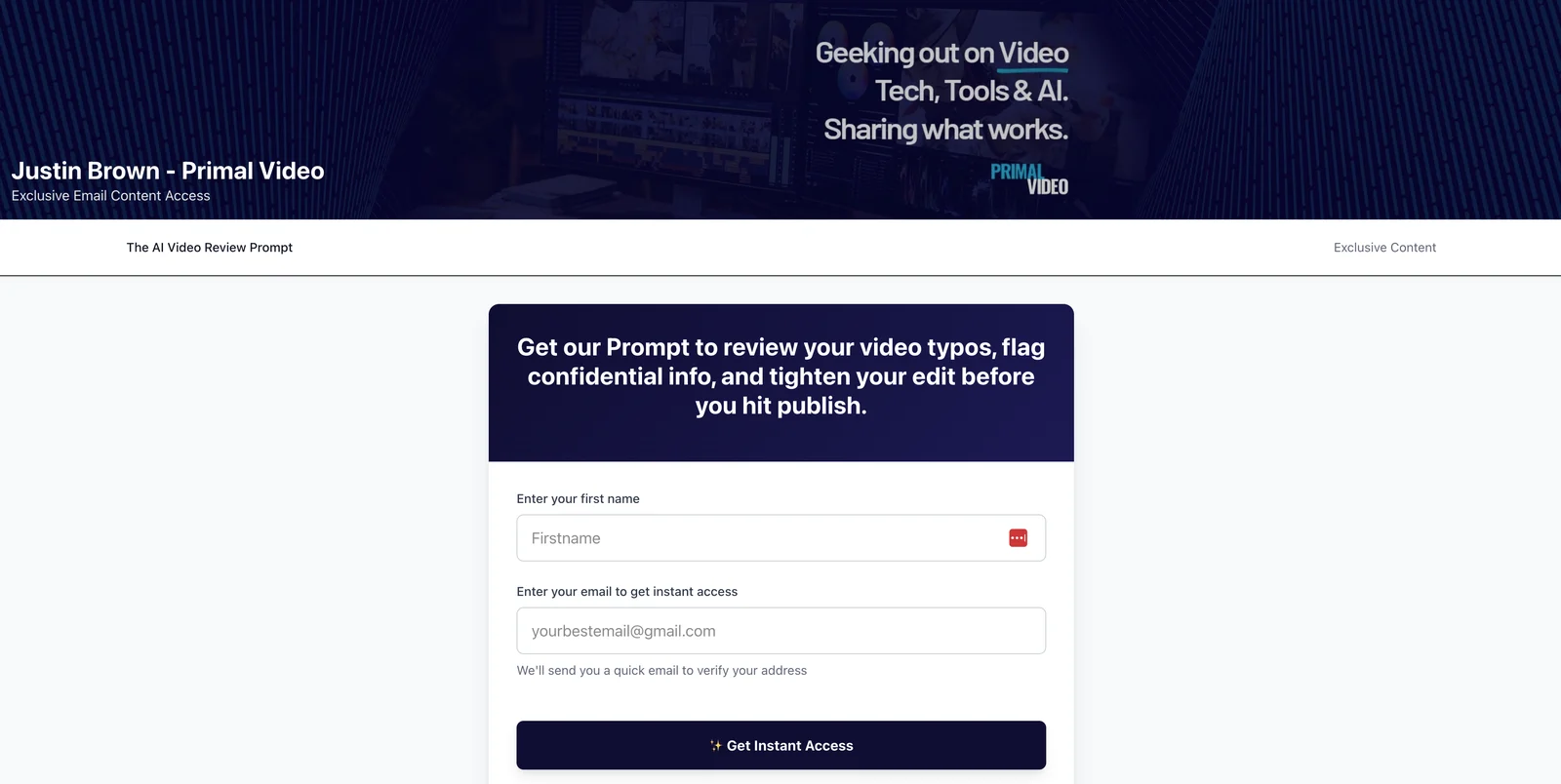
The page uses the channel's own banner, so it feels like part of the channel.
Once a viewer confirms their email, they get the download, along with the video it goes with:
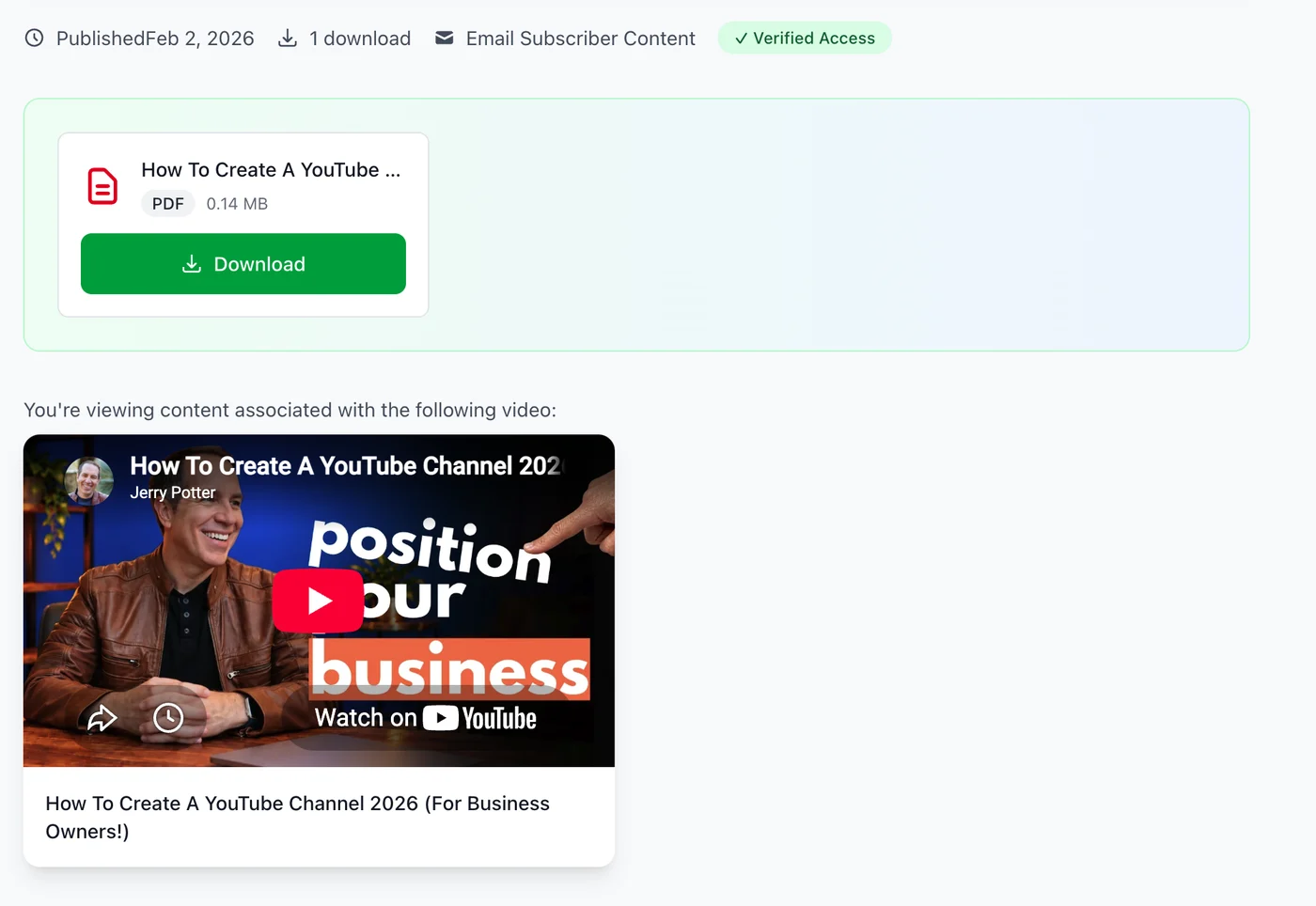
New subscribers land on the download and the video it came from.
Either way, you see clicks, subscribers and the conversion rate for every video, like the Primal Video table above.
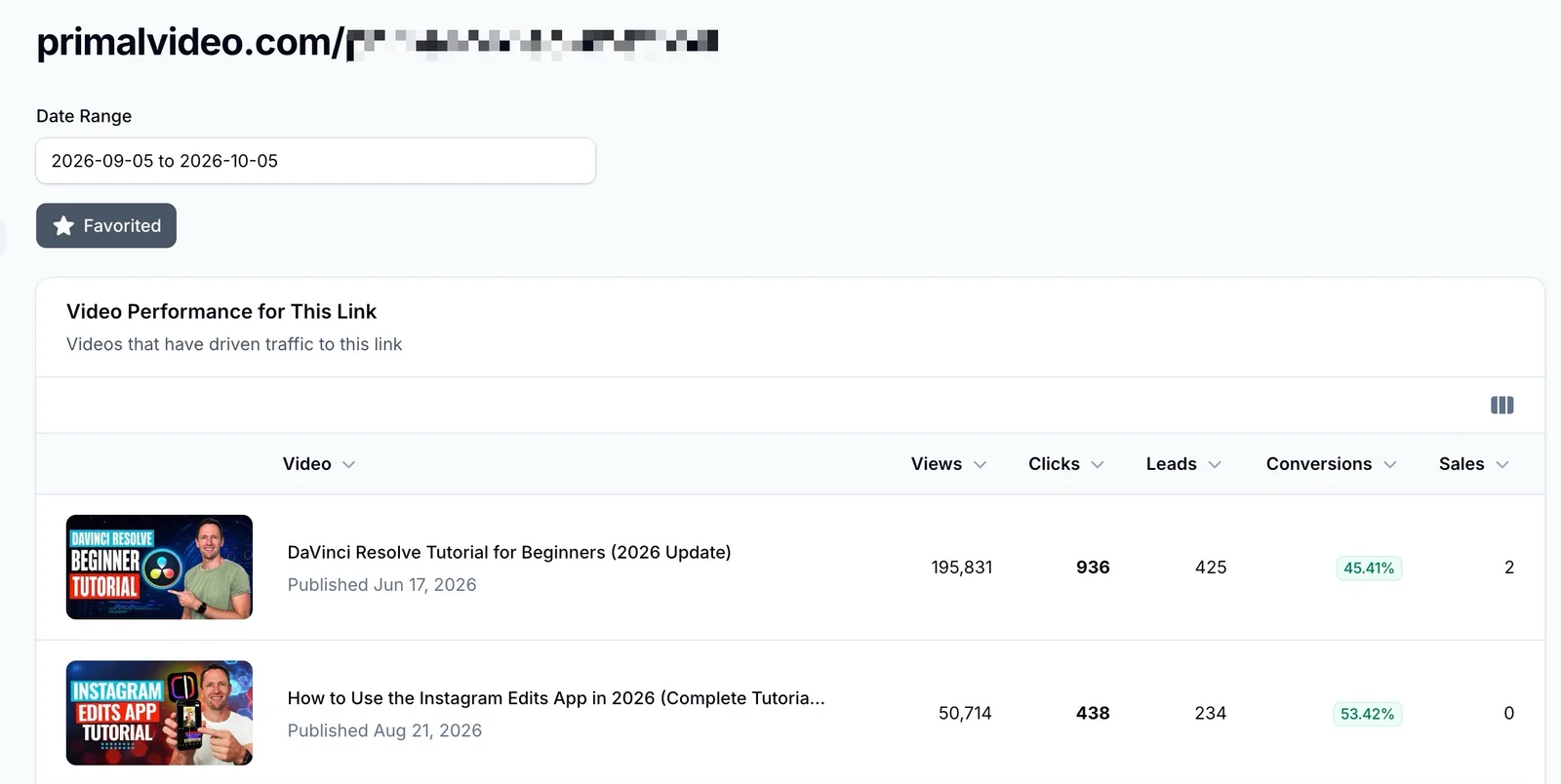
Every video that sent people to the guide page, with its clicks, leads and conversion rate. This view covers September 5 to October 5, a day earlier than the table, so the numbers differ slightly.
Here's how it handles each drawback above:
| The problem | How Video Stats solves it |
|---|---|
| Every link has to be made and pasted by hand, including old descriptions (A) | Video Stats tags the links in your descriptions automatically, old videos included |
| The report shows video IDs, not titles (A) | You see each video by its title and thumbnail |
| You build and maintain a form or tag for every video (B) | One tracking code covers every form on your site, or one Video Stats opt-in page covers every video |
| You only see sign-ups, never the clicks (B) | Clicks, subscribers and conversion rate for every video, side by side |
One limit to know: Video Stats counts subscribers from pages where its tracking code is installed, or from its own opt-in pages. A form on a page without the code won't be counted. And like any tracking, visitors who block scripts can be missed.
Options A and B cost you time with every new video. Option C keeps tracking after you've set it up once.
What to do once you can see subscribers by video
- Make more of the videos that convert, as well as the ones that get views. In the table above, the smaller app tutorials turned clicks into subscribers best.
- Match the lead magnet to the video. A viewer who has learned one tool wants the next step for that tool. The next part of this series covers lead magnets that convert.
- Fix the videos where people click but don't sign up. The traffic is already there, so a better-matched offer or page is the cheapest win on your channel.
- Ask AI to find the patterns. If you've connected Video Stats to ChatGPT or Claude, ask "Which of my videos bring in the most subscribers, and what do they have in common?" 30 ChatGPT and Claude Prompts for YouTube Analytics has more.
FAQ
Why do I need an email list if I already have YouTube subscribers?
YouTube decides which of your subscribers see each video. With an email list, you decide: you can reach every subscriber directly, whenever you want, and tailor what you send to their interests. UK marketers estimate email returns about £41 for every £1 spent, according to the Data & Marketing Association.
Can Google Analytics show which YouTube video a subscriber came from?
Yes, if every video links with its own UTM tags. Put the video's ID in utm_content, mark your sign-up as a key event, and build an Exploration with the Session manual ad content dimension. Our free YouTube UTM Link Builder makes the links.
Does Kit or MailerLite show which video a subscriber came from?
Not on its own. Your email tool only knows which form someone used. You'd need a separate form or tag for each video, or a tool like Video Stats that connects the click to the sign-up.
Do I have to change the links in my old video descriptions?
For the UTM method, yes: every video needs its own link, old ones included. Video Stats updates the links in your descriptions automatically.
What should utm_content be for YouTube links?
The video's ID, the 11-character code in its address (for example, dQw4w9WgXcQ in youtube.com/watch?v=dQw4w9WgXcQ). It's unique to each video and never changes, even if you rename the video.
Want to see which videos fill your email list, without the spreadsheets? Video Stats tracks every link on every video and shows the subscribers each one brings in. Start your free trial, or try our free YouTube UTM Link Builder first.


