Your free download could be converting twice as well. In this guide, you'll learn 7 dos and 3 don'ts for YouTube lead magnets, from real channel data.

Your free download could be turning twice as many viewers into email subscribers, and the fix usually starts with the video you link it from.
On Primal Video, Justin Brown's channel, two free downloads got almost the same traffic in the last 90 days: 898 clicks and 877 clicks. The livestream checklist turned 44% of those clicks into subscribers. The AI toolkit turned 18%. In this guide, you'll learn 7 dos and 3 don'ts for YouTube lead magnets, why being clear beats being clever, and how to give every video its own matching lead magnet without building pages one by one.
By the way, the offer that converted worst is the one most creators start with.
Keep one goal in mind as you read: turning strangers into happy clients. A bigger email list is a step toward that, and the last section covers how to make sure you're growing the right one.
What a YouTube lead magnet is, and why it has to match the video
A lead magnet is something useful you give away in exchange for an email address: a checklist, a template, a guide, a set of presets. On YouTube, you usually offer it with a link in the video's description.
A YouTube viewer is different from someone who lands on your website. They've watched one specific video, so their problem right now is that video's topic. The lead magnet that converts best is the next step from that video.
That means a great freebie in front of the wrong video still underperforms, and a simple one in front of the right video can turn almost half its clicks into subscribers. Here are Primal Video's lead magnets over the last 90 days:
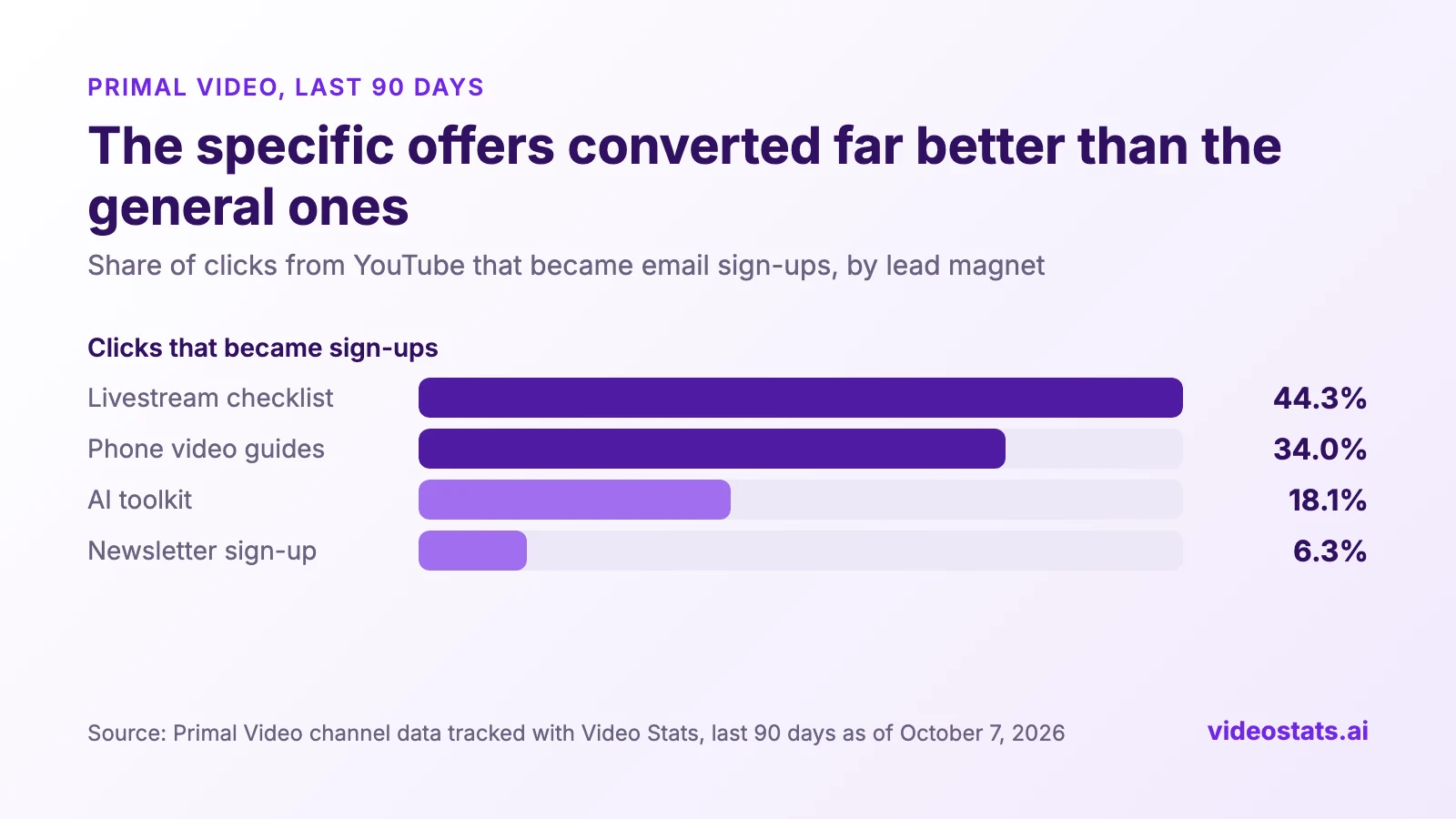
The two specific offers converted far better than the general toolkit and the newsletter.
If you can't see these numbers for your own channel yet, How to Track Which YouTube Videos Bring In Email Subscribers, part 1 of this series, shows you how.
7 dos for YouTube lead magnets that convert
Do 1: Be clear before you're clever, and make it the obvious next step from the video
Viewers decide in seconds whether your offer is for them. If the link under a livestreaming tutorial says "Get my livestream checklist", nobody has to think. If it says "Get my free creator vault", they have to work out what's inside and whether it helps with what they watched.
That means clarity wins you sign-ups that clever names and persuasive copy lose. Primal Video's livestream checklist sits under two livestreaming videos, an OBS tutorial and a guide to streaming from your phone. It converted 44% and 49% of their clicks.
The same guide shows what happens when the match breaks. Primal Video's iPhone and Android video guides converted 41% of the clicks from a camera app tutorial, and 20% from a microphone video.
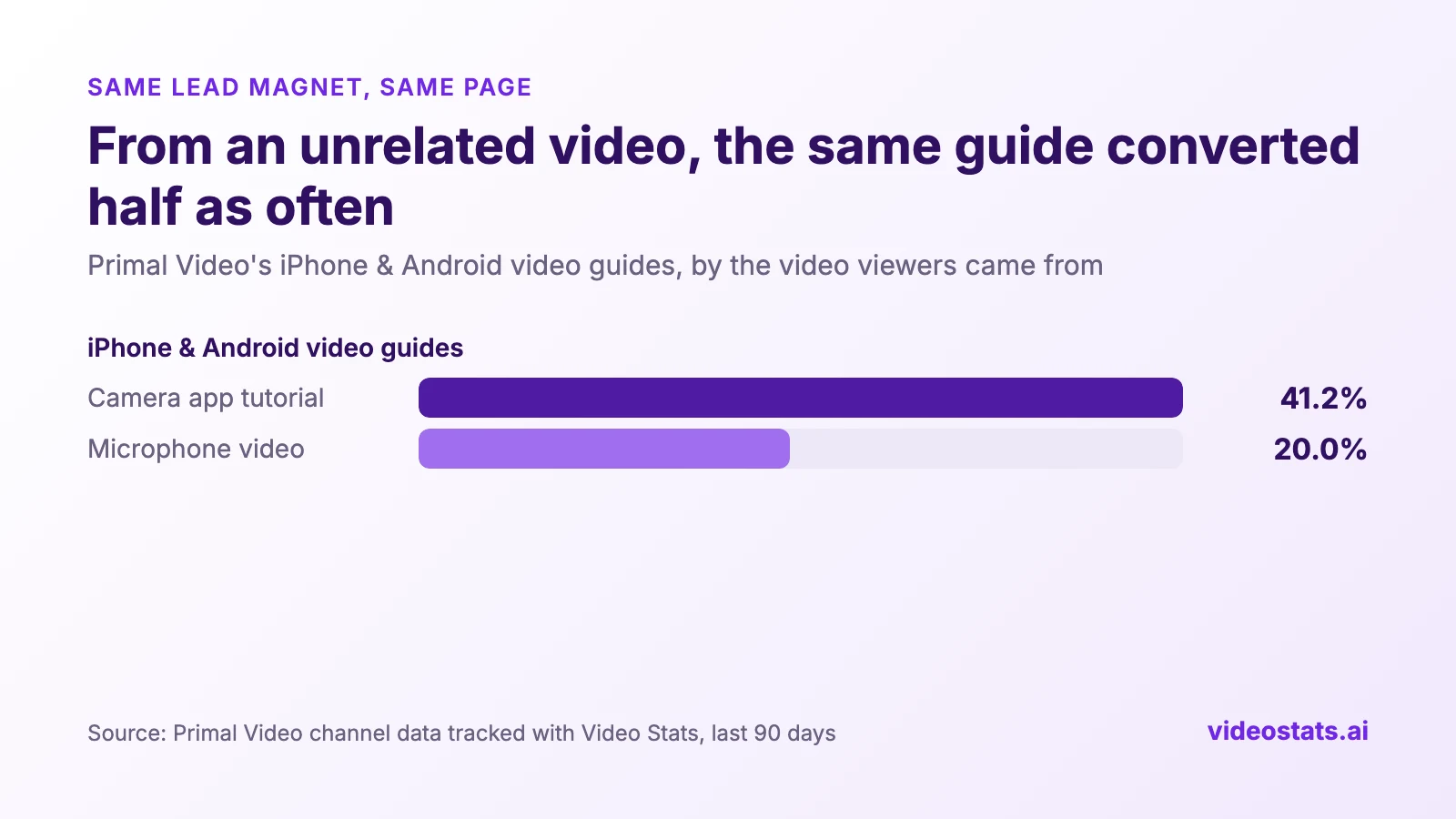
Same guide, same page. From a video it didn't match, it converted half as often. Fewer viewers clicked it, too.
Here's the most important insight you MUST know
Put the two videos side by side, and the mismatch costs you at every step:
| Primal Video, last 90 days | Camera app tutorial | Microphone video |
|---|---|---|
| Engaged views | 78,224 | 9,376 |
| All link clicks in the description | 2,757 | 1,199 |
| Clicks to the iPhone & Android guides | 593 | 20 |
| Share of the video's clicks that went to the guide | 21.5% | 1.7% |
| Guide clicks per 1,000 views | 7.6 | 2.1 |
| Guide sign-ups | 244 | 4 |
| Sign-ups per 1,000 views | 3.1 | 0.4 |
When your lead magnet doesn't match the video, you can expect three things:
- Fewer clicks to your website. The microphone video's viewers clicked links about 1,200 times, mostly on the ones that matched what they came for. Only 20 of those clicks, 1.7%, went to the camera guide, against 21.5% from the camera app tutorial. Per 1,000 views, that's 2.1 clicks against 7.6. Fewer clicks might not be a problem if the people who did click converted better.
- A lower conversion rate. They don't. The few viewers who clicked converted at 20%, against 41% from the matching video.
- Dramatically fewer leads. Fewer clicks multiplied by a lower conversion rate gives you 0.4 sign-ups per 1,000 views, against 3.1. That's about 7 times fewer leads from every view.
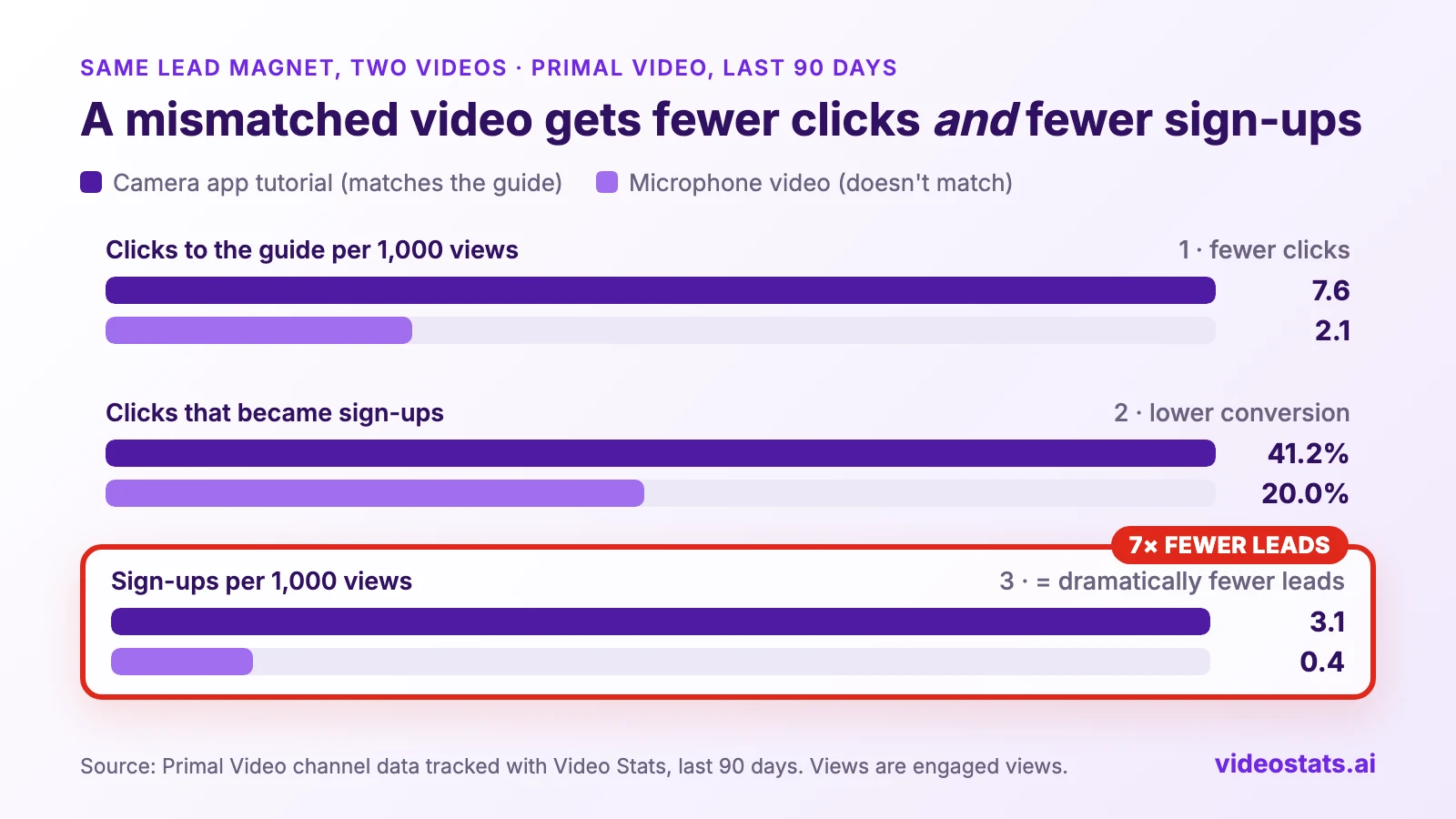
Look at sign-ups per 1,000 views. This isn't a small leak in your funnel, it's a gaping hole.
Conversion experts have found the same thing for years:
- Clarity trumps persuasion. That's the core principle of MECLABS, the research group behind MarketingExperiments. Its founder, Flint McGlaughlin, puts it this way: the marketer's job "is not persuasion; it is clarity". Its published tests include a 201% gain and a 200% gain from making a page clearer rather than more persuasive.
- Simple words convert better. Unbounce studied more than 41,000 landing pages and 57 million conversions. Pages written at a 5th to 7th grade reading level converted at 11.1%, 56% better than pages at an 8th to 9th grade level (Unbounce's 2024 Conversion Benchmark Report).
- Match the message. Marketers call this message match: the page repeats what brought the visitor there, so they know they're in the right place. On YouTube, the video is the ad.
A useful test: if you'd have to explain why the freebie relates to the video, it doesn't relate closely enough.
Do 2: Promise one specific result in the name
"Livestream checklist" tells viewers exactly what they get and when they'd use it. "AI toolkit" could mean anything. On Primal Video, the first converted 44% of its clicks and the second 18%.
The two also differ in how well they match their videos, so the name isn't the only reason for the gap. Still, a name that promises one result makes the match obvious. Name the result, the tool or the moment: "OBS livestream checklist", "DaVinci Resolve shortcut sheet", "iPhone camera settings for video".
Do 3: Make it something viewers can use in minutes
Someone who has watched a 15-minute tutorial to the end wants to act on it, not start a reading assignment. Our data can't prove which format works best, but formats that give a quick win fit that moment:
- A checklist of the steps in the video
- The settings, presets or template you used on screen
- A prompt or script they can copy
- A one-page cheat sheet of shortcuts or answers
Primal Video's top performer is a checklist, and another, an AI video review prompt, is something viewers can use the same day.
Do 4: Show viewers what they'll get with an image of the lead magnet
A lead magnet you can see feels real. A line of text saying "free checklist" asks viewers to imagine it; a picture of the checklist shows them it exists, what it looks like, and roughly how much is in it. So the first rule is simple: have an image of your lead magnet, on the opt-in page and in the video.
That means a better-looking offer at the moment viewers decide, which is when sign-ups are won or lost. The research points the same way:
- People look at images that carry information, and skip decoration. In Nielsen Norman Group's eye-tracking studies, users paid close attention to photos of products and real people, and ignored "big feel-good images that are purely decorative" (Jakob Nielsen, Photos as Web Content). An image of your actual lead magnet is information. A stock photo of a smiling person at a laptop is decoration.
- Real beats generic. In a MarketingExperiments test on a sign-up page for free consultations, replacing a stock photo with a photo of the company's founder increased sign-ups by 35% (This Just Tested: Stock images or real people?). In their words, "Stock images are not the enemy here – irrelevance is."
Here's how Primal Video presents its livestream checklist, the lead magnet that converts 44% of its clicks. The page shows the actual checklist, with a title you can read at a glance:
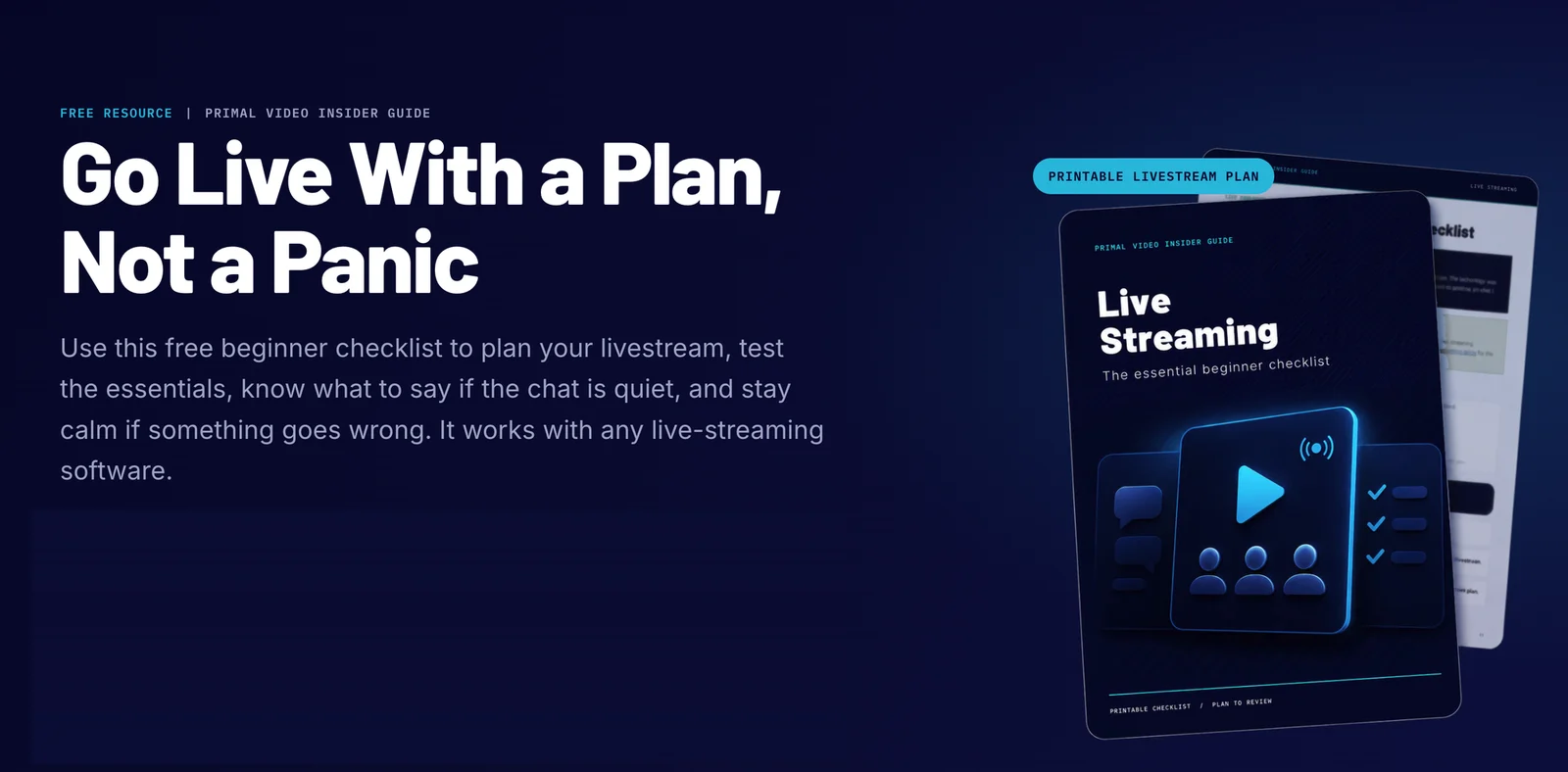
The image does the explaining: a printable checklist, its title, and a glimpse of the pages behind it.
Tips for the image:
- Show the real thing. Use the actual cover, or a page from inside it, rather than a generic picture.
- Make the title readable at phone size. Most of your viewers will see the image on a phone. If the title isn't readable at thumbnail size, it isn't doing its job.
- Use the same name as the video and the page. "OBS livestream checklist" on the image, in the description and in the page headline. This is message match again, in picture form.
- Give a peek inside. A slice of the first page, a few checklist items or a filled-in template shows the value faster than any description.
- Make it look tangible. A simple mockup on a phone, tablet or printed page helps a digital download feel like something worth having. Keep it realistic, and don't let the mockup hide the title.
- Use your channel's look. The same colours and fonts as your thumbnails tell viewers it comes from the creator they've been watching.
Do 5: Promote it in the video, high in the description, and in a pinned comment
A link in the description only works if viewers know it's there. Primal Video promotes its lead magnets in three places, and each one catches viewers the others miss.
In the video, with a big, specific call to action. In Primal Video's OBS tutorial, Justin mentions the checklist 5 minutes 27 seconds in, right after showing viewers how to connect OBS to their YouTube account:
"Now, if you are going to be using this for live streaming, we have put together a free guide that you can download. You can print out and have it as a prompt and a checklist when you're live. So, there's a link to that on screen and in the description box below. But once you've got your live stream set up, or if you're not live streaming, you can skip that step."
While he says it, the checklist's page is on screen, with "Links in the description" across the bottom:
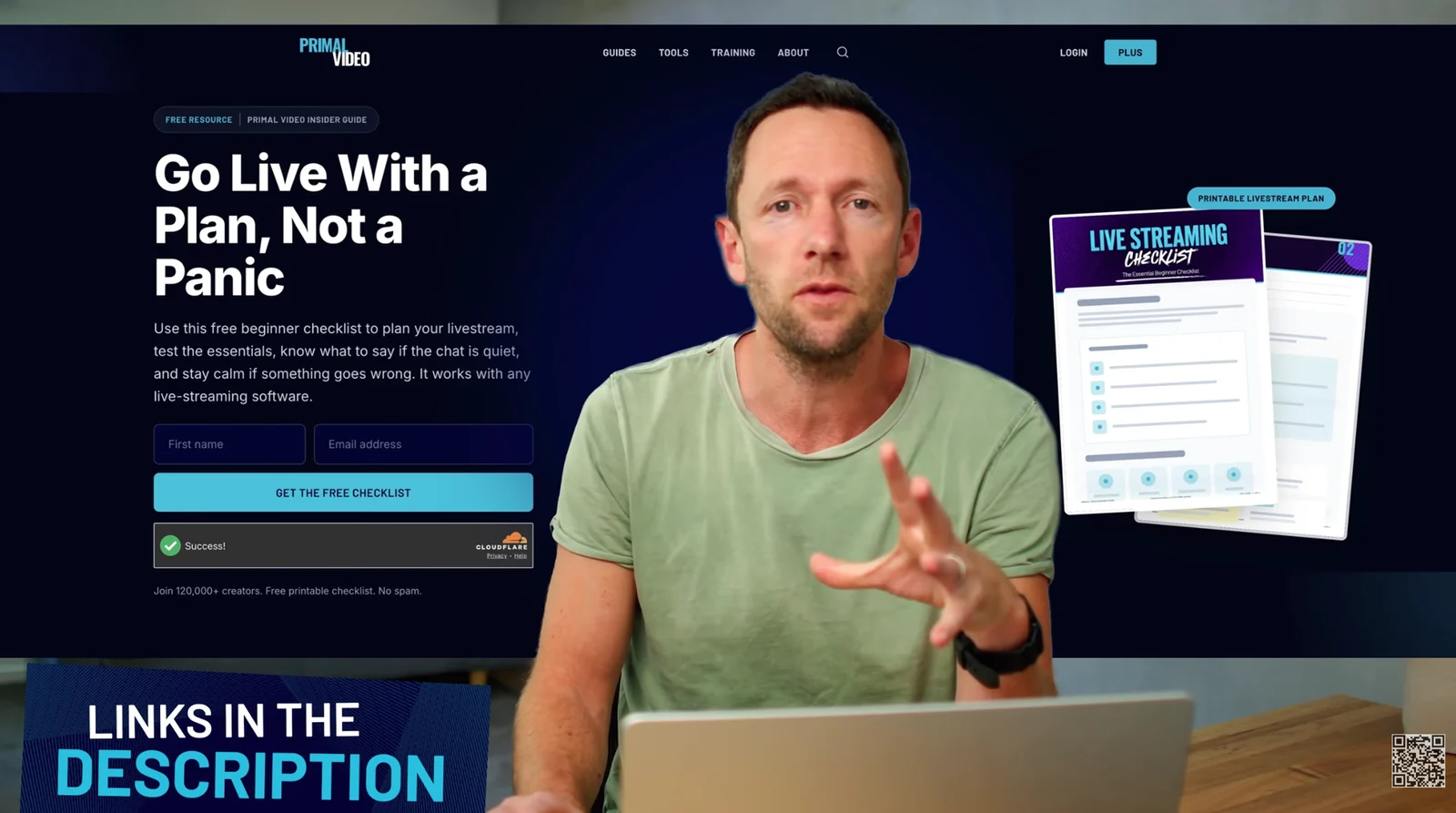
Viewers see exactly what they'll get, at the moment they need it.
He mentions it once more at the end, straight after a tip about doing a test recording before you go live: "So, now that you're up to speed with OBS, if you are going to be live streaming, don't forget to grab our free guide and checklist."
What makes this call to action work:
- It comes at the moment it's relevant. The viewer has connected OBS to YouTube, so they've decided to go live. The checklist is the next step on screen. It's also early, about a quarter of the way into a 20-minute video, so it reaches viewers who never make it to the end.
- It starts with "if". "If you are going to be using this for live streaming" names the viewer's situation before the offer, so the offer reads as help. And "if you're not live streaming, you can skip that step" gives everyone else permission to ignore it.
- It describes how they'll use it. "Print out and have it as a prompt and a checklist when you're live." The viewer can picture it next to them mid-stream.
- It never asks for an email. No list, no newsletter, no "sign up". The words are "download" and "grab", and the opt-in page takes care of the rest.
- It takes about 15 seconds. Then he's straight back to teaching, so it feels like a step in the lesson rather than an ad break.
- It comes back once, at the end. The closing mention follows a tip about being prepared, so the checklist lands as the natural follow-on. And both times, he points to two places: on screen and in the description.
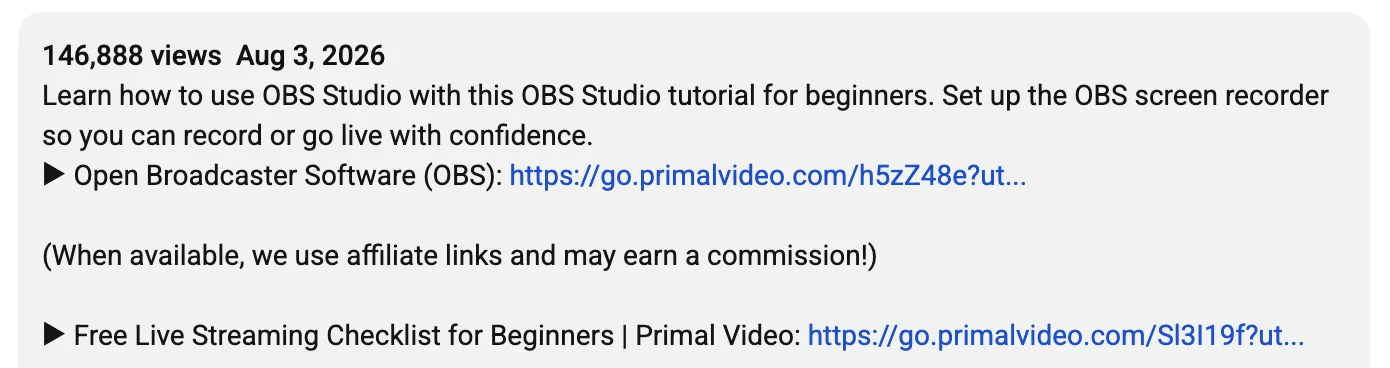
High in the description. Viewers who look for the link shouldn't have to dig for it. In the OBS tutorial, the checklist is the second link, right under the link to OBS itself, and its label repeats the lead magnet's name:
Advanced tip: in the first comment, pinned. Many viewers scroll to the comments without opening the description. A pinned comment with the same tracked link puts the offer in front of them too:
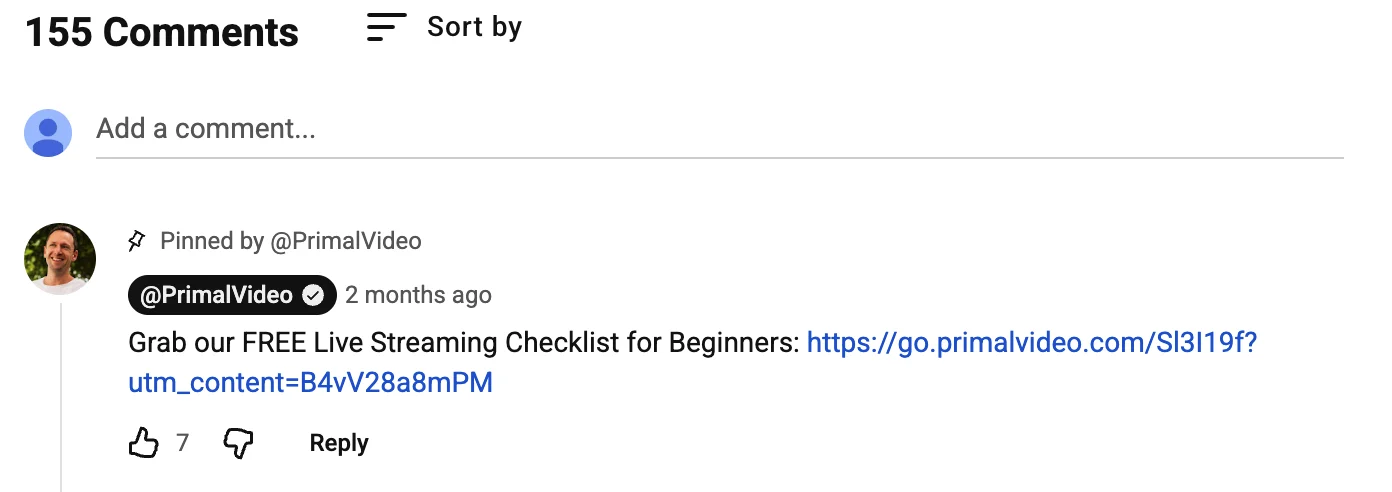
Video Stats can do this for you. Turn on automatic comments, write your comment once, and Video Stats posts it on every new video as soon as it's published, with the links converted to tracking links. All you do is open the video and pin the comment, because YouTube doesn't let other apps pin comments for you.
Use the same words and the same image everywhere: in the video, in the description, in the comment and on the page. The viewer recognizes the offer at every step.
Do 6: Track sign-ups by video, and replace what doesn't convert
You can't fix a mismatch you can't see. Your email tool shows how many people joined, and YouTube shows how many people watched, but neither shows which video's viewers signed up.
When you can see sign-ups by video, mismatches stand out, like the microphone video above. Swap in a lead magnet that matches, and check again in a few weeks. Part 1 of this series covers 3 ways to track sign-ups by video, including our free YouTube UTM Link Builder.
Do 7: Add a QR code for viewers watching on a TV
TV is now the main screen for watching YouTube in the US, according to YouTube's CEO (Our big bets for 2025). Someone watching on a TV can't click a link in your description. They can point their phone at a QR code.
Primal Video keeps a small QR code in the corner of the screen for the whole video. When Justin gets to the call to action, the same code grows into a big "Scan me" box next to the lead magnet:
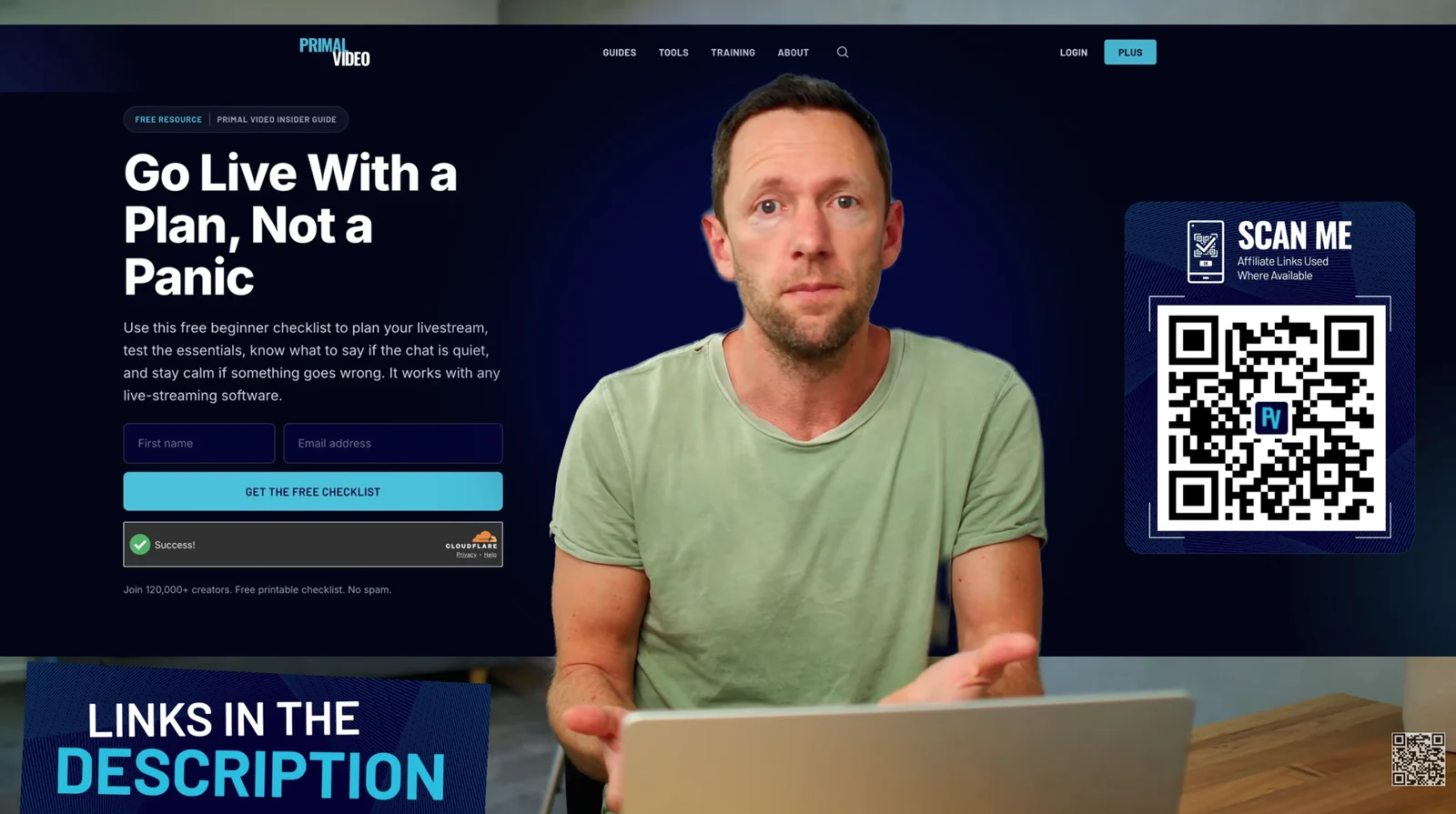
A few seconds after the frame above, the corner QR code becomes a big "Scan me" box.
It works. Over the last 90 days, the QR code in Primal Video's DaVinci Resolve tutorial was scanned 1,097 times and brought in 619 sign-ups. The one in the OBS tutorial was scanned 930 times and brought in 407.
Most QR code generators can tell you that a code was scanned, but not which video it was in. Video Stats QR codes are tied to the video they appear in, so you can see which videos' QR codes get scanned and which scans turn into subscribers. We'll cover QR codes for YouTube in depth in an upcoming article.
3 don'ts for YouTube lead magnets
Don't 1: Don't offer "join my newsletter" as the freebie
A newsletter promises more emails in the future. A lead magnet promises a result today. On Primal Video, the newsletter sign-up page converted 6.3% of its clicks over the last 90 days, and three of the five videos linking to it sent 20 to 65 clicks each without a single sign-up.
And it isn't the page's fault. Primal Video's newsletter page is well designed, with a clear promise and strong social proof:
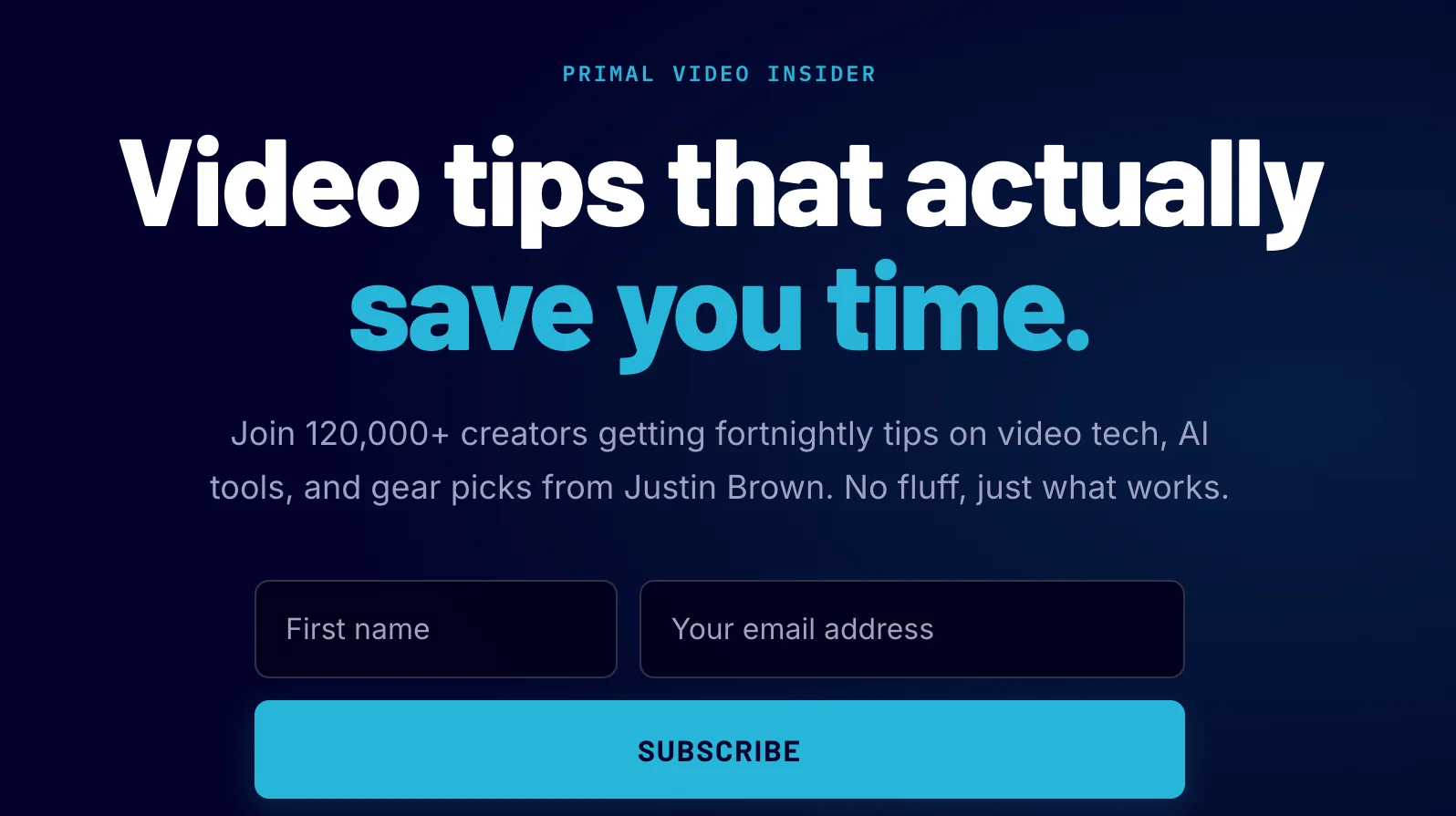
A good page with a general offer. It converted 6.3% of clicks, against 44% for the livestream checklist.
Keep the newsletter, and lead with something useful. Viewers who download your checklist join your list too.
Why you should still have a "join my newsletter" page
So why does Primal Video have a newsletter page at all? For two reasons.
- Newsletter subscribers may become your best clients. Fewer people sign up for a newsletter alone, but the ones who do are fans of your content as a whole, rather than of one freebie. Someone who joins only to hear more from you is likely to pay attention to everything you send, offers included. That's worth testing on your own list: Video Stats tracks sales as well as leads, so you can compare the buyers each page brings in.
- It's a fallback, not a front door. The newsletter page isn't meant to convert viewers of a specific video. It catches everyone else: visitors who arrive from places you can't track as closely, and visitors who browse around your site and want more from you without a specific freebie in mind.
So the lesson stands. Don't make "join my newsletter" the main call to action in your video descriptions. Do keep a newsletter page on your website, for the visitors who don't arrive through one of your matched lead magnets.
Don't 2: Don't put one general freebie in every description
One freebie for every video is easy to set up, which is why so many channels do it. But each video asks it to answer a different question. Primal Video's AI toolkit is linked from 8 different AI videos, and converted anywhere from 9% to 30% of their clicks, 18% overall.
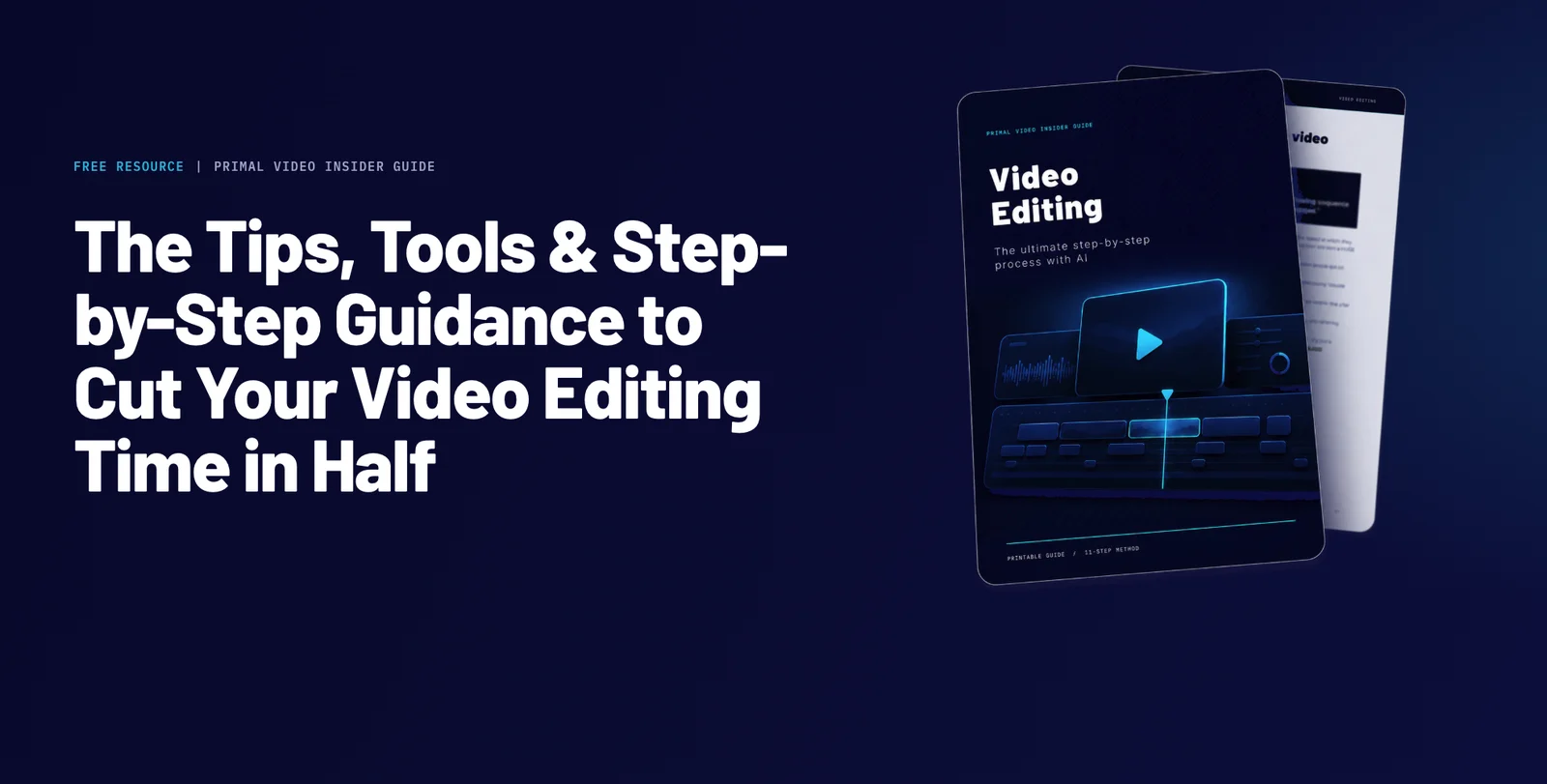
A broad lead magnet can still convert well, as long as it matches the topic of the videos it's linked from. The Primal Video Method is a guide to cutting your video editing time in half, with a version tailored to your editing software. That's a broad offer, but it's linked from beginner editing tutorials (DaVinci Resolve, CapCut and VN), and over the last 60 days it converted 41.7% of 7,586 clicks, close to the livestream checklist's 44.7%:
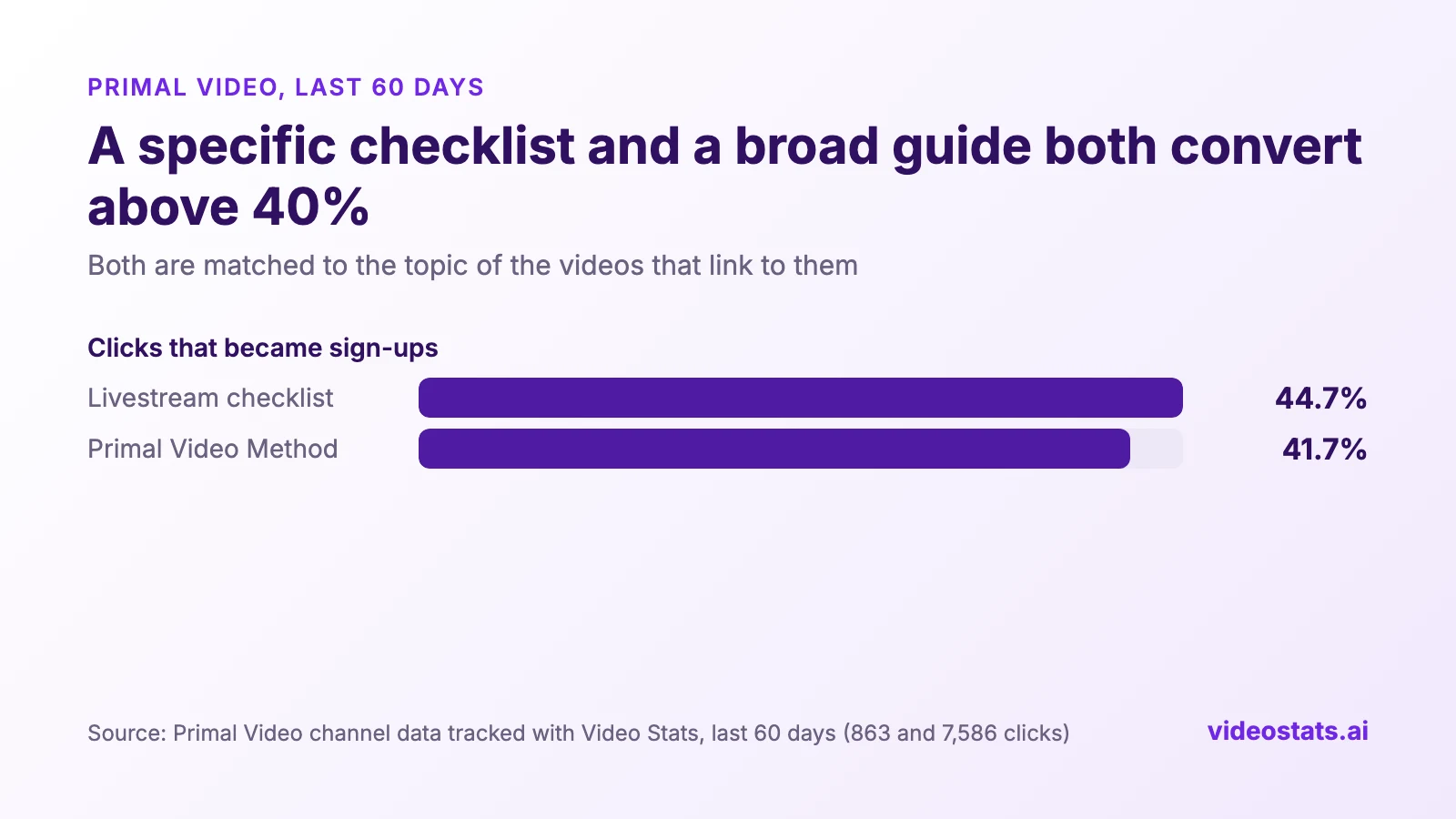
A specific checklist and a broad guide, both matched to the topic of their videos. Both convert above 40%.
So the line that matters runs between offers that match the video's topic and offers that don't. The AI toolkit covers AI tools in general and sits under videos about very different AI tasks. The Primal Video Method covers editing and sits under editing tutorials. When one video sends a lot of clicks to a general offer, that's a sign the video deserves its own lead magnet.
Don't 3: Don't make your offer sound high-effort, complex, or time-intensive
Viewers decide in a few seconds, and they judge the effort before they see the value. "The complete 60-page guide", "a 3-hour masterclass" or "a 12-module system" can sound generous to you, and like homework to them. A viewer who has watched one video wants a quick win, and an offer that sounds like a big commitment asks for time they haven't decided to give you yet.
Look at how Primal Video describes its two best lead magnets:
- The livestream checklist is "a free beginner checklist" that is printable and "works with any live-streaming software". The headline promises calm, "Go Live With a Plan, Not a Panic", and nothing about it sounds like work.
- The Primal Video Method is the bigger of the two, a step-by-step guide. But its headline sells the time it saves, "Cut Your Video Editing Time in Half", rather than the size of the guide.
How to make your offer sound easy:
- Lead with the result, not the size. "Edit in half the time" beats "a 40-page editing guide".
- Use small, light words. Checklist, cheat sheet, one page, printable, template, quick start.
- Say how fast it is to use, when it's true. "Takes 5 minutes", "fill in the blanks", "copy and paste".
- Make a big resource sound like a first step. If you have a full guide, offer the quick-start part first, or describe the guide by the one thing it helps viewers do.
Why a lead magnet for every video used to be too much work, and how Video Stats fixes it
If matching wins, why do most channels send every video to one page? Because matching every video means a separate lead magnet and a separate opt-in page for every video. With a typical page builder, you'd write each lead magnet and build each page by hand, one at a time. So most creators build one general page and link it everywhere.

The percentages are Primal Video's real rates for a general page (its AI toolkit, 18%) and a matched page (its livestream checklist, 44%). The page titles and the flow of dots are illustrations.
Video Stats, which Justin co-founded, makes the new way practical. Its AI Opt-in Page Wizard creates the lead magnet and the page from the video itself:
- It starts from what the viewer watched. Pick a video, and the wizard reads its transcript and creates an opt-in page and a downloadable PDF from that content. The match is built in, so you don't have to remember to make one.
- It takes minutes, not an afternoon. The app usually has the page ready within a few minutes, so a lead magnet for each video becomes realistic.
- It's more effective as well as faster. Each video sends viewers to a page about what they watched, which is the clarity principle from Do 1, applied to every video automatically.
- It tracks every sign-up by video. You see each video's clicks, subscribers and conversion rate from day one, so you know which lead magnets work.
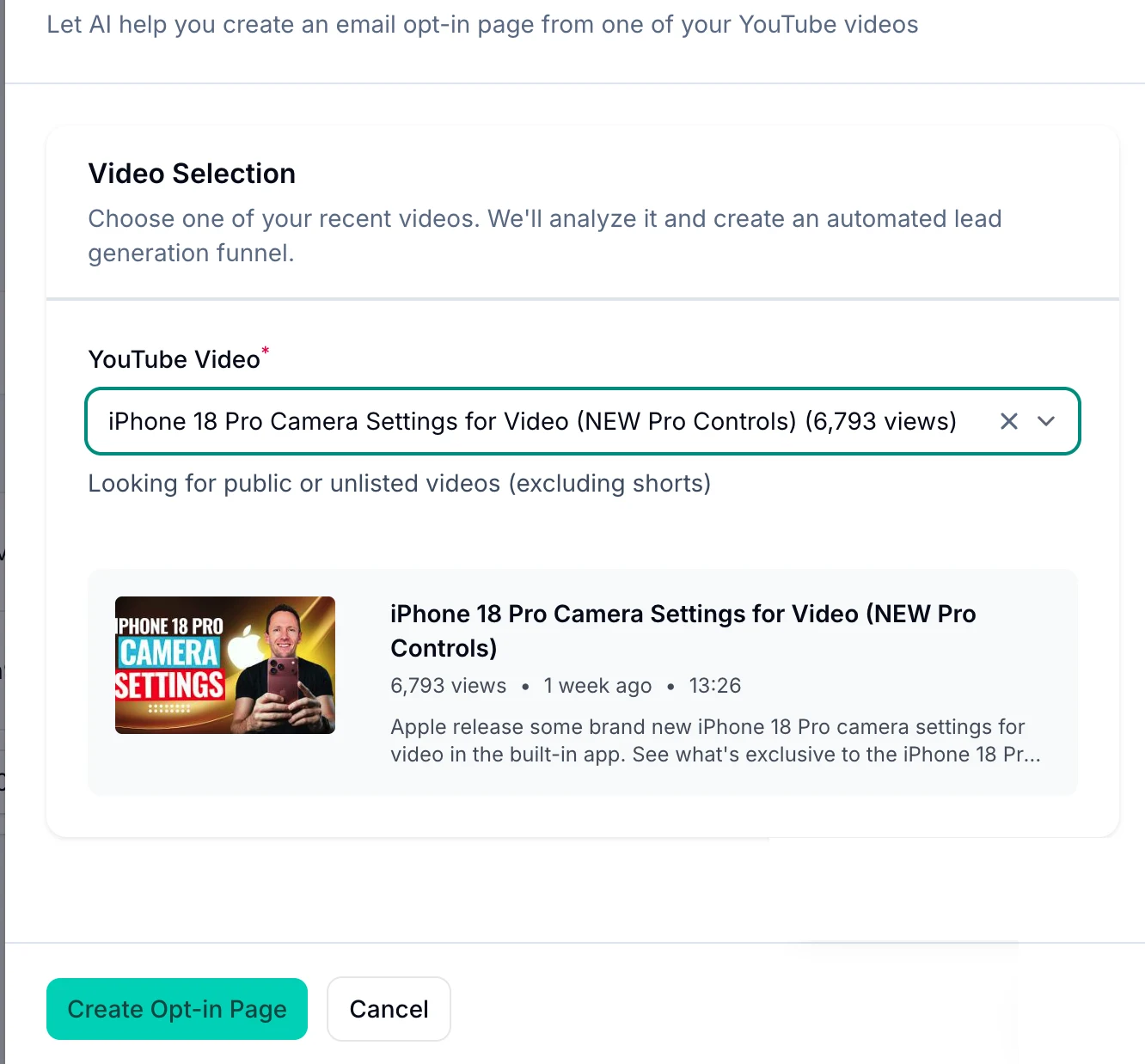
Pick a video and click Create Opt-in Page. Video Stats builds the page and the download from the video's content.
It also changes how you find your best lead magnets. A quick AI-made lead magnet lets you test a topic without spending a weekend on it. When one converts well, your audience has told you what they want. That's the time to invest in a more complete version, such as a full guide, a template pack or a mini-course, on a topic you already know works.
Why you should test several lead magnets instead of perfecting one
If you only ever offer one lead magnet, you can only ever learn how good that one gets. Marketers call this a local maximum: you climb to the top of the hill you're on, without seeing the bigger hill next to it.
Imagine Primal Video had only the AI toolkit, and spent a year tuning videos and descriptions to get the most out of it. Even on its best-matched videos, it topped out between 18% and 30%. They would never have found out that a guide to editing faster converts 41.7% of its clicks, more than twice as many sign-ups from the same traffic. That's twice the list growth they'd have left on the table, without knowing it was there.
Each new lead magnet also tells you something about your audience you couldn't learn any other way: what they want enough to give you their email for.
Every lead magnet tells you who signed up
The lead magnet someone chooses says a lot about them, which makes it the most useful tag on your email list. Look at what Primal Video learns from three of its offers:
| Lead magnet | What it tells you about the people who sign up |
|---|---|
| AI toolkit | They're curious about AI and new tools, and like to try what's new. |
| Livestream checklist | They're about to go live, probably for the first time, and they want to feel prepared rather than panicked. |
| Primal Video Method | They edit their own videos, they're early in their journey, and time is their biggest frustration. Because the guide is tailored to your editing software, you can also learn which app they use. |
The Primal Video Method is the biggest of the three by far, with 3,160 sign-ups in 60 days. So the largest group on Primal Video's list is beginners who want to edit faster. That's worth knowing when you decide what to make, what to sell and what to send.
Use lead magnet tags to send the right emails to the right people
Most email tools, including Kit, MailerLite and ActiveCampaign, can tag each subscriber with the lead magnet they downloaded. Video Stats opt-in pages add that tag for you. With the tags in place, you can stop sending the same email to your whole list at the same time:
- AI toolkit subscribers get a heads-up when a new AI tool is worth trying, and offers built around AI workflows.
- Livestream checklist subscribers get a short series on running their first few streams, sent while they're getting ready to go live.
- Primal Video Method subscribers get editing shortcuts for their app, then an offer that helps them edit even faster.
Each group hears about what it signed up for. That's the kind of personalization people now expect: McKinsey found that 71% of consumers expect it, and that faster-growing companies drive 40% more of their revenue from it. One email list starts working like several smaller, better-targeted ones.
How to make a video-specific lead magnet yourself
If you'd rather make it by hand, start from the video:
- Turn the video's steps into a checklist. If the video teaches a process, the checklist is the process on one page.
- Share what you used on screen. Your settings, presets, template, prompt or script.
- Answer the questions in your comments. The questions viewers ask most make a one-page cheat sheet.
- Name it after the video's result. "OBS livestream checklist" beats "Free download".
- Use the same words everywhere. In the video, in the description and on the page.
What's a good conversion rate for a YouTube lead magnet?
On Primal Video, lead magnets that match their videos convert 30% to 45% of the clicks they get. General offers convert under 20%, and the newsletter about 6%.
Those numbers come from one channel, and every audience is different. Your own best lead magnet is the most useful benchmark you have. Find it, then compare every new lead magnet against it.
If you see a landing-page benchmark like Unbounce's median of 6.6%, keep in mind it measures all kinds of landing-page traffic. Someone who clicks a link after watching your video is already interested, so a matched YouTube lead magnet should do much better.
You can't take leads to the bank: grow the list that buys
Everything above helps you get more sign-ups. Sign-ups are only valuable if they come from people who could become clients, so make sure you're optimizing the whole system rather than one number in it.
That system works like this: your videos attract the right people, your lead magnet brings them onto your email list, and your emails build know, like and trust until they're ready to buy. The goal is to turn strangers into happy clients.
It's easy to optimize for the wrong number. Say you sell a coaching program. A video about the best sites to find pirated courses, so nobody has to pay for training, might fill your list fast. But those subscribers are the opposite of the people who buy coaching. You'd pay to email them, and they'd never buy.
Before you make a video or a lead magnet, ask yourself: "Will this bring me the type of people who are likely to become clients?"
Video Stats tracks sales as well as leads, so you can check which videos and lead magnets bring in buyers, not only subscribers. Ask that question first, and the tactics in this guide will attract more of the right people and grow your revenue as well as your list.
FAQ
What is a lead magnet on YouTube?
A free, useful download, such as a checklist, template or guide, that you offer in a video's description in exchange for an email address. The best ones are the natural next step from the video they're linked from.
Should every YouTube video have its own lead magnet?
Not necessarily. Each topic should have a lead magnet that matches it. Primal Video's livestream checklist serves two livestreaming videos and converts 44% of their clicks.
Where should I put my lead magnet link?
In the description, near the top, and in a pinned comment. Mention it in the video too, at the moment it helps, and add a QR code on screen for viewers watching on a TV. Use the same words everywhere.
What's a good opt-in rate for a YouTube lead magnet?
On Primal Video, matched lead magnets turn 30% to 45% of their clicks into subscribers, and general ones under 20%. Use your own best lead magnet as your benchmark.
Should I make the lead magnets that get the most sign-ups?
Make the ones that get sign-ups from people who could become clients. A lead magnet that fills your list with people who'll never buy costs you money and makes your results harder to read.
Want a matching lead magnet for every video, without building pages one by one? Video Stats creates opt-in pages from your videos and shows the subscribers each video brings in. Start your free trial.


